


Building a compact, self-contained voice assistant on Raspberry Pi 5 is achievable and useful, but it exposes the real engineering tradeoffs in privacy, responsiveness, and hardware design. This article follows a practical tutorial that ties Whisper, a local language host option (for example Ollama), Piper, Whisplay, and PiSugar into a working offline device.
We focus on what you must provision, how to install and configure the stack, where the system will strain, and how to make the device a practical appliance rather than a fragile demo. Keyword themes covered include what the build is, how it works, its benefits, its limits, and how it compares to cloud-based assistants.
Hardware Requirements and Setup
Direct Answer: A reliable setup uses a Raspberry Pi 5 with 8 gigabytes of RAM, a Whisplay HAT for audio and the small LCD, a PiSugar 3 Plus battery for portability, and an active cooler. Expect to add an SD card or NVMe storage sized for large language runtimes and voice files.
Recommended Raspberry Pi 5 Memory And Storage
The tutorial recommends the 8-gigabyte Raspberry Pi 5 because the combined local services often consume around 4 gigabytes of RAM by themselves. Storage should account for multi-hundred-megabyte to multi-gigabyte runtime and voice files; plan for ample SD card or NVMe space.
Whisplay HAT, Microphones, And Speaker Setup
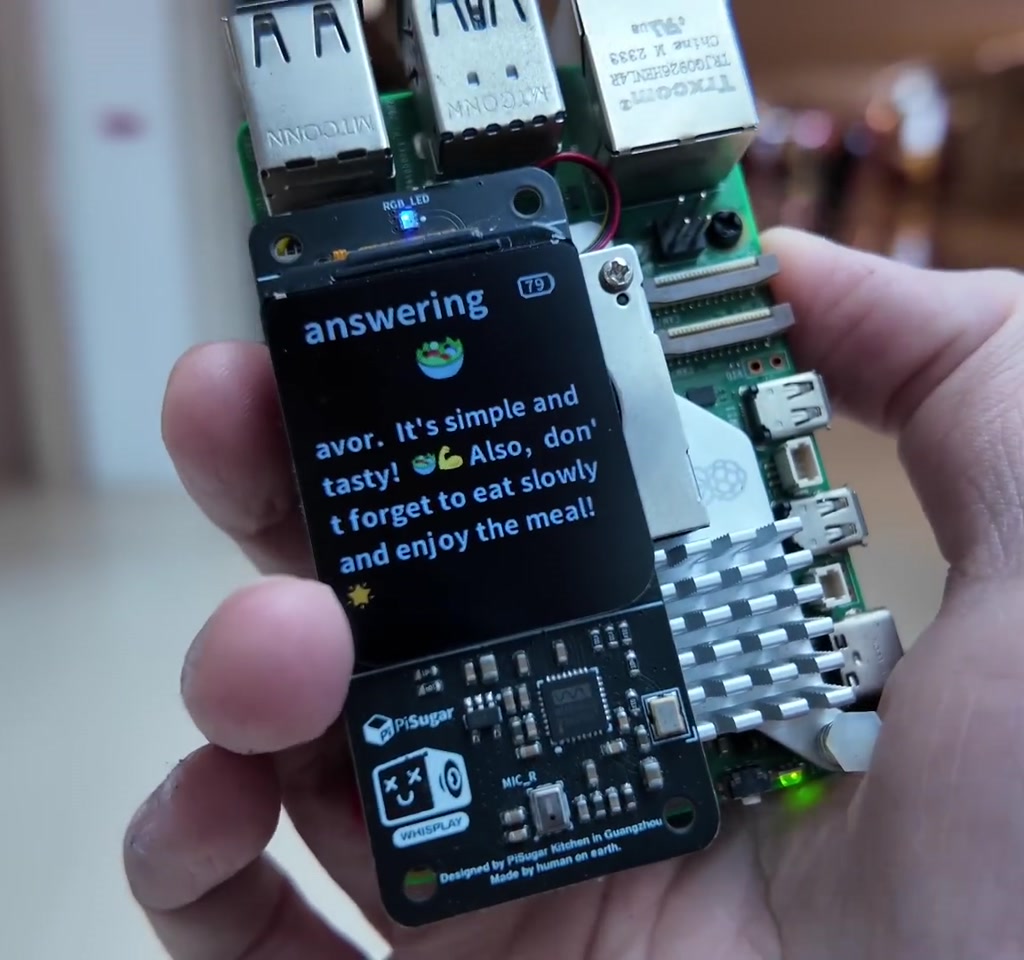
The Whisplay HAT supplies the tiny 1.69-inch LCD, dual microphones, an audio codec, speaker, RGB LEDs, and a programmable button. It connects via the 40-pin GPIO and requires vendor drivers included in the example project to function fully.
PiSugar Battery Integration And Mechanical Notes
PiSugar 3 Plus mounts beneath the Pi to enable untethered operation and battery reporting. On compact stacks you may need minor mechanical compromises, such as lowering cooler profile, to keep the stack stable. Active cooling is strongly advised for sustained inference workloads.
Software Installation and Configuration
Direct Answer: Flash the Pi OS, SSH into the Pi, install Whisplay drivers, clone the chatbot repository, configure a .env file to select Whisper, your local language host, and Piper, then run the provided build and startup scripts to register the chatbot as a system service.
Flashing The OS, Enabling SSH, And Driver Installation
Use Raspberry Pi Imager, select Model 5, preconfigure Wi Fi and SSH, and flash an SD card. After boot, SSH in, install Whisplay drivers from the vendor repository, and verify the HAT by running the Whisplay example to test display and audio.
Cloning The Chatbot Repository And .env Configuration
Clone the tutorial chatbot repo on the Pi, run the included build script to scaffold services, and edit the .env file to pick the speech recognition engine (Whisper), the local language host option (for example Ollama or another local server), the Piper path, and thinking mode toggles.
Practical Package Transfer And Faster Installs
Download large runtime packages on a faster machine, transfer them to the Pi with FTP or SCP, and install locally to avoid slow, repeated downloads on the Pi. This reduces install time and the risk of corrupt downloads.
Speech To Text With Whisper And Text To Speech With Piper
Speech recognition uses the Whisper family; start with a tiny transcription variant to confirm the pipeline. Speech output uses Piper. Install Piper and place paired voice files (runtime representation plus voice data such as ONNX and JSON) in a dedicated folder, then point the .env to that path.
Comparison: Offline Voice Assistant On Raspberry Pi 5 Vs Cloud-Based Assistants
Direct Answer: Offline assistants keep audio and data local for stronger privacy and predictable latency at the cost of higher local memory, storage, thermal, and power requirements. Cloud assistants shift heavy compute off device for lower local demands but send user audio to external servers and incur network latency.
Privacy And Data Handling Compared To Cloud Services
Offline operation means spoken content does not leave the device, which is a clear privacy advantage. Cloud alternatives centralize model compute and data, simplifying device requirements but introducing network dependency and external data handling considerations.
Latency, Responsiveness, And Reliability Tradeoffs
Local inference can be responsive for short queries if you choose smaller model variants and tune for quick replies. However, heavy computations spike CPU, increase fan noise, and drain battery. Cloud services provide more compute headroom but depend on reliable network access and introduce variable latency.
Cost, Maintenance, And Update Paths
Offline builds require upfront hardware provisioning and occasional local maintenance for updates. Cloud services may reduce device cost and push updates centrally, but often come with service fees and less control over model behavior.
Performance Limits and Thermal Considerations
Direct Answer: Expect the local language engine to cause CPU load that raises board temperature and audible fan noise. Memory consumption often approaches multiple gigabytes, and thermal and power draw reduce battery runtime under sustained inference. Monitor temps and use an active cooler for reliable operation.
Memory Consumption And Service Concurrency
The combined services typically use around 4 gigabytes of RAM, which motivates the 8-gigabyte Pi recommendation. Running larger models or several services concurrently will force swapping or service failures on lower memory systems.
Thermal Management And Active Cooling
Heavy inference drives CPU temperatures up and the active cooler ramps the fan. The demo reports audible fan noise during multi-second computations and a case that becomes noticeably warm to the touch. An active cooler is not optional for sustained use.
Battery Life And Power Draw With PiSugar
Inference workload increases power draw and reduces battery runtime. Idle audio standby can last many hours, but sustained inference can drop runtime to a few hours or even under an hour depending on battery capacity and workload intensity.
Customization and Personalization Features
Direct Answer: You can customize voice and behavior by swapping Piper voice files, editing the .env to toggle thinking and verbosity modes, and choosing smaller or larger local language variants. UI tweaks to the Whisplay display and LED expressive states let you tune personality within hardware limits.
Changing Voice Files And Piper Voices
Piper supports multiple voice packages. Install the runtime and paired voice data files, update the .env to point to the voice folder, and restart the chatbot to change the assistant voice. Different voices have different resource footprints.
Tuning Personality Through .env And Thinking Mode
The .env controls speech engine selection, local language host, and a thinking mode that either streams internal reasoning or returns faster, shorter replies. Use these toggles to balance response detail against perceived latency.
Display, LEDs, And Button Interaction Customization
The Whisplay HAT exposes a small LCD, programmable RGB LEDs, and a button. The tutorial demonstrates emoji-style feedback and on screen thinking streams that serve both UX flourish and latency debugging. Keep interactions short to reduce heavy inference bursts.
Who This Is For
This build is best for hobbyists and product designers who want a private, portable voice UI for a fixed role such as a kitchen helper, bedside query device, or offline information kiosk. It suits anyone willing to manage hardware tradeoffs and to optimize for short, task-focused interactions.
Who This Is Not For
This setup is not ideal for users who expect always-on, all-purpose home assistant behavior without manual tuning, large continuous conversations, or minimal device maintenance. If you need large model capacity, multiroom integrations, or long battery life under sustained inference, consider cloud hybrids or more powerful edge hardware.
Frequently Asked Questions
Can This Voice Assistant Operate Without Any Internet Connection?
Yes. The core experience in the tutorial runs fully locally: speech is recorded, transcribed, processed by a local language host, and synthesized locally. Initial downloads and optional remote services may need internet access, but the assistant itself can operate offline after setup.
What Are The Hardware Specifications Required For Smooth Operation?
The tutorial recommends a Raspberry Pi 5 with 8 gigabytes of RAM, a Whisplay HAT for audio and display, a PiSugar 3 Plus battery for portability, active cooling, and sufficient SD card or NVMe storage sized for model runtimes and voice files.
How Do I Install And Configure The Whisper, Ollama, And Piper Services?
Follow the tutorial: flash Raspberry Pi OS, SSH in, install Whisplay drivers, clone the chatbot repository, run the build script, and edit the .env to select Whisper for speech recognition, your local language host option (for example Ollama), and the Piper TTS path. For service-specific commands consult the tutorial repository for exact install steps.
Is It Possible To Customize The Voice Or Personality Of The Assistant?
Yes. Change Piper voice files and update the .env to point to the new voice folder. Adjust the thinking mode and verbosity in the .env to alter response style. The Whisplay LEDs and display also let you tune visible personality cues.
How Does The System Handle Performance And Heat Management?
Performance is managed by choosing smaller model variants, restricting concurrent services, and using an active cooler. Expect fan noise and warm cases during heavy inference. Monitor temperatures on first runs and tune workloads to avoid thermal throttling and service failures.
Can This Setup Run On Earlier Versions Of The Raspberry Pi?
It may run on earlier Pi models, but lower memory and CPU performance will frequently force swapping, lower responsiveness, or service failures. The tutorial specifically recommends Raspberry Pi 5 with 8 gigabytes to provide enough headroom for the combined services.
What Privacy Advantages Does An Offline Voice Assistant Provide?
Offline operation keeps spoken content and model inference on device, preventing audio from being sent to external servers by default. That local first approach reduces exposure of sensitive speech data and gives you control over what is stored and transmitted.
How Do I Troubleshoot Common Installation Or Runtime Issues?
Start with these steps: test the Whisplay example to confirm hardware, run the tiny Whisper transcription variant to validate the pipeline, transfer large packages from a faster machine to avoid corrupt downloads, check service logs, reduce concurrent services, and monitor memory and temperatures. Make the chatbot a system service to improve reliability.
COMMENTS