


What if your desk was not just furniture but an active workspace? The Glow Desk idea is exactly that: use a top-down projector to make the desktop itself a display that blends with your keyboard and mouse.
The early reveal is surprising and important. The real significance here is not that it looks flashy, but that this approach creates a peripheral surface for contextual tools without adding extra monitors. That possibility depends on hitting a few technical thresholds, and missing any one of them shifts the concept from useful to fragile.
In practice the Glow Desk started as a simple experiment. The creator used an unboxing table, a compact Beelink micro PC, a budget 720p projector and some Photoshop trickery to project a glowing frame around the keyboard. That basic loop demonstrated feasibility, and then a 4K laser projector from Valerian pushed the idea into something practical.
What becomes obvious when you look closer is what determines whether the Glow Desk is a novelty or a daily tool: pixel density, brightness, alignment stability, and cost. This article unpacks how the setup works, what actually improved when the projector changed, and the tradeoffs that define whether this belongs on your desk.
What Is The Glow Desk
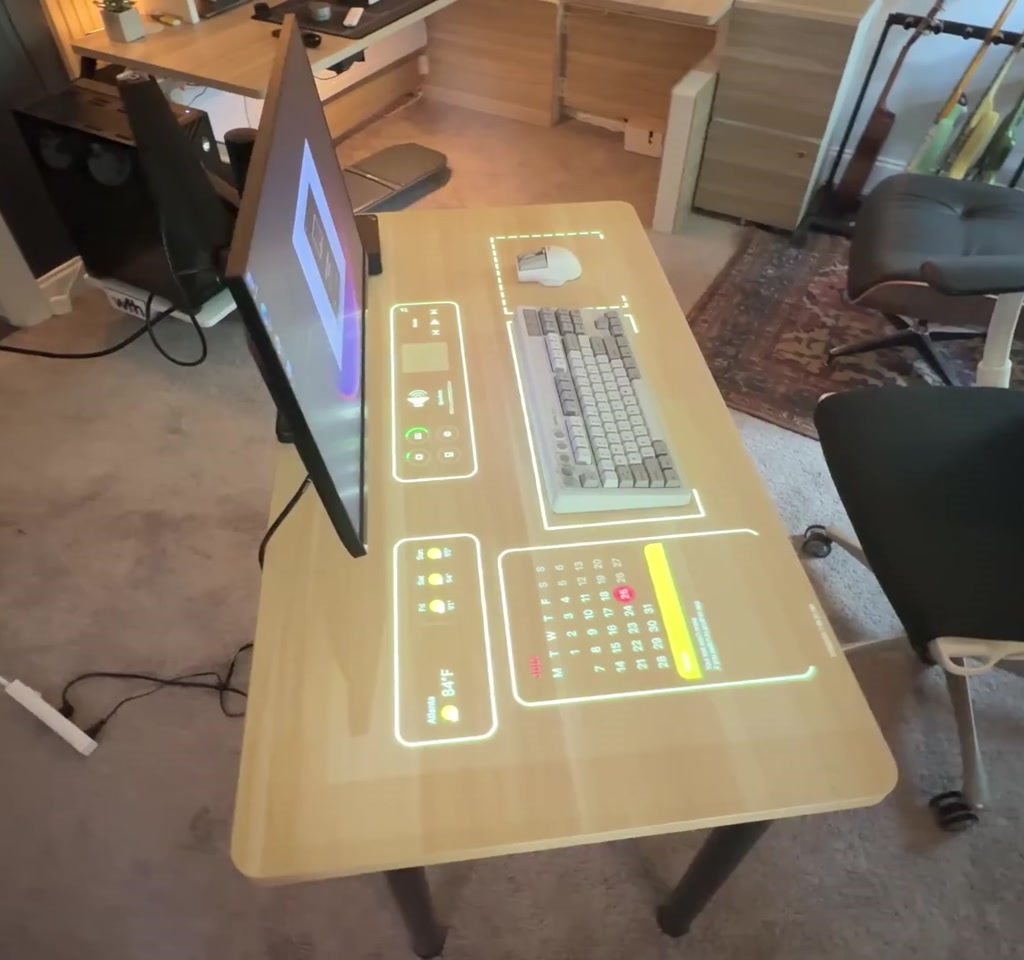
The Glow Desk is a projected desktop system that turns a horizontal tabletop into a contextual display. Using a top-down projector as a second display, it paints widgets, reference content, and ambient visuals around physical peripherals so digital information shares the same action space as hands and tools.
How The Glow Desk Was Built
The physical prototype paired a compact Windows 11 Beelink micro PC with a top-down projector mounted on an articulating arm, treating the projector as a secondary display. Initial proof-of-concept used a 720p unit; upgrading to a Valerian 4K laser projector made the projected UI markedly more readable and practical.
Hardware Choices
The physical setup is minimal but deliberate. A Beelink micro PC provided a compact Windows host that could drive two displays: a conventional monitor and the projector as a second display. The initial projector was a low-cost 720p unit used for proof of concept. Later the project was upgraded to a Valerian Vision Master Pro 2, a 4K laser projector provided by Valerian.
The projector was mounted overhead on an existing articulating arm normally used for studio lights. That choice made positioning adjustable, but it also introduced a practical vulnerability: the arm was not engineered as a dedicated projector mount and the whole system became sensitive to bumps or changes in desk position.
Software And Projection Tricks
On the software side the trick is simple. The PC runs two displays. The projector receives a custom wallpaper where the background is black and only the desired elements are bright. When a projector displays black it essentially projects nothing. That makes it straightforward to paint around a keyboard and preserve dark areas for hands.
The creator used Rainmeter with a Monterey skin to create floating widgets such as calendar, weather, system stats, a Pomodoro timer, and music controls. Windows Fancy Zones was used to pin regular application windows to specific physical locations on the projected surface so videos or step-by-step instructions can sit next to the work area.
Why 4K Changed Everything
Moving from 720p to 4K is not just incremental; it raises pixel density into a range where small UI elements and text become legible at desktop scale. That single change shifted the Glow Desk from a novelty of light to a usable peripheral surface for real productivity tasks.
Resolution And Readability
The change from 1280 by 720 to a 4K laser projector is the moment the idea stops feeling like a gimmick. A 720p projector was readable for big, bold elements but text looked soft and fuzzy, especially in small widgets such as notes. The Valerian 4K unit increases pixel count by roughly a factor of nine versus 720p, which turned those fuzzy widgets into crisp, legible elements.
The takeaway is quantitative: if you want fine text and UI elements on a desk surface, you are chasing screen like pixel density. For many productivity layouts that means moving from 720p into the realm of 4K or at least a much higher native resolution.
Brightness And Ambient Lighting
Brightness is the other non-negotiable. The cheap projector required dimming or closing blinds to be usable. The 4K laser projector was bright enough to keep room lights on, and the creator actually reduced projector brightness to avoid distraction. In short, usable desk projection requires brightness that competes with ambient office lighting, not merely visible light in a darkened room.
Practical Uses For A Projected Desktop
The Glow Desk proved useful in three clear ways: pinned tutorial windows beside a work area, projected references for sketching and mood boards, and ambient visuals that turn the desk into a dynamic backdrop. Each use case leverages spatial proximity to reduce context switching or to create a continuous, tactile work surface.
Hobby Tutorials
The creator pinned tutorial videos next to a mechanical keyboard build area so reference video and the physical project existed in the same field of view. Fancy Zones made it easy to snap a window from the monitor into an exact desk location, keeping hands and instructions aligned.
Sketching And Mood Boards
While sketching on paper or an iPad, inspirational images and color references could be projected directly beside the sketchbook. That digital physical pairing felt different from switching to another screen because the reference shared the same immediate workspace.
Ambience And Screensavers
With enough brightness and resolution it is possible to treat the desktop like a dynamic piece of art. The creator used After Effects and Wallpaper Engine to render custom visuals that blend around peripherals. This serves no productivity purpose but it demonstrates the freedom of the medium.
Common Problems And Limitations
The Glow Desk exposes threshold conditions rather than abstract tradeoffs: cost, mechanical stability, projector duty cycle, and the extra system load of a secondary 4K framebuffer. Any one of these can shift the balance from convenience to annoyance, and they determine whether the setup is hobby hardware or a daily tool.
Cost Is A Hard Boundary
The creator started with a budget projector in the $300 to $500 range. That proved the idea but did not realize the vision. A serious 4K laser projector that delivers both resolution and brightness is a premium device, often costing several thousand dollars. The tradeoff is clear: a usable Glow Desk moves from hobby experiment into a significant hardware investment.
Projection Lifespan And Duty Cycle
Modern laser projectors last far longer than old bulb projectors, with manufacturers rating many models in the tens of thousands of hours. Even so, these devices are designed for intermittent home theater use, not continuous 40-hour workweeks. Running a projector as a daily desktop display accumulates runtime quickly and raises questions about replacement cycles and maintenance.
System Performance And Secondary Displays
Driving a secondary 4K display is not free. The PC must render an extra framebuffer, and that can affect CPU and GPU load particularly for animated content or live windows. On modest hardware the Glow Desk can reduce headroom for other tasks. The Beelink micro PC used here was adequate for the demo, but heavier workflows may require more capable machines.
Alignment Sensitivity
The projection is position-dependent. Bumping the desk or moving items changes how frames sit relative to physical objects. That fragility is mechanical not digital and it shapes the kind of desks and mounts that make sense for long-term use. The question of whether manufacturers will deliver robust alignment hardware remains open.
Glow Desk Vs Traditional Monitors
Comparing a Glow Desk with conventional monitors highlights tradeoffs in spatial mapping, text legibility, color fidelity, and cost. A projected desktop excels at contextual proximity to hands and objects, while a monitor still leads for dense text, precise color work, and reliable alignment under frequent physical interaction.
Decision Factors For Choosing Projection Or Monitor
If your tasks demand spatially proximate references or hands-on pairing with physical projects, projection can reduce context switching. If you need consistent color accuracy, small text clarity, or uninterrupted multihour display duty without mechanical fragility, traditional monitors remain the safer choice.
Who This Is For And Who This Is Not For
The Glow Desk is best for tinkerers, makers, and creatives who value spatially integrated references: hobbyists, DIY electronics builders, and people who pair digital samples with paper or physical prototypes. It suits weekend projects and curated workstations where mechanical stability and budget are accepted constraints.
It is not well-suited for text-heavy offices, color-critical design work, or environments where the desk is frequently moved or bumped. Teams seeking mainstream, maintenance-free displays should favor monitors or tablets until projector hardware and mounts evolve for daylong desk duty.
For mainstream adoption a few things would need to change: projectors tailored to daylong desktop duty, cheaper high-brightness 4K units, and integrated mounts that lock alignment would move the Glow Desk from curiosity to practical accessory. Until then it remains a creative, conditional tool.
FAQ
What Is The Glow Desk?
The Glow Desk is a projected desktop that uses a top-down projector as a second display, painting widgets and references directly onto a tabletop so digital content shares the same physical plane as hands and tools.
How Does A Projected Desktop Work?
A PC treats the projector as a secondary display and sends images that are largely black except for desired elements. Black pixels appear as no light, letting projected widgets sit around peripherals while preserving dark areas for hands.
Do I Need A 4K Projector For A Glow Desk?
For crisp text and detailed UI elements, higher native resolution such as 4K materially improves legibility. A 720p projector can show large elements but will render small text soft and fuzzy.
Will A Projector Last For Daily Use?
Laser projectors are rated in the tens of thousands of hours, but they are typically intended for intermittent use. Continuous daily use accelerates runtime and raises maintenance and replacement considerations.
How Important Is Mounting And Alignment?
Very important. The projection is position-dependent; bumps or shifts can misalign widgets. A stable mount designed for projector duty significantly improves long-term usability.
Does Glow Desk Replace A Second Monitor?
No. It augments the workspace with spatially proximate references and ambient visuals. For dense text, precise color work, or uninterrupted duty a conventional monitor remains superior.
Is A Glow Desk Worth The Cost?
Worth depends on use. If spatially integrated references materially improve your workflow and you accept the cost and mechanical care, it can be a valuable tool. For mainstream use, hardware improvements would need to lower cost and increase reliability.
Can I Use A Small Micro PC For A Projected Desktop?
Yes for basic demos. The Beelink micro PC used here drove the setup, but more intensive 4K content or multiple high resolution windows may require more powerful hardware to maintain headroom for other tasks.
COMMENTS