


Changing the volume should be trivial, but too often it is not. For people who edit, switch apps, or juggle media, hunting for sliders or remembering shortcuts breaks flow. The maker behind this project solved that friction by building a tiny USB control panel, and the surprising lesson is not just about hardware. The real significance here is not that the device exists, it is that restoring a single, physical interaction to a modern desktop reshapes how we manage attention.
That is the primary insight this project surfaces early. Most people assume software can solve these small frictions. In reality, software often sits on top of context switching, adding visual clutter or requiring memorized gestures. A tactile knob returns a fixed, muscle memory-driven action to the user, without query or search.
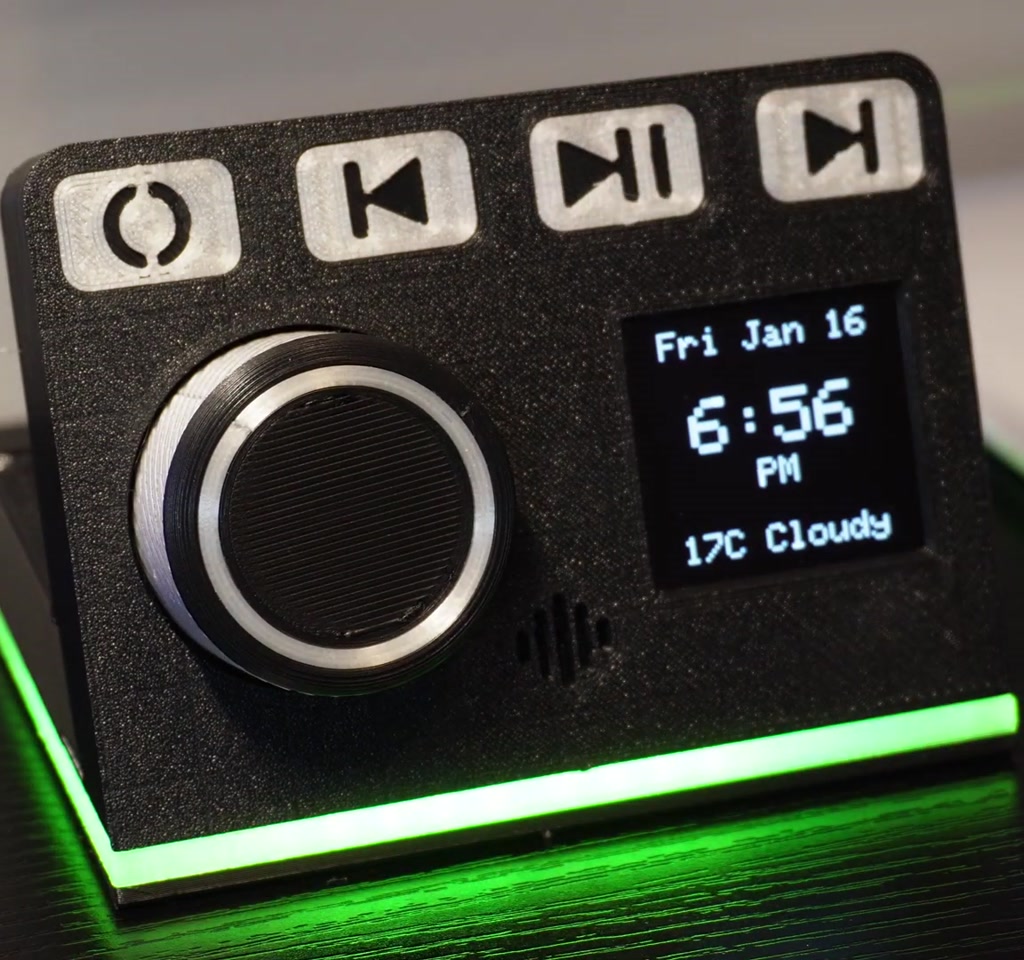
What the article also reveals is where the tradeoffs show up. The builder chose an ESP32 S2 mini to act as the USB interface, added a rotary encoder for the knob, capacitive touch sensors for shortcuts, a 1.5-inch monochrome OLED for status, addressable LEDs for feedback, and a small buzzer for alarms. That hardware mix gives a compact, highly customizable device but it also imposes constraints in cost, build time, and the software needed to keep the system in sync with the computer.
Finally, this is more than a one-off gadget. The creator released all files on ARK and framed the project as intentionally open source and replicable. The goal was not to ship a polished product but to provide a practical, moddable platform that other makers can adapt. What becomes obvious when you look closer is how many small design choices accumulate into a reliable, everyday tool or into maintenance headaches depending on how you trade off complexity, time, and cost.
Why A Physical Knob Still Wins On Desktop
There is a low cognitive cost to turning something tactile. A knob requires no visual confirmation, no short-term memory, and no context switching between apps. The builder prioritized a single motion: reach, turn, click to mute. That is precisely the kind of interaction muscles learn and remember, which is why analog knobs survive in audio gear despite decades of software control.
Cognitive Load And Muscle Memory
When a task is repeated dozens of times a day, any interruption becomes a real productivity tax. Pulling a hand to the keyboard, finding a media key, opening a mixer, or hunting an in-app slider all cost attention. A mechanical rotation mapped directly to system volume collapses that cost to a single, almost reflexive motion. In practical terms, this shifts a multi-step visual task into a one-step physical task.
Tactile Feedback Versus GUI
That does not mean graphics and software are obsolete. The OLED provides context when needed, like a clock, a weather readout, or mode labels. But most of the time the display is idle because the physical control is the interaction. This combination is the real point: a small screen for information, plus a dominant, tactile control for action.
What Is A USB Volume Control Device?
A USB volume control is a dedicated peripheral that uses the USB Human Interface Device profile to send system audio commands, typically mapping a rotary encoder to volume up and down and offering buttons or touch inputs for mute and media shortcuts. Purpose-built, it reduces visual switching and creates a repeatable physical interaction for audio control.
How The Builder Put The Electronics Together
The project started with a breadboard prototype. That is a practical sanity check; nothing about the final enclosure mattered until the ESP32 S2 mini could reliably present itself over USB and control system volume. Not every microcontroller can act as a USB human interface device, so verifying the core USB behavior was the conditional step that determined whether the whole idea would work.
Core Components And Roles
The hardware list is compact and focused. The ESP32 S2 mini acts as the brains and USB bridge. The rotary encoder provides both rotation and a push switch for mute. Four capacitive touch sensors give media shortcuts like previous, play pause and next. A 1.5-inch monochrome OLED supplies menus and status. Addressable LEDs create a controlled accent glow through a diffuser and a small buzzer handles simple alarms and feedback tones.
Design choices followed a principle of minimal moving parts. The capacitive sensors reduce mechanical wear. The encoder is the only real mechanical user interface, which is a deliberate tradeoff between tactile quality and long-term reliability.
Prototyping On Breadboard And Firmware Decisions
On the breadboard the maker verified two things: consistent input readings from the encoder and touch sensors, and reliable USB volume commands to the host. Only after those behaviors were repeatable did the design move toward an enclosure. That is an important rule of thumb for DIY builders: validate interface and host recognition first.
Firmware started with a richer feature set including a volume level counter. But Windows volume is not linear in how it reports or applies changes, especially at different system settings and when adjustments are rapid. The builder observed desynchronization between a tracked counter and the actual system level. The pragmatic response was to simplify the interface, removing the fragile state machine and trusting the encoder as a direct control. This is a concrete example of a design tradeoff between information completeness and system robustness.
How A USB Volume Control Works With Windows
When a USB device presents itself as a HID media controller, it issues increment and decrement commands that map to the host audio stack. Because Windows exposes volume in different internal scales and via multiple audio endpoints, the same increment can produce non linear results. That is why the maker abandoned absolute tracking and relied on direct rotary control to keep behavior predictable.
Design, 3D Printing, And Assembly Choices
The enclosure was designed as an angled, three part body so it could be printed and accessed easily. Splitting the body into three parts reduces print orientation complexity, makes assembly easier, and lets the maker open the device later without destroying glued seams. A narrow translucent strip at the bottom acts as a diffuser for the LEDs, which sit inside the case and glow through that strip.
Practical Build Details
Assembly leaned on simple, fast techniques. Hot glue was emphasized as the primary adhesive for securing sensors and small components, and 30-gauge wire was used for internal connections. The LEDs were cut into two strips of 12 LEDs each and mounted with adhesive backing then reinforced with hot glue. The builder used superglue for the diffuser and mechanical parts like the encoder knob.
These choices are pragmatic but they define maintenance and longevity. Hot glue is fast and forgiving during assembly but can complicate future repairs. Thin wire like 30 gauge keeps routing neat but is more prone to breakage if repeatedly flexed. Those are the boundaries that define the device life cycle.
Time And Cost Tradeoffs
Expect some bounded effort to replicate. Parts shopping tends to fall in a range of tens to low hundreds of dollars depending on choices for the microcontroller, OLED, LEDs and materials. A reasonable parts estimate would be in the range of about 40 to 150 dollars rather than single digit cost. 3D printing the enclosure typically occupies several hours to a full day of printer time, often between 4 and 12 hours depending on print settings and part sizes. Those ranges matter because they determine whether this is a casual weekend hack or a small investment project.
Software Modes, Synchronization, And Practical Limits
The firmware implements multiple modes: a clock with local weather, a timer with an audible alarm, a YouTube subscriber readout, a stopwatch, and LED pattern controls. Touch buttons map to media commands while the knob adjusts volume and mutes on press. The Wi Fi capable ESP32 S2 pulls web data for weather and the subscriber count, which enables fun but also adds network dependency.
Volume Sync And Windows Nonlinearity
The volume desynchronization observed during prototyping is an instructive constraint. Windows uses different internal scales and step behaviors depending on drivers and audio endpoints. That means a device trying to mirror absolute system level can drift, especially when volume changes happen outside the device or change rapidly. The builder solved this by simplifying the interface, removing the absolute counter and opting for a direct control model that does not pretend to be the single source of truth.
This tradeoff highlights a common pattern in maker firmware: complexity can create brittle features. Simpler, repeatable behaviors often produce better everyday results.
Modes, Power, And Network Dependencies
Adding Wi Fi features like weather and subscriber counts enables interesting affordances but also increases failure modes. Network fetches can fail, battery or USB power budgets might be tighter if extra components draw current, and firmware will need graceful handling for offline conditions. In practical terms, the active LED patterns and Wi Fi pulls are noticeable only during normal powered USB operation. Addressable LEDs and the buzzer have modest power needs but if someone were to adapt this for bus-powered hubs or battery operation then power consumption becomes a limiting factor that must be planned for.
USB Volume Control Vs Software Shortcuts
On one side are software shortcuts, hotkeys and on screen sliders that require visual context and memorization. On the other side is a dedicated USB knob that trades broad configurability for immediacy and predictable tactile feedback. For many users the physical control reduces interruption cost, while software approaches win when platform portability and complex macros matter more.
Pros Of A Physical USB Knob
Immediate, low cognitive load control; reliable muscle memory; modular hardware that is easy to modify. The maker prioritized these benefits and the result is a small device that restores a single, repeatable interaction to the desktop.
Pros Of Software Shortcuts
Cross-platform flexibility in some contexts, no physical assembly, and easier distribution at scale. Software can integrate with complex workflows where a single knob would be insufficient, but it adds context-switching costs that physical controls avoid.
Open Source, Community, And What Comes Next
The builder published the enclosure files, wiring diagrams and firmware on ARK as an open source project. That framing invites iteration. People can swap out the OLED for a color screen, add a bigger encoder, or port the firmware to alternate microcontrollers. The goal was explicitly not to produce a sealed consumer product but a replicable platform other makers can modify.
This creates interesting future tradeoffs. Community forks can improve functionality quickly, but they also fragment compatibility. Documentation quality, wiring diagrams and a clear parts list are what make a project reproducible across different skill levels. The maker emphasized clarity in those areas to lower the barrier to entry.
Where This Idea Scales And Where It Stops
Scaling this concept into a small product line would require rethinking assembly methods, replacing hot glue with snap fits or screws, and using heavier gauge internal wiring. It would also mean accounting for regulatory and driver compatibility across operating systems. At small scale the device succeeds because it is cheap to iterate and easy to repair. Those same attributes become constraints if the goal shifts to mass production.
What determines whether this approach works for you is simple. If you value a single, muscle memory-based interaction and are comfortable with a modest build time and component costs, this is compelling. If you need guaranteed cross-platform absolute volume reporting, or you expect a polished, drop-in consumer device, then the builder model may be less suitable.
Design Lessons And Practical Advice For Builders
Some specific advice emerges from the maker choices. Validate USB HID behavior early. Print test pieces before committing to full batches. Prioritize a single reliable control rather than many fragile stateful displays. Hot glue is your friend during prototyping, but plan for easier serviceability if you expect frequent disassembly. And finally, accept that a few software simplifications will increase daily reliability.
The detail most people miss is how much of the user value comes from ergonomics. The angled layout, the placement of the knob, and the thin diffuser strip are not cosmetic; they are what make the knob easy to find and operate without breaking concentration.
There is room for many forks. Someone might add a rotary detent encoder with a stepped tactile feel, upgrade the display, or integrate a BLE profile for mobile devices. Those are natural evolutionary paths because the design is modular and the community can iterate.
For readers interested in replicating this work, the creator shared all relevant files on ARK. That includes the enclosure STL files, wiring diagrams and firmware, so builders can either copy the project directly or treat it as a blueprint for their own adaptations.
Final thought: reclaiming a tiny physical control is not a nostalgic indulgence. It is a precise design choice that reduces cognitive friction. The tension here is productive. Small hardware, combined with curated software, can restore immediacy and calm to everyday tasks. That is a design idea worth spreading and iterating on.
Looking ahead, the most interesting experiments will not be about brighter LEDs or bigger displays. They will be about how these small, focused peripherals reshape attention habits across work and home, and how open source communities evolve the balance between immediacy, complexity and durability.
Who This Is For And Who This Is Not For
Best suited for makers, hobbyists, and power users who prize low-friction control and are comfortable with modest assembly and firmware tweaks. Not suited for people who need guaranteed absolute volume reporting across platforms or a consumer polished, drop-in product without any tinkering.
FAQ
What Is A USB Volume Control?
A USB volume control is a dedicated peripheral that sends standard HID media commands over USB to adjust system audio, usually using a rotary encoder for volume and buttons or touch inputs for mute and media actions. It reduces the need to find on-screen controls or remember hotkeys.
How Much Does It Cost To Build One?
The builder estimated parts in the range of about 40 to 150 dollars, depending on choices for the microcontroller, OLED, LEDs and materials. 3D printing and optional upgrades can shift that range up or down.
Can It Keep Absolute Volume In Sync With Windows?
The maker found that Windows reports and applies volume nonlinearly across endpoints, so absolute tracking can desynchronize. The project avoided absolute counters and used the encoder as a direct control to maintain predictable behavior.
Does This Work On Mac Or Linux?
Cross-platform behavior depends on HID handling and drivers. The article highlights Windows-specific quirks; compatibility with Mac or Linux is possible but will depend on host recognition and driver differences and was not presented as guaranteed.
What Components Are Required?
Key parts listed by the builder include an ESP32 S2 mini (USB capable), a rotary encoder with push switch, capacitive touch sensors, a 1.5-inch monochrome OLED, addressable LEDs, a buzzer, wiring, and a 3D printed enclosure. Exact parts and wiring diagrams are published with the project files.
Where Are The Files Hosted?
The designer published the enclosure STL files, wiring diagrams and firmware on ARK as an open source release so others can replicate or modify the project.
How Long Does 3D Printing Take?
Printing the three-part enclosure typically requires several hours to a full day of printer time, often between 4 and 12 hours depending on print settings and part sizes used by the maker.
Is The Device Battery Operated?
In the described build the device is USB powered. Battery operation or hub-powered use is possible but requires planning for power budgets and component draw, particularly for Wi Fi, LEDs and buzzer usage.
COMMENTS