


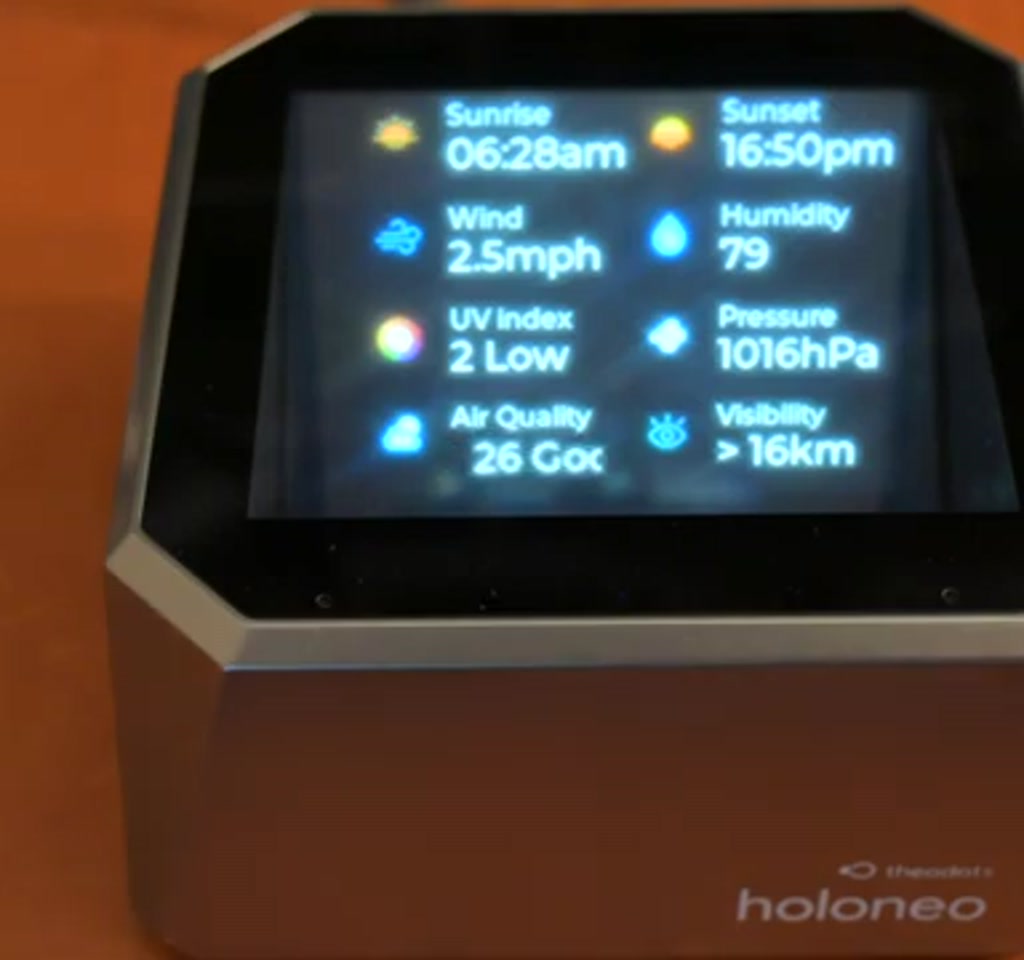
Holoneo arrives with a simple promise: make a small object on your desk feel alive. It is not just a toy projection, it is an attempt to make a hologram an everyday information surface, one that can answer questions, show weather, play media, and even pull lyrics from your phone.
The real significance here is not that images hover above a device. The important shift is that this compact hardware is positioned as a programmable, network-connected presence that can be extended by developers and tied into third-party services. That changes the conversation from cool effect to useful endpoint.
What most people misunderstand at first glance is that holography is the headline but not the whole product. The Holoneo is a bundle of hardware choices, network quirks, file format restrictions, and emerging software glue. The floating images are the party trick; the platform potential and the setup friction decide whether it becomes a daily helper.
From an editorial standpoint, the device is compelling exactly up to the moment the environment or workflow demands more than the out-of-the-box features provide. The part that changes how this should be understood is whether developers and the vendor convert that novelty into scheduled notifications, messaging integrations, or reliable ambient responses. If they do, the Holoneo stops being a desk toy and starts being a new kind of user interface.
What The Holoneo Is And Why It Matters
The Holoneo is a small, roughly four-by-four-inch cube and about three inches tall. It plugs in with a USB Type-C power cable and ships with a microSD card preloaded with content. When powered on it creates a convincing three-dimensional image that appears to float above the unit. The floating effect is most convincing when viewed from a narrow vertical band of angles, which is part of what makes it feel like magic.
That sense of magic is valuable because it changes attention. A weather icon or a tiny avatar that appears to float slightly above the desk sits in a different perceptual register than a notification badge on a phone screen. The Holoneo is interesting because it is trying to make presence literal rather than symbolic.
Why this matters now is twofold. First, personal computing is fragmenting into surfaces. We have laptops, phones, watches, and smart speakers. Adding a low-friction visual surface that can be glanced at or asked questions has a distinct appeal. Second, the Holoneo ships with hooks to external services, including a spot to enter an OpenAI API endpoint and key. That turns a holographic display into a conversational surface, which is where the device becomes meaningful for productivity rather than decoration.
How The Holoneo Works
The Holoneo combines a compact optical assembly with local media playback and simple gesture sensing to create a floating visual and a voice enabled micro assistant. It renders short clips and static sprites from files on the microSD, decodes AVI video for the visual, and routes voice queries through a user-supplied conversational endpoint.
On the network side, initial setup exposes a temporary Wi Fi network and a configuration web UI on port 8080. That web interface is intentionally minimal, letting users add Wi Fi credentials, an OpenAI API URL and key, a city for weather, time zone, and volume. The tradeoff is that early configuration is hands-on rather than app-driven.
How Gesture Control And Voice Interaction Work
Gesture control is deliberately simple: swipe left and right to move between sections, push forward to enter, and swipe forward to back out. A built-in microphone and speaker let the Holoneo send voice input to a conversational API and return spoken responses locally. Both control modes require line of sight and reasonable lighting to register reliably.
Setup, Connectivity, And The Web UI Experience
Getting the device online is immediate but manual. At first boot it opens its own Wi Fi network. You connect a phone to that network and point a browser at the specified IP address on port 8080 to finish configuration. The settings page exposes only a handful of controls, making the initial feature surface small but creating early workflow friction for casual users.
Theodots says an official app is in development, and that will matter for mainstream adoption because the current process is clumsy. Until then, expect some quirks: default values that persist visually in the web UI and a reliance on the microSD card for media management.
Setup Quirks And Practical Tips
The device defaults to Shenzhen and a CST minus eight time zone. Even after updating the city and time zone so the display shows the correct local time and weather, the web UI sometimes still displays the default values. The microSD card is user accessible for adding pictures and AVI video files, which favors openness but keeps file swapping and manual management part of the routine.
Benefits And Practical Use Cases
Holoneo excels as a glanceable presence device that changes how you notice information. A tiny floating badge for incoming Slack messages, a short weather animation, or a spoken quick answer with a related visual creates multimodal cues that feel more persistent than ephemeral phone alerts.
It also functions as a Bluetooth speaker with a lyrics display mode, allowing the unit to double as a media companion. These small wins do not require perfect hardware; they hinge on scheduling, notification bridging, and tighter app integration to become genuinely useful.
Limitations, Tradeoffs, And Real Constraints
The Holoneo is limited by media formats, storage logistics, and interaction boundaries. It depends on AVI video files and a microSD card for content; a 4-gigabyte card holds roughly a few hundred short clips depending on size. The holographic effect is angle-dependent and flattens outside a narrow vertical viewing band, and gesture sensing works best within arm reach.
Another tradeoff is the OpenAI integration. The device gives you a hook to route voice queries to a conversational endpoint, but you must supply the API endpoint and a valid key. That moves billing and privacy control to the user and creates an ongoing cost that scales with usage.
Interaction Reliability And Environmental Boundaries
Expect the most convincing three-dimensional effect within a roughly 20 to 40 degree vertical window relative to the device center, and gesture recognition that performs best at typical arm reach distances. Lighting and unobstructed sight lines materially affect performance, making placement and desk context important considerations.
Holoneo Compared To Alternatives
Compared to smart speakers, the Holoneo adds a visible information surface that can carry symbolic cues and brief animations. Compared to smart displays, it is not a monitor replacement; it prioritizes glanceability over long-form content. Compared to phone notifications, it offers a persistent, desk-anchored presence rather than transient badges.
These comparisons matter when deciding whether to add a Holoneo to a workflow. If you want a low attention companion that offers multimodal cues and a tactile, physical presence, it fills a niche. If you need high-fidelity visuals, large-screen interactions, or fully integrated mobile configuration today, other devices remain more practical.
Developer Potential And The Community Question
Theodots positions the Holoneo as open to community development, and that is the clearest path to meaningful utility. Integrations that bridge Slack, calendar, home automation, or security cameras could turn the device into a persistent presence for notifications and ambient awareness.
Open hardware without low-barrier tooling risks slow adoption. Tools that convert common assets into compatible AVI sequences or push small payloads to the microSD over Wi Fi will determine whether hobbyist interest becomes broader utility. This is where the platform could either accelerate or stall depending on developer ergonomics.
Where Holoneo Fits On Your Desk
Viewed practically, the Holoneo is a presence device best placed within sight of a primary workstation or a common area where glanceable information and short audio responses add value. It is not a replacement for monitors or a phone, but it can be a small persistent companion that signals presence, status, and short notifications.
Two paths make sense for the device to evolve: software maturity that adds scheduling and notification bridging, and content tooling that simplifies authoring and compression for the microSD. Either would shift the device from charming novelty toward everyday utility.
Who This Is For And Who This Is Not For
Who This Is For: Early adopters, desktop tinkerers, and developers who enjoy integrating new devices into workflows. It suits people who value glanceable information, multimodal cues, and a novel visual presence over raw screen real estate.
Who This Is Not For: Users who need out-of-the-box mobile polish, seamless app-driven setup, high-resolution video playback, or a device to replace a monitor. If you prefer fully managed ecosystems with minimal manual file handling, this device will feel premature today.
Final Thought
Holoneo is an intriguing experiment in turning holography into a practical presence. The hardware delivers an attention-commanding visual, but the long-term value depends on software, community tools, and the user experience of setup and ongoing management. Watch for firmware updates and the first developer projects to see whether this becomes a new ambient surface or remains a delightful object.
FAQ
What Is Holoneo?
Holoneo is a compact desktop holographic display that shows short floating images and animations from a microSD card, supports gesture control, includes a microphone and speaker, and can route voice queries to a conversational API when you provide an endpoint and key.
How Does Holoneo Connect To The Internet?
On first boot it opens a temporary Wi Fi network and offers a web UI on port 8080 for configuration. You enter Wi Fi credentials and other settings through that interface. An official mobile app is reported to be in development.
What Media Formats And Storage Does Holoneo Use?
The Holoneo relies on a user accessible microSD card for content and currently accepts AVI video files for animated visuals. Storage capacity limits the number and length of clips; a 4-gigabyte card holds roughly a few hundred short AVI clips depending on file size.
Can Holoneo Use OpenAI For Voice Responses?
Yes. The device has a settings field where you enter an OpenAI API URL and key. Voice queries are sent to that endpoint and spoken responses are returned through the unit. Billing and data flow are controlled by the API account you provide.
How Reliable Is Gesture Control And Viewing Angle?
Gesture recognition requires a clear line of sight and adequate lighting, and the holographic effect appears most three-dimensional within a roughly 20 to 40 degree vertical band in front of the device. Outside those boundaries the image flattens and gestures may fail to register.
Is Holoneo A Replacement For A Monitor Or Smart Display?
No. Holoneo is designed as a glanceable presence device, not a monitor replacement. It is best for short animations, notifications, and conversational micro tasks rather than long-form content or detailed visual work.
Can Developers Build Integrations For Holoneo?
The vendor encourages community development and the platform favors openness through microSD content and developer hooks. Practical adoption will depend on tooling that simplifies creating compatible clips and delivering notifications or scheduled content over the network.
Does Holoneo Offer Localization And Time Format Options?
The current firmware has limited locale toggles. Users have reported mismatches in the web UI default city and time zone settings, and there is no obvious toggle for 12 versus 24-hour time or Celsius versus Fahrenheit in the shipped firmware.
COMMENTS