


The arrival of the official YouTube app on the Apple Vision Pro is more than a swaggering port of an existing service. It reframes what a video platform can be when the screen is no longer a rectangle you hold but a window you inhabit.
The real significance here is not only that Google shipped a native client for VisionOS, but that YouTube treats spatial and high dynamic range formats as first-class citizens, with controls and environment hooks that change viewing from passive consumption into a deliberate spatial experience.
This article untangles what that actually means, what most people misunderstand about spatial video, and the two practical boundaries that will determine whether this feels revolutionary or merely novel for everyday use.
What becomes obvious when you look closer is that the Vision Pro version of YouTube is not a one-to-one translation of phone or TV behavior. The app layers three separate modes of watching 2D, 3D, and 360 content into a single interface and ties them directly to VisionOS features like pinning, immersive environments, and the Mac Virtual Display. That combination is where the value and the tradeoffs sit.
What Makes YouTube On Apple Vision Pro Different
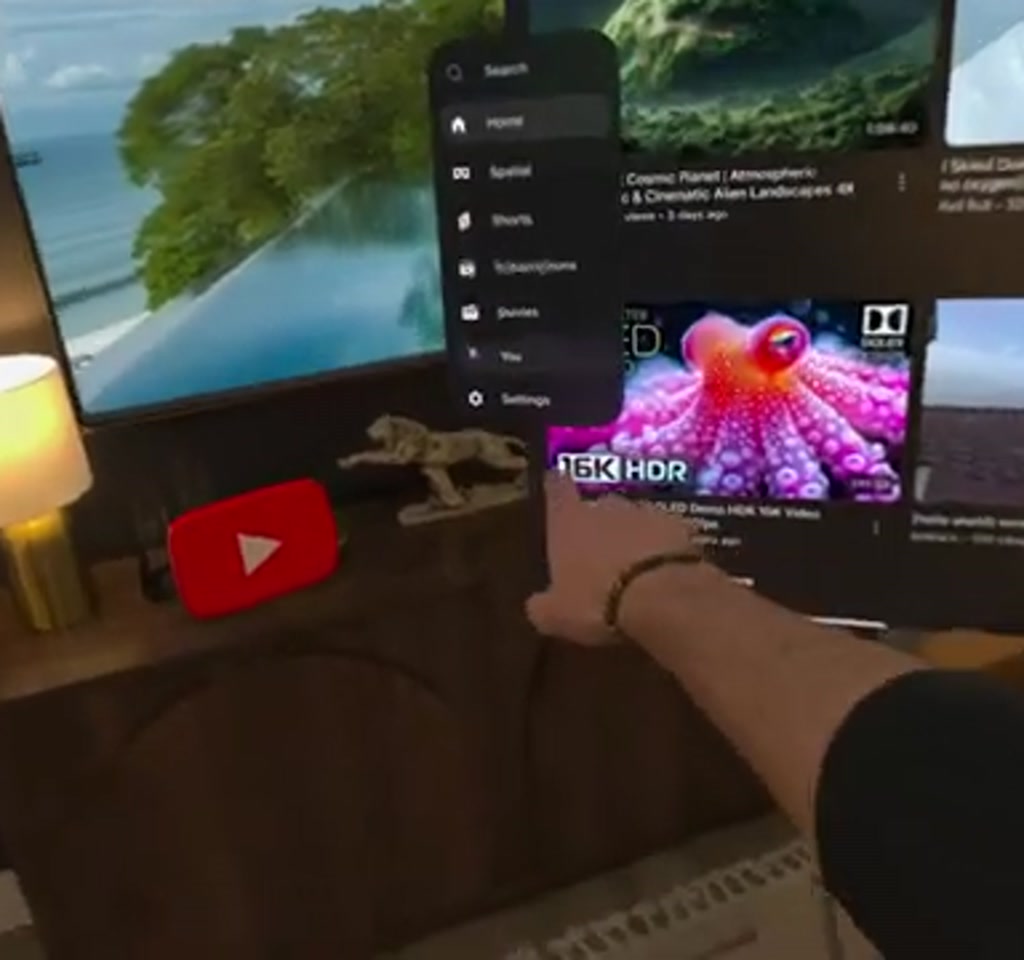
The interface preserves familiar YouTube navigation while adding spatial-specific controls. A translucent app window, a left side menu with Home, Shorts, Subscriptions and a Spatial tab, and a full account sign-in flow make it feel like the native YouTube people already know.
But this version surfaces items that rarely mattered on phones. Spatial playback modes live in their own tab. Pinning a video to a physical wall, switching to Dolby Vision 8K HDR, or dropping the same player into a virtual beach scene are visible actions rather than hidden settings.
What Is Spatial Video And How It Works
Spatial video is a format that captures environment and depth so viewers can look around inside a scene instead of only seeing a framed rectangle. On Vision Pro, spatial playback includes 180 and 360 degree clips and stereoscopic 3D, with head and body movement changing the visible framing in real time.
Controls, Multitasking And Virtual Environments
YouTube on Vision Pro responds to the device interaction model. A pinch brings up playback controls, a pinch and hold pins the screen to a wall, and the Digital Crown can move you from an office into an immersive beach environment while the same player continues running.
Those controls are meaningful because they let the viewer choose context quickly: keep a pinned giant screen for focused watching, or move the player into an immersive scene for presence and ambience.
Working While Watching
One of the most tangible implications is the Mac Virtual Display integration. The app supports having a large YouTube screen pinned while a virtual Mac workspace sits nearby. This makes multitasking practical: check a tutorial or a travel video while you edit a document on the virtual Mac window without switching physical devices.
From an editorial standpoint, the moment this becomes useful is when the video is reference material rather than background entertainment. The tradeoff is cognitive. A giant cinematic screen plus an active workspace is excellent for productivity tasks that tolerate split attention, less ideal for deep focused work.
Immersive Environments And Lighting
Vision Pro’s environments matter because YouTube content can borrow their scale and lighting. The app will float a player in front of palm trees or a nighttime scene, and third-party integrations like Philips Hue let viewers shift real room lighting with a VisionOS widget.
The effect is cinematic. The detail most people miss is how lighting and spatial context change perception of contrast and color. An 8K Dolby Vision clip looks markedly different with ambient lighting that matches the virtual scene.
Spatial And 360 Video: A New Medium
Spatial content on the Spatial tab includes 180 and 360-degree videos and stereoscopic 3D. The viewer can physically move around and the video pans accordingly, and a pinch plus an arm movement reorients the focal point of the capture.
That capability is what separates motionless 360 playback on a phone from embodied viewing on Vision Pro. Being able to see your hands while you look around is a small sensory cue that significantly increases presence.
How Physical Movement Changes Framing
When a viewer literally walks left or right, the world captured in a 360 video shifts correspondingly. That changes how creators think about framing. Instead of cutting to a close-up, cinematographers can let viewers discover details by moving their heads, which shifts storytelling from editor-controlled to viewer-assisted.
When Motion Becomes A Threshold
That said, motion sensitivity is a material constraint. Active 360 footage with lots of camera movement will be exhilarating for some and uncomfortable for others. The threshold for discomfort appears quickly for certain viewers, so session lengths for intense 360 content are often counted in minutes rather than hours for a sizable portion of the audience.
Bandwidth, Comfort And Other Constraints
Two clear, quantifiable constraints define the real-world usefulness of YouTube on Vision Pro: bandwidth and human comfort. Both are practical limits that determine the scenarios where this shines.
Bandwidth: Streaming high-resolution spatial content and Dolby Vision 8K will use significant network resources. While exact bitrates vary by encoding, high dynamic range 8K streams typically push into tens of megabits per second, and reliable playback often benefits from consistent connections in the 50 megabits per second and up range. That means home Wi Fi quality and mobile tethering are important gating factors.
Comfort And Session Length: Not every viewer tolerates sustained spatial motion. For immersive 360 clips that include active camera movement, many viewers will prefer shorter sessions, often on the order of 10 to 30 minutes, before needing a break. This shifts how creators should pace content and how platforms should design discovery for repeatable consumption.
Additional tradeoffs include storage and discovery. Producers must deliver spatial formats that are much larger than standard HD. For creators this raises production and upload costs, and for platforms it creates a curation challenge because spatial content remains a small, specialized slice of the catalog.
Practical Implications For Creators And Viewers
For creators, the Vision Pro YouTube client signals a clear incentive to invest in spatial and high dynamic range workflows. Scenes that reward viewer movement and stereoscopic capture will be more compelling on Vision Pro than on flat screens. However, that investment only pays off where audiences have the hardware and bandwidth to appreciate it.
For viewers, subscription behavior and discovery matter more than ever. The Spatial tab and Subscriptions become primary pathways to find immersive content because it will not surface reliably through standard recommendation mechanisms designed for 2D video.
Another practical point relates to multitasking. Pinning a player and running a Mac Virtual Display is powerful, but it is a resource-juggling act. Running multiple high-fidelity streams or heavy Mac workloads at the same time is a realistic boundary for session design. Expect this setup to be most compelling for workflows that mix light to medium compute tasks with visual reference material.
YouTube On Vision Pro Vs Traditional Viewing And Other Platforms
Compared to phones and televisions, YouTube on Vision Pro adds spatial presence and environment control while keeping familiar navigation. Unlike flat screens, it ties playback to head movement and virtual scenes, which changes content design and discovery in meaningful ways.
Vision Pro Vs Phone
Phones offer convenience and ubiquity; Vision Pro offers scale and presence. The latter improves immersion for travel, documentary, and tutorial content but requires more bandwidth, a premium headset, and often shorter sessions for intensive 360 footage.
Vision Pro Versus Living Room TV
A living room TV gives a large, shared viewing surface without motion sensitivity or head tracking. Vision Pro substitutes shared scale for individualized presence. The choice depends on whether the viewer values solitary immersion or communal convenience.
Practical Workflow And Production Considerations
Producers must consider capture rigs, stereoscopic editing, and HDR grading to take advantage of Vision Pro playback. Distribution choices include how to tag spatial content for discovery and whether to offer parallel flat versions for legacy viewers.
Discovery And Metadata
Because spatial videos represent a small catalog slice, meaningful metadata and explicit Spatial tab placement matter. Creators who optimize titles, descriptions, and tags for spatial discovery increase the chance their work surfaces to Vision Pro users.
Verdict And What Comes Next
The official YouTube app on Apple Vision Pro makes a decisive argument for spatial video as a meaningful extension of streaming. It is the cleanest example yet of how platform, content, and hardware can be coordinated to offer something genuinely new.
The thing that changes how this should be understood is that presence and convenience are split. The Vision Pro version is both more immersive and more situational. It will be transformative for travel, documentary, and tutorial content where spatial context adds value, and it will remain a niche viewing mode for casual long-form binge watching because of bandwidth and comfort boundaries.
What becomes interesting now is the feedback loop. If more users own premium headsets and networks keep up, creators will invest more in spatial storytelling, which improves the value proposition of the device. If either side lags, the feature will remain an excellent but specialist capability.
The Vision Pro YouTube app reframes video watching by making spatial choice explicit, so the decision to watch becomes a question of context and intent rather than of screen size alone.
Expectations for the near term include steadily better spatial discovery tools from platforms, more creators experimenting with 180 and 360 formats, and incremental improvements in encoding efficiency that reduce bandwidth friction.
Linking the experience back to the original walkthrough, Justin Ryan demonstrates many of these behaviors in action, from pinning players to shifting immersive environments, and that hands-on demonstration helps explain why the app feels like a deliberate redesign rather than a simple transplant.
Looking ahead, the most interesting question is how the wider ecosystem responds: will smart lighting, UI patterns, and content formats converge around spatial viewing, or will those elements remain optional flourishes? The answer will shape whether YouTube on Vision Pro is a neat technical showcase or a foundation for a genuinely different era of online video.
Until then, the platform change is already visible. The app is live, spatial experiences are accessible, and the first creative patterns are starting to emerge. The next wave will be defined by who adopts the format, who experiments with pacing and framing, and how the networks cope with larger, richer media.
Who This Is For And Who This Is Not For
Who This Is For: Viewers who value immersive travel, documentary, or tutorial experiences, creators experimenting with depth and movement, and professionals who use visual reference material while multitasking will find YouTube on Vision Pro compelling.
Who This Is Not For: Casual binge watchers who prefer long uninterrupted sessions, viewers with strong motion sensitivity, and anyone constrained by low bandwidth or standard non-spatial discovery habits should consider alternative viewing modes.
FAQ
What Is YouTube On Apple Vision Pro?
The YouTube app for Apple Vision Pro is a native VisionOS client that supports standard 2D playback and spatial formats such as 180, 360, and stereoscopic 3D, while integrating Vision Pro features like pinning, immersive environments, and Mac Virtual Display.
How Does Spatial Video Work On Vision Pro?
Spatial video captures environment and depth so viewers can look around inside a scene. On Vision Pro, head and body movement change the visible framing, and the UI provides explicit controls for switching between flat and spatial playback modes.
Is 8K Dolby Vision Supported In The App?
The Vision Pro YouTube client surfaces Dolby Vision 8K HDR as an available playback option, allowing compatible content to play with higher dynamic range when the source and network conditions permit.
How Much Bandwidth Does Spatial 8K Streaming Use?
Exact bitrates vary by encoding, but high dynamic range 8K streams typically push into tens of megabits per second. Reliable playback often benefits from consistent connections in the 50 megabits per second and up range, so Wi Fi quality and tethering matter.
Can I Multitask While Watching YouTube On Vision Pro?
Yes. The app supports pinning a player while running a virtual Mac workspace, making light to medium multitasking practical. Running multiple high fidelity streams or heavy compute tasks simultaneously is a realistic boundary to consider.
Does Spatial Video Cause Motion Sickness?
Motion sensitivity is a known constraint. Active 360 footage with lots of camera movement can cause discomfort for some viewers, and many users prefer shorter session lengths for intense spatial clips.
Will Spatial Content Replace Traditional Video?
Not immediately. Spatial content adds new storytelling options and is well-suited to specific genres, but bandwidth, hardware adoption, and comfort limits mean it will complement rather than immediately replace flat video.
How Should Creators Prepare For Vision Pro Playback?
Creators should consider stereoscopic capture, HDR grading, and clear metadata placement in the Spatial tab. They should also weigh production costs against the current size of the spatial audience before making large investments.
COMMENTS