


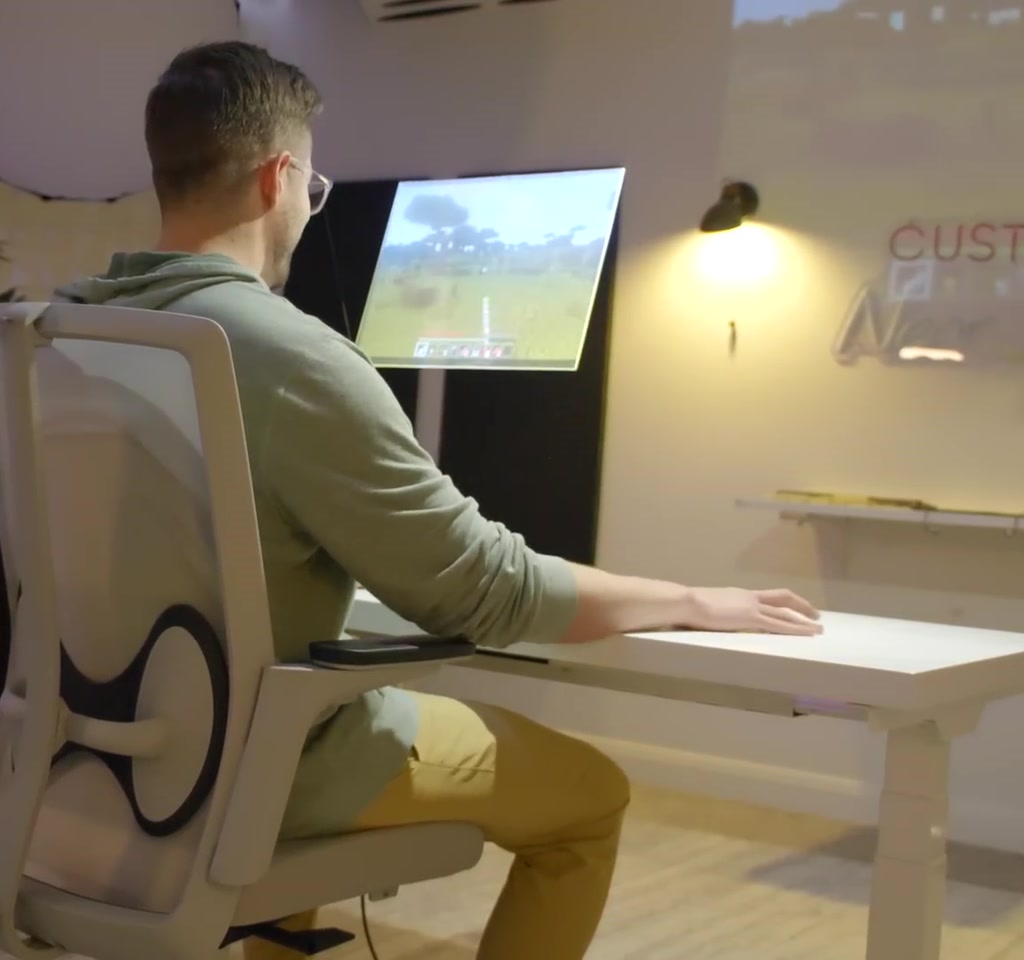
This story starts with a simple ambition: an impossibly clean desk, not the cleaned desk you see on social feeds but one that truly disappears. The creator wanted no visible PC, no mouse, no keyboard, and a screen that seemed to float in midair. That ambition is the useful signal here, because what matters is not that the tech is invisible but what the choice to hide it forces you to manage instead.
The real significance here is not novelty for novelty’s sake. What becomes interesting is the tradeoff between visual calm and the engineering, cost, and usability overhead required to sustain it. Making something disappear in plain sight rearranges difficulty rather than removes it.
Over three months the maker grafted a disassembled ASUS Scar 18, a projector, tracking camera, custom software, and painstaking keyboard work into a Flexispot E7 standing desk. The final effect is arresting. The details that follow explain how that illusion was built, what it buys you, and the practical limits that define whether it is a clever studio piece or a workable daily machine.
What most people misunderstand is that invisibility is a design choice with boundaries: ambient light affects the floating screen, tracking and wireless links introduce latency and failure modes, and embedded thermal management becomes a continuous obligation. The rest of this article walks through each compromise and why it matters.
How The Idea Took Shape
The project began with the Flexispot E7 as the chassis. The creator cited long experience with that desk and its advertised height range of 22.8 to 48.4 inches. The desk was hollowed to accept a slimline laptop motherboard, an internal projector, and a cable management tray, turning the tabletop into a sealed electronics bay.
Choosing a standing desk as the physical platform is itself a constraint and an advantage. The E7 provides the structural support and lift range that make embedding components feasible, but making a desk structural and serviceable at the same time requires planning for load, cooling, and future access.
What Invisible PC Setup Means
Invisible PC setup refers to physically embedding computing hardware into furniture so that screens, inputs, and cables are hidden from view. That choice prioritizes visual minimalism over conventional modularity, and it creates specific demands on cooling, maintenance access, and user input translation that do not exist with standard desktop rigs.
Making A Mouse That Isn’t There
The tactile problem was the mouse. The creator rejected projection keyboards and gesture-only input because he wanted touch responsiveness. The solution for pointer input was to move sensing off the table and into a lamp. A depth-sensing camera and a small ceiling-mounted mini PC track the hand in three dimensions and wirelessly transmit cursor data to the embedded machine.
What becomes obvious when you look closer is that input translation is the critical software task. The system must convert 3D hand position and finger motion into 2D pointer coordinates, clicks, and scroll events, with sensitivity and smoothing tuned to feel natural.
Tracking, Latency, And Feel
To feel like a physical mouse the tracking pipeline must reach interactive frame rates and low end-to-end latency. Achieving sub-50 millisecond latency is difficult with wireless hops and processing stages. If responsiveness slips into the tens to low hundreds of milliseconds, cursor lag and jitter become perceptible during fast pointer movement such as gaming.
Reliability And Environmental Limits
Ceiling-mounted depth cameras reduce tabletop clutter but introduce occlusion risks and sensitivity to ambient lighting. Wireless transmission adds another failure point through interference or network congestion. These are practical limits that shape where and how an invisible input system can be trusted for daily use.
The Keyboard That Disappeared But Still Types
The keyboard became the longest series of iterations. Early experiments with epoxy to encapsulate keys failed because thickness, stickiness, and material cure characteristics interfered with key travel. The final approach relied on precise cutouts in the desk, careful sanding and lubrication of key stems, and painting keycaps to match the desktop finish so they virtually vanish to the eye.
That invisible keyboard offers the visual result the creator wanted, but it introduces a maintenance tax. Every key needed individual tuning and lubrication. What is quick to swap on a normal keyboard becomes hours of delicate work once the assembly is sealed, so the tradeoff is aesthetic cleanliness for repairability and service time.
How The Floating Screen Works
The floating screen effect is built from standard optical tricks applied in a compact form. A one-inch projector embedded in the desk reflects off an angled mirror and projects onto a clear polycarbonate panel coated with a nanoparticle film. The panel is hung on monofilament so it reads as a levitating image from typical viewing positions.
This arrangement produces a strong visual payoff in controlled lighting and viewing angles, but it depends on projector brightness, screen coating efficiency, and viewer position. Bright ambient light and off-axis viewing both degrade contrast, which constrains where the effect succeeds.
Benefits Of Hiding A Workstation
Embedding a PC into furniture buys an uncluttered surface, a refined aesthetic, and a compelling social signal that the space is curated. For creative studios, streaming setups, and design-forward workspaces the payoff is immediate: cleaner visuals, fewer visible cables, and a striking reveal moment that ordinary setups cannot match.
Constraints And Tradeoffs
Designing for invisibility forces tradeoffs in thermal management, serviceability, input reliability, and cost. These are not small adjustments; they require active cooling channels, larger power feeds, modular access points, and higher component and labor costs. In short, hiding hardware moves complexity out of sight, not out of existence.
Two Concrete Constraints That Define Usefulness
First, thermal and power management. Embedding high-performance laptop hardware into a desk requires airflow channels and active cooling. Under gaming or sustained CPU load, components will generate meaningful heat. The consequence is that the desk needs escape paths for warm air and a power feed sized for peak draw.
Second, time and labor versus replacement flexibility. The build took roughly three months and included many iterative failures: two epoxy attempts, a liquid plastic try, and then painstaking mechanical fitting and painting. Servicing a sealed setup is more expensive and slower than swapping a tower or replacing a keyboard.
Costs That Hide Behind Clean Surfaces
Beyond labor, component choices push costs upward. Compact projector optics, nanoparticle films, ceiling-mounted sensors, and custom software typically place the build in the hundreds or low thousands of dollars, not the consumer tens. That makes the visual payoff a deliberate investment rather than an incidental side effect.
Why The Design Decision Matters
Choosing invisibility is an editorial decision about what to prioritize. The creator prioritized tactile feel and zero visible cables, which required added engineering: wireless telemetry, hidden cooling, and manual key refinement. Those decisions reveal underlying values about form versus function and where inconvenience is acceptable.
Invisible PC Versus Traditional Desktop
Invisible PC setup versus traditional desktop is a tradeoff between look and serviceability. A standard desktop offers modular upgrades, easier thermal management, and straightforward troubleshooting. An embedded desk trades those operational advantages for a curated surface and an integrated lifestyle object. Which is better depends on priorities such as ease of repair, upgrade cadence, and the importance of surface aesthetics.
Cooling And Performance
Traditional desktop cases have known airflow paths and room for larger cooling systems. Embedded desks must plan escape routes for heat and often accept reduced sustained performance or louder fans to maintain thermals under load.
Maintenance And Upgrades
Desktops are designed with swapability in mind. Embedded systems require forward planning: modular mounts, removable panels, and standardized connectors if you want upgrades or fast repair without destructive disassembly.
Input And Interaction
Physical peripherals remain the baseline for reliability and latency. Depth-sensor-based input can approach that feel but introduces wireless hops and environmental sensitivity that gaming and precision work may not tolerate without careful engineering.
Lessons From The Workshop
What the project surfaces is applicable beyond novelty builds. Minimalist surfaces shift cognitive load into engineering: hidden systems need robust routing, accessible service points, and fail-safes. That is why professional design for built-in electronics favors removable panels, standardized modular components, and maintenance access even when the visible finish is seamless.
From an editorial standpoint, the most interesting moment is not the reveal but the set of small, repetitive decisions that made the reveal possible. Hundreds of tiny sanding passes, dozens of software tweaks to cursor sensitivity, and multiple thermal design iterations collectively determined success. These micro decisions are invisible in the final clip, but they are where the project lives or dies.
Where This Idea Goes Next
There are clear paths for refinement. Better integrated modules designed for embedded furniture would reduce labor. More robust wireless telemetry and lower latency depth sensors would close the feel gap with physical mice. Optical advances could make floating images brighter and more visible under a wider range of lighting conditions.
What remains open is whether those improvements will migrate from artful one-offs into everyday products. The cultural pull toward cleaner spaces is real, but standardized serviceability, modular cooling, and accessible upgrade paths are the missing pieces that would push this idea toward broader adoption.
Who This Is For And Who It Is Not For
This approach suits builders, streamers, and studio owners who value aesthetic control and are willing to invest time and money in custom engineering and maintenance. It also fits creative directors who use a piece as a statement or installation rather than a daily replaceable workstation.
It is not for people who need frequent upgrades, fast repairability, or low-latency competitive gaming without the tolerance for intermittent tracking issues. If you require predictable, serviceable hardware that can be swapped quickly, a conventional desktop or standard peripherals remain the practical choice.
FAQ
What Is An Invisible PC Setup?
An invisible PC setup embeds computing hardware into furniture so screens, keyboards, and cables are hidden. It emphasizes surface minimalism and requires special solutions for cooling, input translation, and maintenance access.
How Does The Floating Screen Work?
The floating effect is produced by a compact projector reflecting off a mirror onto a clear panel coated with a light-enhancing film. The panel is suspended to appear levitated. The illusion depends on projector brightness, viewing angle, and controlled ambient light.
Is A Depth Camera Mouse Practical For Gaming?
Depth camera input can be practical but it introduces wireless hops and environmental sensitivity. Achieving sub-50 ms end-to-end latency is challenging; if latency exceeds that, fast pointer movements and precision tasks may feel degraded compared to a physical mouse.
How Hot Do Embedded Components Get?
High-performance laptop components generate meaningful heat under sustained load. Embedded designs require airflow channels and active cooling. The build must accommodate peak power draw and provide warm air escape paths to avoid thermal throttling.
Can This Setup Be Serviced Or Upgraded Easily?
Serviceability is limited compared to a standard desktop. The project required deliberate access planning. Without removable panels or modular mounts, repairs and upgrades become time-consuming and may take hours or days rather than minutes.
How Much Does An Invisible PC Setup Cost?
Costs vary by components and labor, but compact projectors, nanoparticle films, ceiling mounts, and custom software push prices beyond inexpensive consumer options. Component and labor costs often place such builds in the hundreds to low thousands of dollars range.
Will This Trend Become Mainstream?
It is uncertain. Wider adoption would likely require standardized embedded modules, serviceable furniture designs, and improvements in projection and input latency. Until those elements exist, the concept is most common in curated one-off builds.
Does The Creator Credit Any Sponsor?
The creator thanked Flexispot for sponsoring the build and noted long personal use of Flexispot desks, with the E7 model chosen for its strength and lift range. That sponsorship was disclosed in the project notes.
COMMENTS