


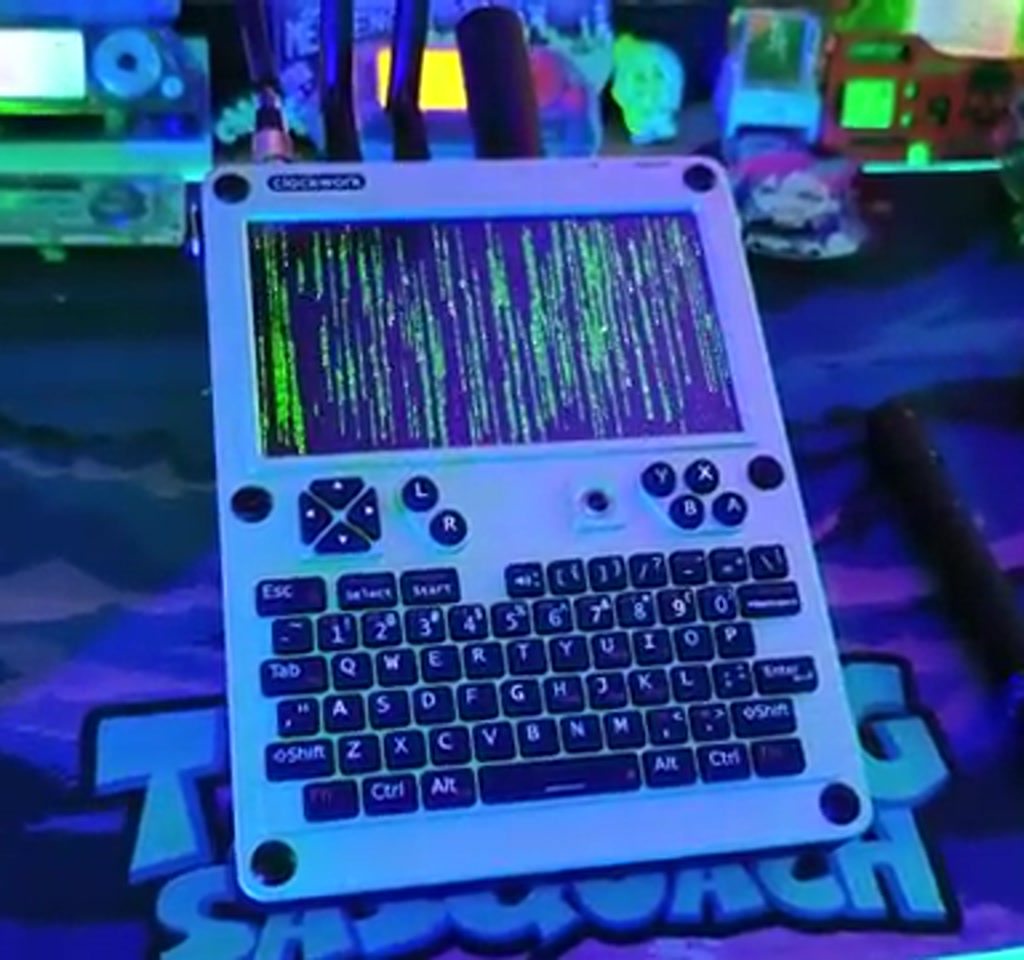
The headline here is intentionally provocative: this is not just another handheld that can run Doom. The uConsole by Clockwork already does the obvious tricks. What actually changes the game is the combination of the Raspberry Pi CM5 compute module and the Hacker Gadgets Multiboard, which turn a compact aluminum console into a portable field lab for radio work, long-range comms, navigation, and full Linux workflows.
The real significance is not the nostalgia or the emulators. What this setup reveals is how specialist hardware that once needed a backpack full of gear now fits inside a small, well-engineered chassis, provided you accept a specific set of tradeoffs around availability, battery, and thermal management.
Most people misunderstand why this matters. They see gaming and think leisure. The detail most people miss is that the uConsole is a general-purpose Linux computer first, and a clever handheld form factor second. That ordering makes a huge difference for what developers, field researchers, and hobbyist tinkerers can actually do with it.
Over the next sections the article will walk through the build and the parts that matter, explain the hardware and software choices, and identify the practical limits that define when this approach is compelling and when it becomes fragile. The constraints are real. They are also useful, because they show exactly what problems this little machine is good at solving.
Unboxing And The Build Experience
Clockwork ships the uConsole as an all-aluminum, tank-like handheld. The chassis, keyboard, and kickstand arrive in separate pieces that snap and screw together. In the hands of the person in the transcript the assembly flow is straightforward: mount the display and keyboard, seat the trackball, and secure the inner boards with the supplied screws. The package includes a thermal pad intended for a compute module upgrade, which foreshadows the CM5 swap.
Two small but practical notes from the build stand out. First, the stock antennas are reported as being underwhelming in performance, and the manufacturer appears to anticipate third-party antenna mods. Second, the trackball is usable but noticeable as a weak point in tactile quality, and upgrades exist. Those are the kinds of physical tradeoffs you accept to keep this device compact and robust.
What The Multiboard Adds To The uConsole
The Hacker Gadgets Multiboard is the transformational expansion. It brings real radio capabilities into the same enclosure as the main compute module. The transcript lists the board functions clearly: RTL SDR capability, LoRa long-range communications, GPS for positioning, and upgraded Wi Fi, plus additional USB-C and USB-A ports for peripherals.
In short, the Multiboard converts the uConsole from a standalone handheld into an integrated radio platform. It places SDR reception, low-power LoRa transmission, and GPS location inside one chassis, allowing a single Linux device to perform spectrum reconnaissance, location-stamped logging, and low-bandwidth messaging without external dongles.
Antenna And Reception Tradeoffs
Antennas matter more than raw boards. The stock antenna included with the uConsole is described as “terrible” by the builder in the transcript, which is a candid and useful signal.
Replacing or repositioning antennas, or printing a small 3D adapter, is a common and necessary step for anyone relying on SDR or LoRa outdoors.
Quantified context: LoRa range can span from hundreds of meters in dense urban pockets to several kilometers in open line of sight. SDR reception sensitivity is strongly affected by antenna placement and design, and significant improvement often requires swapping the short stock whip for a tuned external antenna.
Why The Raspberry Pi CM5 Matters
The CM5 upgrade is primarily about compute headroom. The transcript frames the Raspberry Pi CM5 as a high-performance compute module that enables simultaneous radio workflows, better emulation performance, and smoother multitasking when SDR, GPS, and peripheral tools run together.
The uConsole ships with an adapter board for Raspberry Pi compute modules, and the transcript describes a deliberate upgrade to the Raspberry Pi CM5 compute module.
In the maker narrative the CM5 is positioned as the most powerful compute module ever made. That power buys several practical things: easier multitasking, faster emulation performance for retro games, and more headroom when multiple radios and analysis tools run simultaneously.
There is an engineering consequence: more compute means more heat and higher power draw. The device includes a thermal pad and the builder takes care to seat the CM5 carefully. That is not just ritual. Thermal contact and case conduction are the difference between a short burst of speed and a sustained workflow.
Software Choices, Setup, And Field Usability
DragonOS and targeted SDR tooling make the hardware useful. Flashing a purpose-built SDR distribution, pairing SDR++ for visualization, and keeping a curated set of peripherals turns the uConsole into a field-ready device faster than piecing together generic desktop Linux images.
On the software side the builder flashes DragonOS onto a 256 gig SD card using Balena Etcher. DragonOS is chosen specifically because it is tailored for software-defined radio workflows.
SDR++ is used as the front end for tuning and visualization, and the system successfully receives FM broadcast signals during the demonstration.
Other software highlights in the transcript underline the uConsole’s versatility. RetroArch and SCUMMVM enable robust retro gaming. QFlipper provides a bridge to Flipper Zero devices for managing and updating that community tool. Together, these examples show the device functioning as a recreational console, a radio analysis unit, and a peripheral manager all at once.
Learning Curve And Practical Setup Time
DragonOS and the SDR ecosystem are not plug-and-play in the sense of consumer devices. Expect setup and tuning to require time. Quantified context: initial flashing and OS expansion often takes an hour. Getting all radios, antenna connections, and optional firmware updated and tuned tends to take a few additional hours to reach field readiness unless you are already comfortable with Linux and SDR tooling.
Practical Workflows In The Field
Once assembled and configured the uConsole supports several distinct workflows. The transcript highlights three that are worth expanding on.
First, mobile SDR analysis. The combination of a handheld keyboard, a visible-spectrum waterfall in SDR++, and a compact antenna makes basic spectrum reconnaissance far easier to perform outdoors than with a laptop and a stick SDR alone.
Second, low-power long-range messaging. With LoRa available on the Multiboard the device can function as a gateway or as a node in a mesh of ultra-low bandwidth sensors. This suits experiments, remote telemetry, and certain off-grid applications where cellular is unavailable or undesirable.
Third, mixed recreational and productive use. Running RetroArch for gaming and simultaneously managing a Flipper Zero for hardware tinkering demonstrates how a single Linux handheld becomes both a work tool and a source of play without swapping devices.
uConsole Versus Separate Devices
Comparing the integrated uConsole approach to carrying separate devices clarifies why someone might choose consolidation over specialization. Portability and convenience come at the cost of thermal headroom, upgradeability, and often price. The tradeoff plays out differently depending on mission priorities.
Portability And Field Use
One device reduces bulk and setup time. A single handheld replaces a laptop, a USB SDR stick, a LoRa gateway, and a GPS puck for many basic field tasks. That simplification accelerates quick surveys and improvised tests where mobility matters more than absolute performance.
Performance And Flexibility
Dedicated gear still wins in raw performance and scalable antenna systems. For sustained high-duty-cycle SDR capture, a laptop with a cooled SDR and external antennas will outlast a compact handheld. The uConsole is strongest when multi-tool convenience outweighs specialized capacity.
Cost And Availability
Cost comparisons are context dependent. The uConsole plus CM5 and Multiboard positions the build in a higher hobby tier, while separate components can be purchased gradually or chosen based on specific performance needs. Availability and wait times can tilt the decision one way or the other.
Constraints And Tradeoffs
This approach wins by compactness and flexibility, but the list of boundaries that define its usefulness is concrete. Below are the two categories that matter most when judging whether the uConsole approach is right for you.
Availability And Wait Time
Constraint one is supply. The transcript opens with a candid line: it took eight months to get these. That scarcity is not cosmetic. The Multiboard and the CM5 add-ons are described as almost impossible to get in some windows. In practice, this means timelines measured in months rather than weeks when ordering specialized compute modules and third-party expansion boards.
The implied cost is also non-trivial. While exact retail prices are not quoted in the transcript, the combination of a premium aluminum handheld, a high-end compute module, multiple antennas, and a specialized Multiboard places the total build into a more expensive hobby tier. Expect upgrades and accessories to scale costs into the hundreds rather than the tens.
Power, Heat, And Runtime
Constraint two is power and thermal management. Upgrading to a higher-performance compute module increases power draw and heat generation. The builder includes a thermal pad and describes careful seating because compact enclosures have limited cooling pathways.
Quantified context: battery life in these configurations tends to be measured in hours rather than a full day. Under mixed use with SDR reception, LoRa activity, and active display time, practical runtimes often fall in the range of roughly 2 to 6 hours depending on screen brightness, radio duty cycles, and CPU load.
Sustained heavy compute and multiple radios active at once will push thermal limits, and in practice thermal throttling typically emerges after tens of minutes under constant high load unless external cooling or conservative profiles are used.
Where This Fits In The Broader Hardware Landscape
What this setup signals about portable computing is a larger trend. Two or three years ago you would have needed separate devices for SDR, LoRa nodes, and a retro handheld. Now a single Linux machine, when designed with expansion in mind, can credibly replace that small fleet for many use cases.
That compression of capability opens new workflows. Field researchers can prototype sensor networks faster. Makers can iterate on radio experiments without hauling a small lab. Retro gaming remains a delightful side effect, and its presence is not accidental. A usable keyboard and a comfortable form factor make the device useful beyond specialized technical tasks.
From an editorial standpoint the interesting tension is between capability and friction. The uConsole approach succeeds up to the point where supply delays, battery and thermal constraints, or antenna compromises become the deciding factors. For the people who accept those boundaries, the payoff is a very compact, highly capable handheld that changes where certain kinds of work can be done.
Quotable takeaway: “This is not about running Doom. This is about compressing the tools of a small radio and development lab into something you can carry in one hand.”
What the transcript makes clear is that the device is not a turnkey magic wand. It is an invitation to tinker. The most compelling use cases are those where portability, flexibility, and the willingness to live with a defined set of tradeoffs are the priority.
As the ecosystem around modular compute modules and small expansion boards continues to evolve, one open question is how quickly vendors will close the gaps that currently matter the most: supply chains for compute modules, better integrated antenna solutions, and battery management tuned to mixed radio and compute workloads.
That progress will determine whether devices like the uConsole remain niche curiosities or become mainstream handheld workstations for makers and field professionals.
If you want to explore similar topics, consider looking into portable SDR workflows and the broader hobbyist LoRa ecosystem, both of which provide useful context for how the uConsole fits into modern maker tooling.
Where this goes next will be decided in the field, one firmware update and one antenna swap at a time.
Who This Is For And Who This Is Not For
Best Suited For: Makers, field researchers, and hobbyists who need portable radio tools, integrated GPS capability, and a compact Linux environment for ad hoc experiments. If you value consolidation and mobility, and are comfortable with hands-on setup, this build is compelling.
Not Ideal For: Users who need turnkey consumer simplicity, long continuous runtimes without external power, or enterprise-grade signal capture and processing that require larger cooled systems and external antenna arrays.
FAQ – Frequently Asked Questions
What Is The uConsole With CM5 Multiboard Setup? The uConsole in this article refers to a Clockwork uConsole handheld upgraded with a Raspberry Pi CM5 compute module and a Hacker Gadgets Multiboard to add SDR, LoRa, GPS, and improved Wi Fi inside the same aluminum chassis.
How Does The Multiboard Change The uConsole? The Multiboard integrates radio functions into the handheld, enabling SDR reception, LoRa transmission, and GPS location without external USB dongles. It also exposes additional USB ports for peripherals and expands the device from a gaming handheld into a portable radio workstation.
Is DragonOS Required To Use SDR On This Device? DragonOS is not strictly required, but it is the distribution used in the transcript because it bundles SDR tooling and simplifies setup. Alternatives are possible, though they may require more manual configuration.
How Long Does The Battery Last With CM5 And Radios Active? The transcript reports practical runtimes in the range of roughly 2 to 6 hours depending on screen brightness, radio duty cycles, and CPU load. Heavy continuous use will shorten runtime and may trigger thermal throttling.
How Hard Is The Setup For Someone New To SDR? The setup is moderately challenging. Expect an initial hour for flashing and basic configuration, plus additional time for antenna tuning, firmware updates, and radio calibration. Familiarity with Linux and SDR concepts reduces setup time significantly.
Can The Antennas Be Upgraded? Yes. The transcript describes the stock antenna as underwhelming and notes that replacing or repositioning antennas is a common improvement. Users often add tuned external antennas or 3D printed adapters for better reception.
Are CM5 Modules And The Multiboard Easy To Buy? The transcript describes significant wait times; the builder reports an eight-month timeline to obtain components. Availability can vary and lead times may be months rather than weeks.
Does This Replace A Full Field SDR Setup? For many quick surveys and low duty cycle tasks, yes. For sustained, high-precision captures and complex antenna arrays, dedicated hardware and bigger setups remain superior. The uConsole trades some raw capability for portability and convenience.
COMMENTS