


The arrival of the Corsair Galleon 100SD matters because it is the long-awaited union of two desktop worlds: a flagship mechanical keyboard and Elgato Stream Deck functionality packed into one body. For creators, streamers, and power users the question is no longer could this be done, but what changes when it is done as a single device.
The real significance here is not merely novelty. What actually determines whether this matters is how much that consolidation changes a workflow. Put another way, the Galleon 100SD is interesting when you want fewer objects on the desk and tighter context switching between typing, macro control, and streaming tools.
Most people misunderstand the tradeoffs. Folding a Stream Deck into a keyboard collapses two separate software and hardware stacks into one purchase, but it also introduces limits: the keyboard uses traditional mechanical switches rather than Hall effect or TMR, and the screen is not touchscreen. Those are not defects so much as design boundaries that define who benefits most.
What this article ultimately reveals is that the Corsair Galleon 100SD is less a replacement for existing setups and more an accelerator for certain users. It shortens the distance between action and response for creators willing to pay a flagship price and accept specific hardware choices.
What The Corsair Galleon 100SD Actually Is
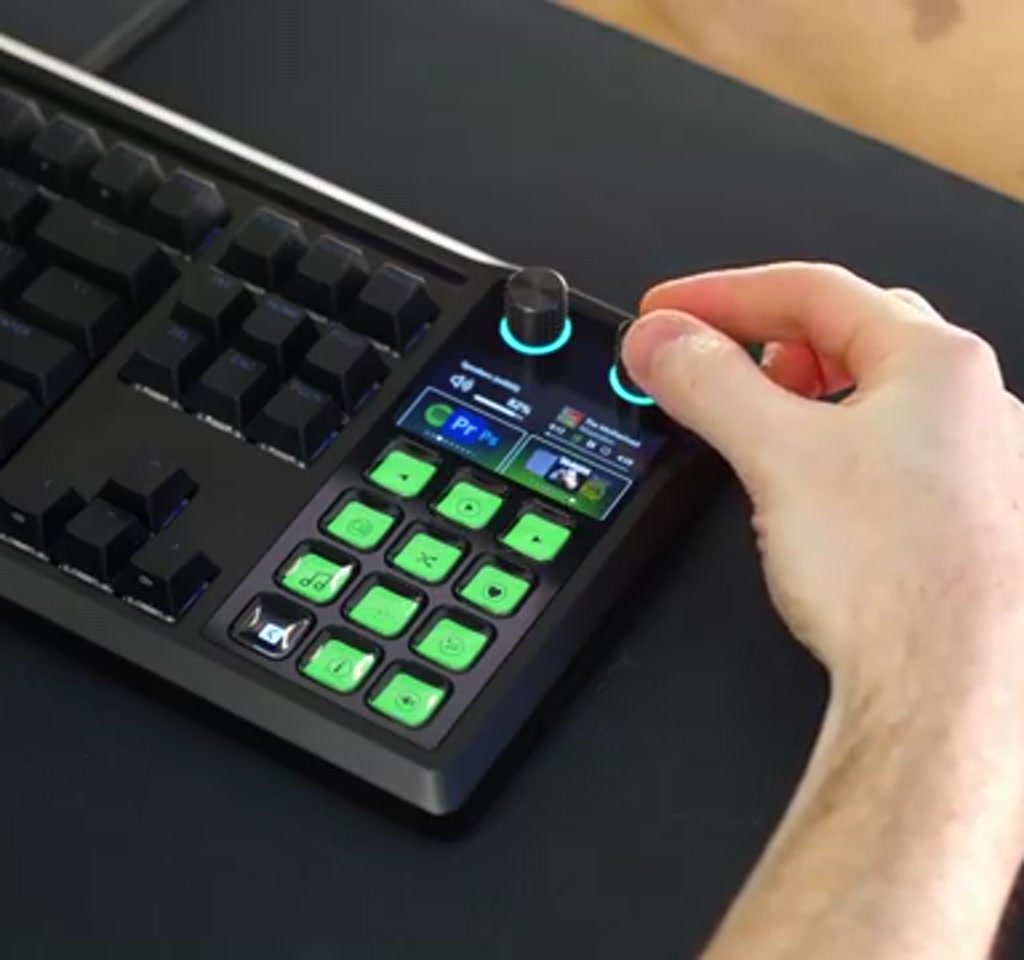
At its core the Corsair Galleon 100SD is a full-size mechanical keyboard that integrates a 12-key LCD Stream Deck module, two programmable dials, and a five-inch LCD screen into a single chassis. That combination is intended to make macro control and streaming actions as immediate as a keystroke.
The Corsair Galleon 100SD is Corsair’s new flagship keyboard that integrates a 12-key LCD Stream Deck module, two programmable dials, and a 5-inch LCD screen into a full-size mechanical keyboard chassis. It looks familiar to Corsair Vanguard owners because the design language carries over: aluminum frame, minimal RGB accent, detachable magnetic wrist rest and full-size layout with numpad options.
Key numerical facts are useful here because they set expectations. The Stream Deck section has 12 customizable LCD keys. The mechanical switches are MLX pulse linear switches with 3.6 millimeters total travel and a 2 millimeter actuation point, rated at about 45 grams of actuation force. The keyboard supports a polling rate up to 8000 Hertz through its driver options. The package includes two USB-C cables, and the keyboard has two USB-C pass-through ports for dongles and peripherals.
Stream Deck Integration And How It Changes Workflow
The immediate payoff is a shorter reaction loop: stream controls, macros and continuous dials live where your hands already rest. That compression of tasks into one input device changes habits, because the barrier to triggering an action is now a single reach or thumb press rather than an extra surface across the desk.
Software And Profiles
The Stream Deck portion runs through Elgato Stream Deck software. Once the software is installed, the 5-inch screen and dials stop being decorative and become interactive, supporting widgets, app tie-ins, and marketplace plugins. Profile management is drag and drop, with prebuilt packs available for browsers, streaming apps, and games.
What becomes obvious when you look closer is that the keyboard exposes two separate software domains. Stream Deck software controls the LCD keys, dials, and screen widgets. Corsair supplies a web-based driver for RGB and keyboard hardware features. That split saves users from obligate iCUE installs, but it also creates a mild friction point because two UIs are still involved when customizing the device.
Profiles And Plugins
Prebuilt profile packs accelerate day one usefulness for common apps and games, while community creators are likely to fill niche workflows. Expect profile and icon packs to be the primary vector of value growth after launch.
Dials And Screen Interaction
The two programmable dials serve continuous controls like volume, lighting or in-app parameters. Because the five-inch screen is not touch-enabled, interaction relies on the dials and LCD keys. That design choice preserves tactile control but changes how some users expect to interact with on-screen widgets.
Gaming And Productivity Use Cases
For creators the Galleon 100SD lets scene switching, toggles and macros live under the fingers that type, shortening the gap between intent and result. For gamers the built-in profiles and dials let one device handle both rapid in-game actions and peripheral adjustments without a separate control surface.
The integration unlocks immediate use cases for creators. On the productivity side you can map app launches, browser macros, media controls and visual widgets such as weather or system volume information. For streaming, the Stream Deck features integrate with OBS and Streamlabs so scene switching, mute toggles, and overlays can be handled directly from the keyboard without a standalone deck.
For gaming the prebuilt profiles are where this will scale fastest. Some titles already have multi-page packs with icons, macros and contextual actions so a single tap can trigger a gadget, call out, or class action. The dials add continuous controls such as volume, lighting, or in-game parameters. The payoff grows as community creators produce profiles, which should expand rapidly once the board is broadly available.
Hardware, Switches, And Acoustics
Corsair prioritized a refined sound and feel, opting for gasket mount construction with six layers of sound damping. Those choices aim to deliver a deep, controlled acoustic signature rather than a bright, jangly tone.
Six Layer Damping And Construction
Corsair emphasized acoustics. The Galleon 100SD uses gasket mount construction plus six layers of sound-dampening including foam PET film and silicone. The stabilizers and modifiers are pre-lubed. In practical terms those choices aim to reduce resonance and give a deep, controlled sound profile rather than a bright or jangly signature.
Switch Specs And Tradeoffs
The keyboard uses lubed linear MLX pulse mechanical switches with a 2 millimeter actuation and 3.6 millimeter total travel. They are five-pin compatible and the PCB accepts three-pin switches as well. Those are conventional mechanical choices rather than ultra low actuation sensors.
The tradeoff here is explicit. Hall effect and TMR designs are distinguished by ultra-low actuation behavior, sometimes registering at 0.1 to 0.2 millimeters, which benefits certain competitive players who rely on micro-actuation immunity and near instantaneous triggers. The Galleon 100SD does not offer that micro-actuation. Quantitatively, where Hall effect actuation can be an order of magnitude shallower, the Galleon sits at a conventional 2 millimeter actuation, which means the difference is only noticeable for users who consistently operate within that 0.1 to 0.2 millimeter window.
Two Important Tradeoffs Buyers Must Consider
Price and interface design are where the decision lives. At about $350 the Galleon 100SD sits in premium territory, and its five-inch LCD is not touch-enabled. Both facts shape whether consolidation into a single device is an advantage or a compromise.
First, price. The Corsair Galleon 100SD is priced at about $350. That positions it as a premium device and places it in a cost bracket where buyers will weigh whether consolidating a keyboard and Stream Deck into one purchase justifies the outlay. In rough terms the keyboard is priced in the hundreds rather than the tens, so budget buyers or those already owning a Stream Deck might prefer to keep separate devices.
Second, interface limits. The screen is a 5-inch LCD but it is not touch-enabled. That design choice pushes interaction toward the dials and the LCD keys.
The presenter in the transcript expresses a preference for touch interaction, which highlights a boundary: for users who expect direct tactile screen gestures the current implementation changes the ergonomics of control rather than simplifying them. Additionally, the product ships with a limited set of pre-release profiles; community content will expand its capabilities over time, but day one functionality is constrained.
Corsair Galleon 100SD Vs Separate Stream Deck And Keyboard
Consolidation reduces desk clutter and reduces reaction time, but a separate Stream Deck plus keyboard offers modular upgrades, alternative sensors such as Hall effect or TMR, and the ability to replace only one element. The choice depends on whether you value a single cohesive surface or modular flexibility.
When Modularity Wins
If you already own a high-end keyboard or need Hall effect micro actuation, keeping separate devices preserves those investments and lets you upgrade the deck or the keyboard independently.
When Integration Wins
If you buy new and prefer fewer devices, integration can be a net gain in speed and ergonomics. The Galleon 100SD is engineered for that combined experience rather than for maximizing each subcomponent in isolation.
Where This Fits In The Desktop Ecosystem
The Galleon 100SD signals a shift toward embedding specialized control surfaces into primary inputs. That reflects a broader trend of collapsing function into fewer pieces of hardware, but it also raises questions about where customization and sensor innovation will land next.
The detail most people miss is how this changes habit formation. When the macros, widgets and dials are under the same palm that types, workflows reconfigure. Commands that used to require a reach become reflexive. That behavioral compression creates efficiency gains not captured by spec tables.
At the same time the design choices are signals. The absence of Hall effect or TMR suggests Corsair prioritized the integration engineering and acoustics over offering a hybrid sensor platform. That may be strategic given development timelines and the fact that the Stream Deck Plus timeline overlapped with Corsair hardware cycles.
What To Expect After Launch
Value is likely to increase as community creators publish profiles and as official plugin support expands. Expect meaningful additions in the weeks to months after release rather than an immediate flood of tailored packs.
Once the keyboard reaches mass market the Stream Deck marketplace will matter more than hardware minutiae. Profiles, icon packs and creator-driven macros will expand the device utility. The initial constraint of fewer community profiles should ease as creators publish packs for common workflows and popular games.
Power users should expect a gradual increase in value rather than an immediate flood. Community-driven assets often arrive in waves, so the most useful integrations for specific apps and games will appear within weeks to months after launch. That pace is typical for any platform that relies on third-party content.
Who This Is For / Who This Is Not For
Who This Is For: Creators, streamers, and power users who want fewer desktop devices and faster context switching will find the Galleon 100SD compelling. If you are buying new and value an integrated control surface under your hands, this device accelerates common workflows.
Who This Is Not For: Competitive players who need Hall effect or TMR micro actuation, budget buyers who prefer a cheaper separate Stream Deck, or users who require a touchscreen surface will want to consider alternatives.
FAQ
What Is The Corsair Galleon 100SD?
The Galleon 100SD is a flagship Corsair mechanical keyboard that integrates a 12-key LCD Stream Deck module, two programmable dials, and a five-inch LCD screen into a full-size keyboard chassis.
How Does Stream Deck Integration Work On The Galleon 100SD?
The Stream Deck functions are handled by Elgato Stream Deck software, which controls the LCD keys, dials, and screen widgets. Corsair provides a separate web-based driver for RGB and keyboard features.
Is The Screen Touch Enabled?
No. The five-inch LCD is not touch-enabled, so interaction relies on the LCD keys and programmable dials.
Are The Switches Hall Effect Or TMR?
No. The keyboard uses lubed linear MLX pulse mechanical switches with a 2 millimeter actuation and 3.6 millimeter total travel rather than Hall effect or TMR sensing.
How Much Does The Galleon 100SD Cost?
The keyboard is priced at about $350, placing it in premium territory compared to separate budget Stream Deck and keyboard options.
Can The Galleon 100SD Replace A Dedicated Stream Deck?
For many creators and streamers the integration will replace a standalone Stream Deck, especially if consolidation and reduced desk clutter are priorities. Users requiring Hall effect actuation or a touchscreen may prefer separate devices.
What Are The Primary Hardware Tradeoffs?
Key tradeoffs are the choice of conventional mechanical MLX switches over micro actuation sensors and a non-touch LCD. Those design decisions favor acoustics and integration engineering over hybrid sensor capability.
When Will Community Profiles Expand?
Community profiles and creator packs typically arrive in waves after launch. Expect more useful integrations to appear within weeks to months as creators publish profiles and icon packs.
COMMENTS