


Most people assume digital photo frames are glorified slideshows that end up in a drawer of forgotten gadgets. The Divoom Times Frame takes a different route by treating a small display as a living surface, mixing community-driven pixel art, live widgets and ambient lighting to become an expressive desktop object.
What Is The Divoom Times Frame?
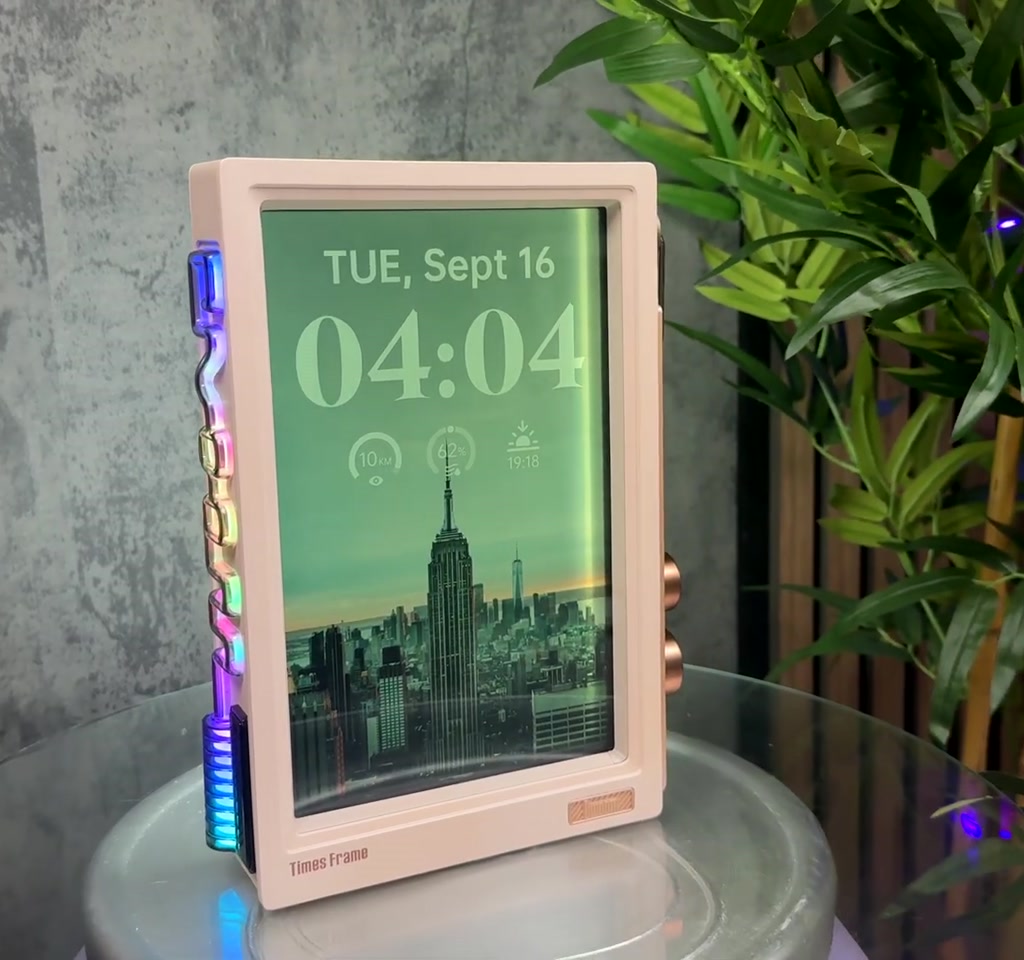
The Divoom Times Frame is a small smart frame designed for desks and shelves that supports images, video, pixel art and live widgets. It pairs a 10.1-inch 1080p IPS display with a backlight halo, 64 GB of onboard storage and a companion app to manage content and community designs.
Direct Answer: The Times Frame is a compact smart display that blends pixel art, widgets and ambient lighting to act as both decor and a productivity surface. It offers local storage, a library of community art and live content fed by over 50 supported APIs.
How The Times Frame Works
Display Technology And Physical Controls
The unit uses a semi-transparent 10.1-inch IPS panel with 1080p resolution and an open light box on the back to create an illuminated halo effect. A rotary knob on the side provides tactile control for quick adjustments without the phone.
Companion App And Content Management
The companion app is the customization hub: upload photos, arrange widgets, install clock faces and share access so others can send content to the frame. Most deep customization happens inside that app rather than on the device itself.
Direct Answer: The Times Frame operates through the device display, a companion app and networked APIs. You upload or select pixel art, images or widgets in the app and the frame displays live or stored content. Networked widgets refresh via your home connection.
Features And Ecosystem
Pixel Art Community And Creative Tools
Divoom highlights a Pixel Arts Co Create community with a reported library of over 700,000 pixel art designs. The app includes simple editing tools so non-artists can adapt or remix community content for immediate use on the frame.
Widget Library And Live Data
The Times Frame offers more than 400 clock faces and supports over 50 external APIs to power widgets like weather, stock tickers, calendar reminders, Pomodoro timers and social counters. That mix of small utilities is central to its workflow value.
Benefits And Use Cases
The Times Frame brings atmosphere and small-task utility to desks, living rooms and creative spaces. Its combination of ambient light, customizable pixel art and live widgets can make a workspace feel curated while delivering quick glances of useful data.
Direct Answer: Benefits include a blend of decor and function, on-device local storage for tens of thousands of images, a large community library of pixel art, and widgets that provide glanceable information useful for home offices and creative desks.
Limitations And Practical Tradeoffs
Price Versus Commodity Frames
At a price a little over £150, the Times Frame sits above bargain digital frames under £50. The premium buys character, design and a richer ecosystem, but it is not aimed at buyers who only want a cheap slideshow.
Storage, Power And Network Dependence
The device includes 64 GB of storage. Depending on photo sizes, that equates to roughly 10,000 to 30,000 average smartphone images, while video files will use capacity faster. The frame is mains powered and meant to remain plugged in, and many widgets rely on network APIs so connectivity affects refresh speed.
Direct Answer: Expect tradeoffs: continuous mains power is required, local storage is finite at 64 GB, and many widgets depend on your home network. These choices favor a permanent ambient desktop role rather than portable use.
Divoom Times Frame Versus Traditional Digital Photo Frames
Display And Design Differences
Traditional digital photo frames often prioritize large storage and simple slideshows. The Times Frame prioritizes personality and live features, adding an ambient halo backlight and community pixel art instead of focusing solely on resolution or photo count.
Feature And Ecosystem Comparison
Compared to basic frames, the Times Frame adds a richer widget library, app-driven customization, and a social content ecosystem. If you value mood, interactivity and small utilities, those differences matter in real use.
Alternatives And Comparative Options
Smart Displays Versus The Times Frame
Large smart displays emphasize voice assistants and media playback. The Times Frame is not trying to replace a smart speaker or tablet. Its niche is ambient, tactile control and pixel-driven aesthetics combined with a set of small, glanceable widgets.
When To Choose A Simpler Digital Frame
If you only want a plug-and-play slideshow for holiday photos and minimal setup, a cheaper digital frame will deliver that with less cost and less configuration effort.
Setup, Privacy And Ongoing Use
Setup typically takes minutes to an hour depending on how deep you go into widget setup and community content. The app is free and Divoom does not lock core features behind a subscription, which reduces ongoing cost concerns. Any device that connects to APIs requires comfort with network permissions.
Who This Is For And Who This Is Not For
Who This Is For: People who want a small desktop display that doubles as decor and a utility surface, especially home office workers, creatives and anyone who values mood and glanceable data.
Who This Is Not For: Buyers who only want a cheap slideshow box, a battery portable picture frame, or who need a device focused on media playback and voice assistant features.
Final Summary And Recommendation
The Divoom Times Frame is not a conventional digital photo frame with apps bolted on; it is a personality engine for a desk that trades raw photo capacity for a curated mix of pixel art, widgets and ambient light. For those seeking mood and small productivity gains, it is worth a look.
FAQ
What Is The Divoom Times Frame?
The Times Frame is a compact smart frame with a 10.1-inch 1080p IPS display, 64 GB storage, pixel art support, and an app-driven widget ecosystem designed for desks and shelves.
How Much Storage Does The Times Frame Have?
The device includes 64 GB of onboard storage. Depending on photo sizes, that typically stores roughly 10,000 to 30,000 average smartphone images; video files will reduce that capacity faster.
Does The Times Frame Require A Subscription?
No. The companion app is free and core features are not locked behind a subscription according to the reviewed information.
Can The Times Frame Run Widgets Without The Network?
Some stored content works offline, but many live widgets depend on APIs and network connectivity. Networked widgets refresh via your home connection and can experience occasional lag.
Is The Times Frame Battery-Powered Or Portable?
The Times Frame is designed for continuous mains operation. It is not a battery portable gadget and is best suited for permanent placement on a desk or shelf.
How Big Is The Display And What Resolution Does It Use?
The display is 10.1 inches and uses a 1080p IPS panel with a semi-transparent finish and a backlight halo for ambient lighting effects.
How Large Is The Pixel Art Library?
Divoom reports a Pixel Arts Co Create community with a library of over 700,000 pixel art designs available for remixing and use on the frame.
Does The Times Frame Support External APIs And Widgets?
Yes. The Times Frame supports more than 50 external APIs and includes a growing library of widgets, such as weather, clocks, timers and social counters.
COMMENTS