


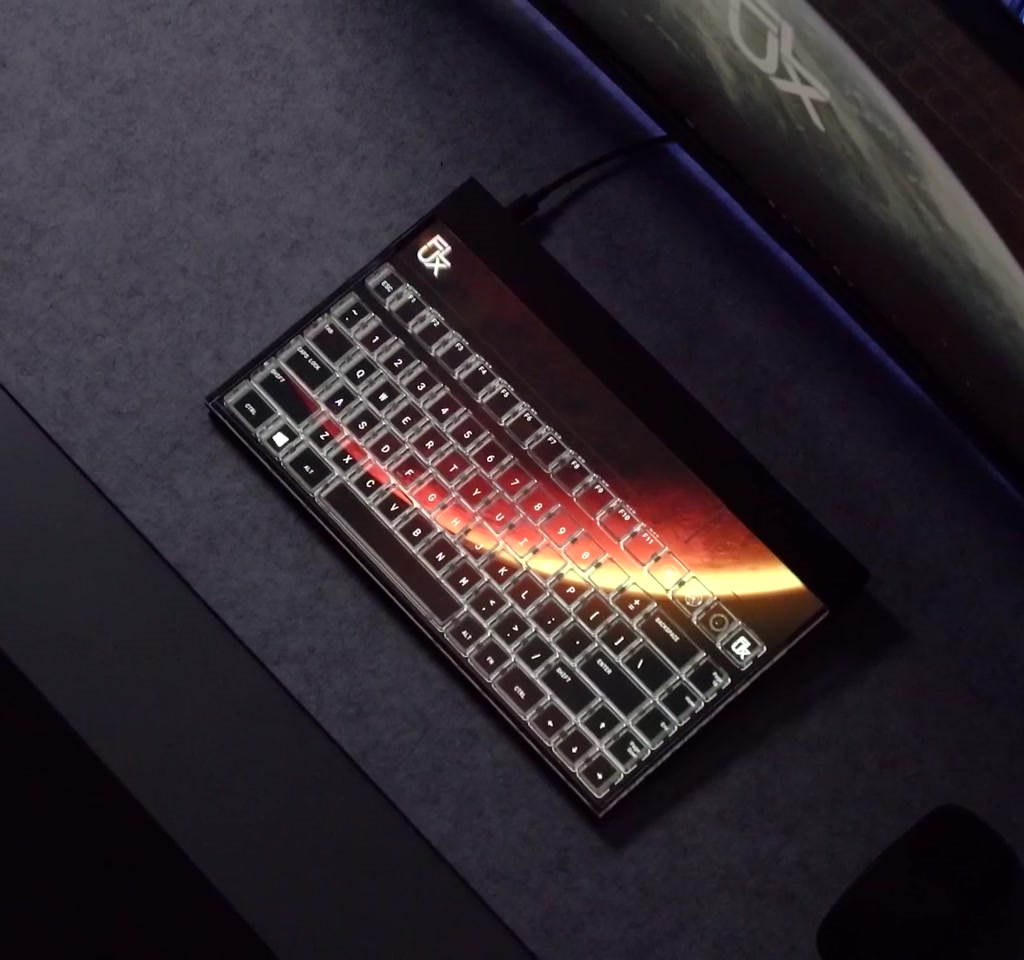
The Flux Keyboard announces itself as more than a peripheral. It blends a full HD display with transparent maglev key switches, modular keyframes, and accessory dials to turn a keyboard into a programmable, living interface. That combination is tempting because it reframes the keyboard from a fixed tool into a context-aware surface that changes with the software you use.
The real significance here is not the presence of a screen but the idea that a primary input device can surface the exact controls you need, when you need them. What becomes useful is the keyboard acting as a real-time extension of the application, showing shortcuts, macros, and interactive visuals without forcing the user to look away from their workflow.
Most people misunderstand this as a simple aesthetic upgrade. What actually determines whether it matters is workflow density and willingness to accept two concrete tradeoffs: cost and power. This only becomes interesting when users need frequent context switching across apps and when they are willing to invest time to customize profiles and modules.
What the Flux Keyboard promises is a collision of mechanical tactility and display-driven adaptability. The company positions it as a next interface paradigm, pairing adjustable actuation maglev switches, a modular keyframe system that swaps between tactile and linear layouts instantly, and up to four add-on modules for dials and extra keys.
At its core, the Flux Keyboard tries to solve a recurring tension: keyboards are fast and tactile, while touchscreens are dynamic and contextual. The product keeps the mechanical feel that many users rely on while allowing the surface above the switches to change visually and functionally. The embedded processor drives a full HD display so the keys can show app-specific shortcuts, language layouts, or animated backgrounds.
What The Flux Keyboard Is And How It Works
The Flux Keyboard is a hybrid input device that combines a full HD display with transparent keys, maglev switches, and modular hardware slots. Its onboard processor drives the display and can switch visual profiles based on active software, allowing keys to show context-sensitive shortcuts, macros, and layouts without heavy desktop dependencies.
Definition And Core Components
Essentially, the Flux Keyboard is a programmable keyboard with an integrated display, replaceable keyframes, adjustable maglev actuation, and up to four expansion modules such as dials or extra key clusters. The design prioritizes visual feedback and physical controls that map to software tasks in real time.
How The Flux Keyboard Reimagines Input
The display is described as automatically switching profiles based on the active software. In practice that means the keyboard can present context-sensitive macros and shortcuts for creative tools, development environments, or games. Because the display is driven by an onboard processor, it is positioned as broadly compatible with different host systems rather than requiring heavy desktop software.
A Display That Speaks Software
The display functions as an always-visible layer of UI that maps commands to physical keys. Instead of guessing which modifier or shortcut applies, the keyboard shows what’s available for the current application. This reduces the mental cost of context switching and keeps hands near primary controls.
Transparent Maglev Switches And Modularity
The keys are transparent so the display remains visible, and the switches are maglev style with adjustable actuation. The modular keyframe idea allows swapping key modules for different finger feel: tactile profiles for typing and linear profiles for gaming. The keyframes are claimed to be instantly swappable, which reframes a keyboard as a platform that can be reconfigured on the fly rather than a single fixed device.
The Modules, Dials, And The Promise Of Context
The Flux Keyboard includes modular add-ons that extend the input vocabulary. A machined aluminium side dial and transparent rocker switch aim to provide precise continuous control. There are triple dial modules for mixing and fine adjustments and triple key modules for immediate access to frequently used functions.
Side Dial And Triple Modules
These physical controls map naturally to tasks such as volume, brush size, or timeline scrubbing. Multiple dials allow parallel control over several variables without deep menu navigation, which is particularly useful in creative workflows that juggle many small adjustments.
Up To Four Expandable Slots
Allowing up to four modules creates flexibility but also introduces tradeoffs: each module increases cost, weight, and desk footprint. This modularity is compelling for users who will actively use multiple hardware controls and less so for those who prefer a minimal setup.
Benefits And Practical Advantages
When it works as intended, the Flux Keyboard reduces hunting for shortcuts, condenses multi-device workflows, and provides tactile knobs for continuous parameters. For professionals who pivot between applications or who require multiple simultaneous controls, having dedicated hardware that mirrors software context is a clear productivity win.
Why The Display Matters
Visible, app-aware key labels and onscreen widgets remove ambiguity from complex command sets. That clarity can speed decision-making and reduce interrupt-driven errors, especially in fast-paced creative or development sessions where every second of attention counts.
Constraints And Tradeoffs To Consider
There are two obvious constraints that determine real-world usefulness. First, cost. A product that combines a full HD display, maglev switches, machined aluminium body, and modular hardware tends to sit in the higher price bands of peripherals. Expect costs to scale into the hundreds rather than the tens of dollars for a device of this complexity.
Second, power and thermal behavior. A keyboard with an active full HD display and an embedded processor will draw noticeably more energy than a traditional mechanical keyboard. In rough terms, the power profile shifts from the low milliwatt range of passive USB keyboards to the single-digit watts that small displays and processors commonly consume while active. That matters because continuous display use will register on a desktop power budget and will limit options for wireless battery-powered operation without larger batteries or compromises.
Configuration Friction And Software Integration
Customization is not instant. Building useful profiles, assigning macros, and tuning actuation and dial mappings typically requires hours of setup. The onboard processor claims broad compatibility, but the smoothest integrations often depend on companion drivers or apps, which add maintenance and update cycles.
Flux Keyboard Vs Traditional Keyboards And Controllers
Compared to fixed-layout mechanical keyboards, the Flux Keyboard trades simplicity for adaptability. Against touchscreens and standalone controllers, it offers tactile feedback and persistent physical controls mapped to software. The comparison pivots on priorities: raw reliability and low maintenance versus contextual flexibility and upfront setup time.
Flux Keyboard Vs Mechanical Keyboards
Traditional mechanical keyboards prioritize longevity, predictable feel, and low power draw. The Flux Keyboard introduces visual and modular complexity that can speed workflows but demands higher cost and power. For users who prize plug-and-play reliability, a classic mechanical keyboard remains hard to beat.
Flux Keyboard Vs Programmable Controllers
Compared to decks and external controllers, the Flux Keyboard centralizes function into a single hub that stays under the hands. External controllers keep layout and power separate, often at lower cost, but require the user to divide attention between devices. The Flux model reduces device switching at the expense of a single, more complex device to manage.
The Bigger Picture For Interfaces
The Flux Keyboard is more than a peripheral. It is a signal that interface design is moving toward dynamic hardware surfaces that reframe physical controls as software-defined. That shift creates design patterns where tools are no longer static collections of buttons but programmable ecosystems that reveal themselves under different contexts.
What becomes clear when you look closer is that these devices ask more of users. They demand configuration literacy and a willingness to tune. The payoff is higher efficiency during intense workflows because the machine presents the right controls at the right time. For complex applications that frequently require different command sets the keyboard becomes a direct extension of the software instead of a distant companion.
Design Tradeoffs And Where This Fits
The Flux Keyboard sits at the intersection of several design tensions. It trades the absolute simplicity and reliability of a fixed key layout for adaptability. That tradeoff appears when a person must decide between a low-maintenance keyboard that just works and a configurable surface that rewards upfront setup with workflow gains.
Configuration is a measurable friction. Customizing profiles, arranging modules, and assigning macros are not instantaneous. A realistic deployment will often require one to several hours to build a productive set of profiles and to fine-tune actuation and dial mappings. That time investment is part of the product cost and will determine whether it truly accelerates work or becomes a novelty device.
Who This Is For And Who This Is Not For
Who This Is For: Creatives, video editors, DAW users, developers who switch between heavy toolsets, and power users who value on-hand tactile controls and are willing to invest in setup and cost. Wired workstation users who prioritize desktop power and stability will get the most benefit.
Who This Is Not For: Casual typists, minimalists, and those who prefer low-maintenance peripherals or strict portability. Users who need long battery life or expect immediate plug-and-play simplicity without configuration should consider traditional mechanical keyboards or separate controllers.
Open Questions And Adoption Tensions
Two open tensions remain: whether enough workflows truly require an adaptive keyboard to justify its higher price, and how the industry will handle profile standardization, module ecosystems, and power profiles. These questions influence whether the Flux Keyboard becomes a niche tool or the start of a broader shift.
Adoption will depend on ecosystem moves such as shared profile libraries, robust driver support, and module pricing that keeps the entry barrier reasonable. Until those patterns emerge, the Flux Keyboard reads as a credible experiment rather than an inevitable replacement.
FAQ
What Is The Flux Keyboard?
The Flux Keyboard combines a full HD display, transparent maglev switches, modular keyframes, and up to four expansion modules to create a context-aware, programmable keyboard surface.
How Does The Display Work?
An onboard processor drives the full HD display and is described as switching profiles based on active software. That design aims to show app-specific shortcuts, language layouts, and animated visuals without heavy desktop software.
Is The Flux Keyboard Wireless?
The article does not confirm a wireless model. It does note that the added power draw from an active display and processor makes battery-powered operation more challenging without larger batteries or compromises.
How Much Power Does The Flux Keyboard Use?
The piece notes a shift from low milliwatt passive keyboard profiles to single-digit watts for small displays and processors while active, which is materially higher than typical wired mechanical keyboards.
Can You Swap Keyframes And Modules?
Yes. The keyboard uses modular keyframes and up to four add-on slots. Keyframes are claimed to be instantly swappable between tactile and linear profiles, and modules include dials and extra key clusters.
Does It Require Companion Software?
The onboard processor is positioned for broad compatibility, but the article cautions that the smoothest experience in similar systems often benefits from dedicated drivers or companion apps. A definitive statement about required software is not provided.
Is It Worth The Cost?
That depends on workflow density, willingness to invest time in configuration, and tolerance for the power and cost tradeoffs. For users who gain measurable efficiency through context-aware controls, the investment can pay off; for others it may feel unnecessary.
How Many Modules Can It Support?
The design allows up to four expandable modules, which increases flexibility but also adds cost, weight, and desk footprint.
For more context and demos, see material and demonstrations from the team behind the product to evaluate compatibility and module pricing for your needs.
COMMENTS