


The Quest 3 arrived as a gaming-first device, but what becomes clear when you look closer is that it quietly maps real life into shared presence. Owners who treat it only as a library of action titles are missing entire categories of experience where presence, scale, and social connection matter more than high scores.
This article reveals the non-gaming features that change what a VR headset can be: room scans that let you meet friends inside a copy of your living room, photogrammetry travel that places you at the rim of the Grand Canyon, live arena concerts that put you beside the drummer, and cinema systems that let distant friends share a single streaming session. The real significance here is not novelty. It is how Quest 3 turns ordinary media and ordinary spaces into something that feels physically present.
Most people assume the constraints are purely technical and that the headset is only for games. What actually determines whether these features are thrilling or frustrating is a mix of content availability, bandwidth, and the environmental conditions where you use the headset. That conditionality is the thread that runs through every non-gaming use case.
Below are five clusters of experiences that demand attention, each with the tradeoffs and limits that shape whether they will work for you. Expect to find specific practical detail, not slogans. The detail most people miss is that a headset is only half the equation; the experience depends on place, network, and the formats creators choose to deliver.
What Quest 3 Presence Features Mean
Presence features on Quest 3 are experiences that recreate real scale, spatial cues, and social proximity so users feel physically co-located with people or places. These features include room scans, photogrammetry travel, immersive concert captures, and shared viewing systems that emphasize bodily cues and environmental fidelity over traditional flat-screen viewing.
Hyperscape And Scanning Your Room
Hyperscape is a suite of highly realistic scans, including demo locations and a toolset that allows Quest 3 and 3s owners to scan a physical room and then step into that scan. The result can be surreal: two people in different cities can meet inside a shared digital twin of one person’s living room and feel like they are literally standing in the same space.
What makes Hyperscape interesting is presence. Unlike a 360 video or a rendered scene, the scan is a direct capture of a real-world place. When the scan is accurate the brain treats familiar scale and object placement as cues for spatial presence, and that amplifies social interactions.
How The Scans Work And What To Expect
Scans rely on spatial mapping and photogrammetry-style captures done by the headset’s cameras. They tend to be most reliable in well-lit, clutter-managed rooms and typically focus on single-room scans rather than whole-house captures. Rooms with consistent lighting and without heavy reflective surfaces produce the cleanest results.
Practical Scan Setup And Time Investment
Constraint 1, quantified: scan reliability and visual fidelity drop with dim lighting and tight spaces, which means photographers and casual users will often need to invest a short preparation window of 10 to 30 minutes to clear and light a room for the best outcome. The tradeoff is immediate: a cleaner scan takes more time to prepare but yields a far stronger sense of presence.
Social And Privacy Tradeoffs
Inviting friends into a scan is compelling, but it also raises practical limits. Sharing a scan depends on accounts, permissions, and sometimes app-specific restrictions. The experience is most seamless when both parties use the same app versions and maintain fast, low-latency connections. In certain cases hosts may need to explicitly grant access, which inserts friction but is necessary for privacy control.
How Photogrammetry And Travel Scenes Work
Photogrammetry captures build 3D spaces from many photographs to reproduce depth, texture, and parallax with high fidelity. On Quest 3 these scenes let you move through photo-real environments where scale and atmospheric detail deliver convincing cues that the brain uses to infer real presence.
Brink Traveler And Location Capture
Brink Traveler represents a different angle on realism. The developers travel to real sites, capture high-resolution footage and photogrammetry, and stitch those captures into environments you can walk through on Quest 3. These are not simple panoramas; they are photo-real spaces where scale, texture, and atmospheric cues are preserved to a degree that fools the senses into thinking you are there.
Production Costs And File Size Tradeoffs
What becomes obvious when you sample multiple locations is how format choice drives immersion. Photogrammetry scenes that include depth, parallax, and high-resolution textures avoid the flatness of stitched panoramas. They tend to be expensive to produce and so many of the most convincing scenes are offered behind a paywall, while app updates and new locales may be free once purchased.
Constraint 2, quantified: high fidelity photogrammetry content typically sits in a pricing band of tens of dollars per premium experience, and file sizes can run into multiple gigabytes. That means device storage and download time are practical limits for users who want to build a library of several locations.
Live Events, Concerts, And TV In VR
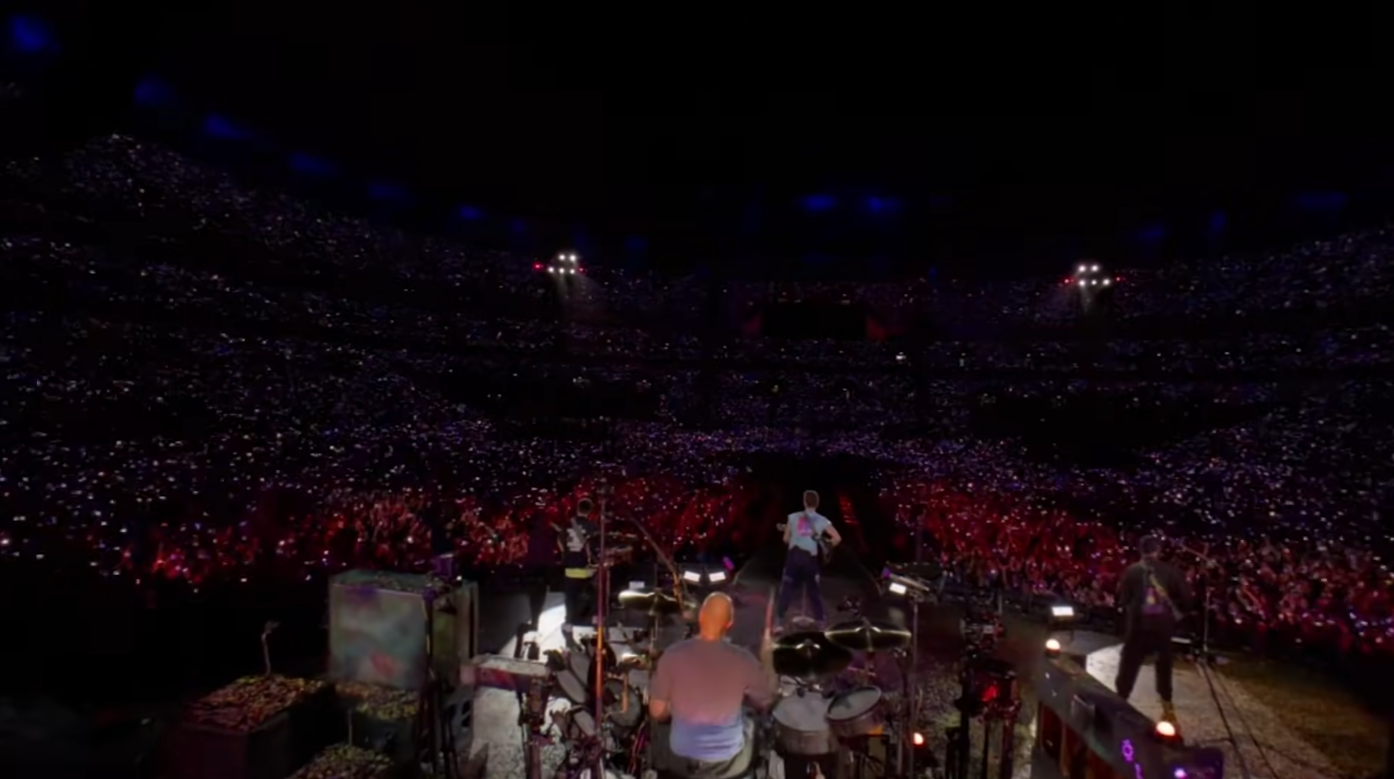
Watching a concert in VR is no longer a novelty. Quest 3 supports multiple delivery channels for live and recorded events, including Meta’s TV app lineup where major productions and concerts are presented in 3D or immersive 180 and 360 formats. The sensation differs by format: sitting in a 3D capture can place you beside performers, while a 360 edit tends to reproduce crowd energy.
Event Windows And Scarcity
Some events are time-limited. For example, certain concerts have been offered only for a fixed window, creating event-like scarcity. Time-limited availability changes the psychology of the experience; it produces shared real-time viewing that feels more like attending a live event than watching a permanent stream.
Bandwidth, Resolution, And Playback Quality
Practical constraint: streaming high-resolution concert content is bandwidth sensitive. Many of the best concert captures are delivered in 8K source formats, so the experience is optimized when the headset can access a broadband connection. Expect the difference between a home fiber or fast Wi-Fi connection and a congested mobile hotspot to be noticeable.
Documentaries, 3D Nature, And Scale
Beyond pop concerts, the catalogue includes documentaries and extreme sports captures. These often leverage 3D and 8K uploads to create realistic altitude and speed cues. The payoff is visceral: aerial footage and mountain climbs translate into a convincing sensation of height because the depth cues hold up across visual focus and head movement.
Watching Movies And Shared Screens In VR
The Quest 3 really changes the social TV model. Fluid XR and Bigscreen VR enable people to sign into or stream content and sit together in virtual living rooms or cinemas. Fluid XR stands out because it can proxy a host’s streaming session so a friend can watch without logging into the same subscription service. That simplicity is a social multiplier.
Fluid XR, Game Streaming, And Controller Visualization
Fluid XR also supports flat game streaming. Players can stream Xbox Game Pass or GeForce Now titles to a massive virtual screen and allow friends to watch. The platform even skins virtual controllers so viewers see reactive inputs, which reduces cognitive dissonance when watching someone otherwise invisible controlling a game.
Latency Needs For Shared Viewing
Constraint 3, quantified: interactive streaming experiences are latency sensitive. For console and cloud gaming to feel good over Fluid XR, the session generally benefits from broadband with bandwidth in the tens of megabits per second and latency under 50 to 100 milliseconds where possible. Lower speeds and higher latency shift games from responsive to sluggish, which is why network quality often determines whether the session feels like shared couch play or a remote spectating session.
Shared Cinema Social Tradeoffs
Shared viewing provides social presence but also new etiquette. If one person controls playback, the other is dependent on their connection and account. That simplifies access but concentrates responsibility, which can be convenient or frustrating depending on who is hosting. The tradeoff is real: effortless joining versus distributed control.
Games, Movement, And Where The Headset Still Shines
It should not be forgotten that Quest 3 is engineered for games. Titles such as fast-paced movement games combine precise tracking and a responsive controller system to create momentum-driven combat and parkour-style locomotion. These games showcase the hardware’s low-latency tracking and haptics in their most demanding form.
Embodied Interaction And Sandbox Play
That said, the headset’s appeal is broader than AAA launches. Sandbox experiences, physics-driven hubs, and physically intense action pieces demonstrate that games in VR are not only about visuals but about embodied interaction.
Comfort, Battery, And Session Planning
Constraint 4, quantified: physically active play sessions tend to be measured in blocks of 20 to 60 minutes for most users before comfort and sweat become factors. Battery life and headset heat become practical limits during extended play. For long sessions, users typically plan short breaks or external battery solutions, which shifts the session from continuous use to segmented play.
Limitations And Practical Constraints Of Presence Modes
Presence-driven features demand more than a headset: consistent lighting, storage headroom, and stable networks. Where those conditions fail, the illusion fractures into glitches, long downloads, and awkward social handoffs. That gap between potential and reality is the central limitation most owners discover within their first few sessions.
Network Quality And Home Infrastructure
High-resolution streaming and synchronized social sessions are bandwidth sensitive. A strong home network materially improves concert, streaming, and shared-play experiences, while congested or mobile networks reduce fidelity and increase latency. Network planning is therefore an essential part of the user equation.
File Sizes, Updates, And Device Storage
Photogrammetry and 8K captures require substantial storage and time to download. Managing space on the device and choosing which locations to keep becomes part of the practice of ownership, especially for users who want several premium locations installed simultaneously.
Quest 3 Versus Alternatives
Comparisons matter when you are choosing a platform for presence rather than raw graphics power. Quest 3 competes on integrated scanning, an accessible app ecosystem, and a standalone form factor. Alternatives may offer tethered PC fidelity, lighter weight, or different sharing mechanics; the right choice depends on whether you prioritize convenience or maximum visual fidelity.
Quest 3 Compared To Tethered VR Headsets
Tethered headsets can push higher graphical fidelity and accept larger data pipelines, making them attractive for the most photoreal captures. Quest 3 sacrifices some peak fidelity for portability and simplicity, which often wins when social convenience or casual use dominates the decision.
Quest 3 Compared To Lightweight AR Glasses
Lightweight AR glasses prioritize day-to-day augmentation rather than immersive presence. If your goal is to overlay information in real-world tasks, AR glasses are the better choice. If the goal is shared presence in recreated spaces or attending virtual events, Quest 3 remains the stronger option.
Who This Is For And Who This Is Not For
Who This Is For: Users who value social presence, have reliable home networks, and can allocate a spare room or quiet space for better scans. Creative professionals and enthusiasts who want photogrammetry travel, shared cinemas, or live VR concerts will find the headset’s mix of features compelling.
Who This Is Not For: People with limited bandwidth, cramped or highly reflective living spaces, or those who prefer plug-and-play streaming without setup. If you need maximum graphical fidelity for PC VR or daily lightweight AR overlays, consider alternatives before investing in presence-driven use cases.
FAQ
What Is Hyperscape On Quest 3?
Hyperscape is a suite of realistic room and location scans that lets Quest 3 users capture and enter photogrammetry-based digital twins of real spaces, enabling shared presence experiences between remote participants.
How Do Room Scans Work On Quest 3?
Room scans use the headset’s cameras and spatial mapping combined with photogrammetry techniques to capture depth and texture. Scans are most reliable in well-lit, decluttered single-room settings.
Is Watching Concerts In VR Better Than Video?
VR concert captures offer stronger spatial and scale cues than flat video, especially in 3D or immersive 180/360 formats. The experience depends heavily on bandwidth and the capture format used.
Can You Share Streaming Sessions Without Multiple Logins?
Yes. Platforms like Fluid XR can proxy a host’s streaming session so friends can join without logging into the same subscription, simplifying shared viewing at the cost of centralized control.
Does Photogrammetry Content Cost More And Take Space?
High-fidelity photogrammetry is often premium content, typically priced in the tens of dollars for standout locations, and can require multiple gigabytes of storage per scene.
What Network Speed Do I Need For Smooth VR Concerts Or Cloud Gaming?
Effective sessions generally benefit from broadband with speeds in the tens of megabits per second and latency under 50 to 100 milliseconds. Slower or higher-latency connections will reduce quality.
How Long Can You Play Actively Before Comfort Issues Arise?
Physically active VR sessions commonly run 20 to 60 minutes before comfort, sweat, or battery limits prompt a break. Many users plan segmented play or external battery options for longer use.
Will These Presence Features Become Mainstream?
That remains an open question. Adoption will hinge on creators, networks, and consumers accepting the preparation costs presence demands, such as improved lighting, storage, and higher bandwidth. The trend is promising but not guaranteed.
The Quest 3 is not a single-purpose device. It is a platform where scanning, photogrammetry, live capture, and social streaming collide. The edges where these ideas meet are where the most surprising experiences live, and those edges are defined by networks, file sizes, lighting, and social habits as much as by software.
Expect these non-gaming features to evolve quickly. As creators experiment with event windows, higher fidelity captures, and simpler sharing models, the headset will become less a gaming console and more a social and experiential appliance. The question that remains open is how mainstream audiences will adapt their living rooms and bandwidth to match the promise of presence.
The future worth watching is not whether VR games get prettier, but whether these presence-driven formats become ordinary parts of how people meet, watch, and travel together.
COMMENTS