


The most interesting part of this build is not the gadgetry, it is the idea that an older Android handheld can be repurposed into a compact, functional workstation with a few cheap parts and a little plastic. That is the observation ETA Prime documents while converting a Razer Edge into a palm-sized cyberdeck. What this reveals is a practical path for anyone with a spare device to turn it into a flexible, magnetic pocket rig for gaming, emulation, and light productivity.
This article explains what makes that possible, where the real tradeoffs sit, and how small design choices determine whether the project is a novelty or a useful daily carry. The early signal matters: the build works because of ecosystem leverage, not because the Razer Edge is a modern flagship.
Two practical constraints shape everything that follows, and they are both clearly visible from the start. One is software, namely the Razer Edge shipping with Android 12, which limits built in terminal and Linux integration that newer Android versions offer. The other is raw performance, the Snapdragon G3X Gen1 chipset and 6 or 8 gigabyte RAM ceiling, which sets expectations for local emulation and native PC workloads.
The part that changes how this should be understood is this. The project succeeds when cloud gaming, clever mounting, and 3D printed ergonomics carry the load. It becomes fragile when you expect flagship-level local emulation or seamless Linux installs without extra work.
In short, the Razer Edge Cyberdeck is a brilliant example of composition: accessible hardware, off-the-shelf accessories, and a community design file combine to produce something more than the sum of its parts.
Below is a close look at the parts, assembly choices, and practical performance limits. Along the way there are concrete tradeoffs, approximate numeric context, and actionable considerations for anyone thinking about the same route.
The Parts And Why They Matter
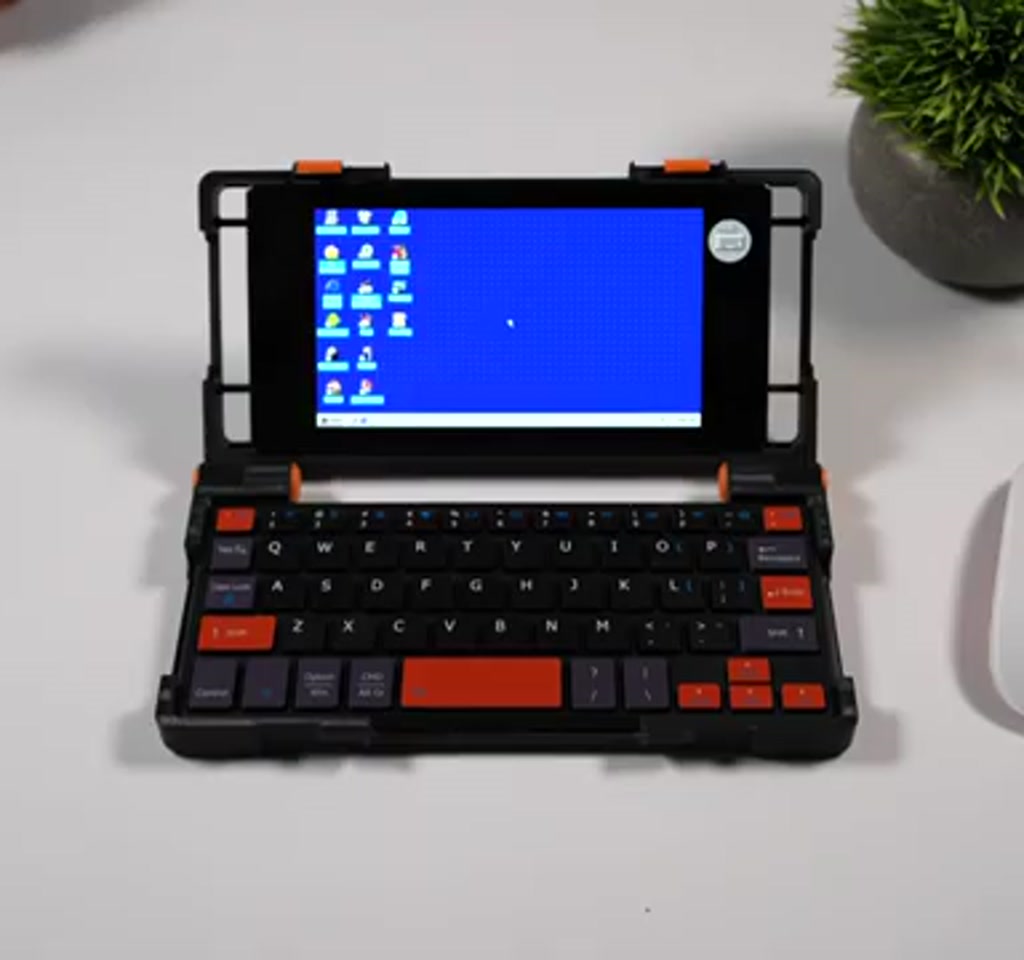
A Razer Edge Cyberdeck is assembled from three practical building blocks: a low-cost Razer Edge handheld, a compact Bluetooth keyboard, and a 3D printed clamshell paired with a magnetic adapter. That combination emphasizes portability and modularity, shifting heavier workloads to cloud services while preserving short writing and local emulation use cases.
ETA Prime started with a Razer Edge, a handheld that shipped with a detachable controller and the Snapdragon G3X Gen1 chipset. At launch it was presented as a gaming handheld with cloud gaming in mind.
Today the same hardware has aged into a bargain if you can source one used. In the documented build the device was purchased on a marketplace for about $80 without the original controller.
That price point matters because it reframes the project. For under a hundred dollars for the core device you can add modest peripherals and a 3D printed shell and end up with a capable pocket workstation. The other components in the build are intentionally low-cost and easy to source.
Key components used in the build include:
- Bluetooth foldable keyboard, selected for compactness and color match. This class of keyboard typically costs in the low tens of dollars.
- A 3D printed clamshell case based on a palm top model by S. Gordienko on Printables. The base model was modified in Tinkercad to fit the larger Razer Edge screen. Printing requires modest filament and a few hours to complete depending on printer speed and layer height.
- An OSNAP MagSafe adapter, in this case a popsocket style magnet plus a small adhesive metal ring and sticky back metal plates. The metal plate packs used for attaching magnets often retail for around five dollars for several pieces.
Two explicit hardware constraints are present. The Razer Edge comes with either 6 gigabyte or 8 gigabyte RAM options. That RAM range defines the memory ceiling for everything from multitasking to emulator performance. Second, the G3X Gen1 chipset is not top of the line; it is capable, but it is a generation behind the highest performance mobile silicon. These are boundary conditions that determine where cloud gaming must pick up the slack and where local emulation will be feasible.
How The Clamshell Is Assembled And Magnetically Mounted
The magnetic interface and the hinge system are the mechanical heart of the project. A reliably centered magnet plus adjustable hinge torque turn a handful of printed parts into a satisfying pocket workstation that stays open or closed as you choose, and allows the handheld to be removed quickly when needed.
Hinge Design And Torque Adjustment
The 3D printed palm top is a clamshell that closes around a compact Bluetooth keyboard. ETA Prime modified the center cutout in Tinkercad to fit the larger Razer Edge, then printed hinge pins and sliders.
The hinge pins are secured with small screws so the user can torque them to the desired tension. That torque adjustment is a small but important ergonomic detail. Tighten them too much and the case becomes hard to open. Leave them too loose and it flaps when used on the move.
MagSafe Mounting And Compatibility
For magnetic mounting the build uses an OSNAP MagSafe adapter that adds a magnet to the back of the handheld via an adhesive metal ring. The corresponding metal plate is stuck to the inside of the 3D printed case. The result is a non-destructive magnetic interface that allows quick removal and insertion. That is the design decision that turns a glued in device into a flexible, multi-device platform.
Practical detail that matters: ETA Prime used a popsocket-style MagSafe part he had on hand, not because a popsocket is essential, but because the magnet and metal ring provide the mechanical interface. This shows there is room for improvisation; a thinner commercial MagSafe adapter exists and may be preferable for aesthetics, but the functional requirement is simply a magnet plus adhesive metal ring.
What The Razer Edge Cyberdeck Can Actually Do
The Razer Edge Cyberdeck is useful because it leverages cloud services and a broad Android app ecosystem to deliver functionality beyond what its local hardware can sustain. That means good portable productivity, solid cloud gaming, and a realistic—but limited—local emulation envelope.
Cloud Gaming Capabilities
Cloud gaming is where this composition shines. At release Razer positioned the Edge for cloud play, and the software improvements since then have made that pitch more robust. ETA Prime reports the device performs well with Steam Link and GeForce Now, and moonlight remains an alternative for users who prefer a particular streaming protocol.
The practical implication is clear: with a stable home network or low-latency internet, cloud services can deliver high-end gaming experiences to the cheap handheld, pushing the burden off local silicon.
Quantified context: latency and streaming quality will determine whether cloud gaming feels native or laggy. Expect the experience to be bandwidth sensitive. In practice a stable broadband connection in the double digit megabits per second range is necessary for smooth 720p to 1080p streaming at 60 frames per second. Higher resolution cloud streams require proportionally more bandwidth and a strong local Wi Fi link.
Emulation And Local Play Details
Local emulation is possible, but the performance envelope is bounded. ETA Prime demonstrates GameCube emulation at 720p, which works well for many titles, and PS2 emulation through the latest version of NeethersX2 produced playable results, for example running God of War 2 at 1.75X internal resolution with decent performance. ETA Prime notes that 1.5X may be the more consistent choice for that title, while easier PS2 games can scale to 3X or 4X internally.
For x86 PC games via Game Hub there is a mixed bag. Lightweight indie titles like Silk Song and Hades 2 run smoothly, but demanding modern PC games such as Cyberpunk 2077 are outside realistic expectations.
The guideline is simple: if the desktop version of a game is modest in CPU and GPU demand, the Razer Edge may emulate it at playable rates. Anything requiring a modern discrete GPU will not.
Tradeoffs And Constraints
Two constraints make or break the experience: software generation and raw performance. Android 12 limits seamless Linux and terminal integration, while the Snapdragon G3X Gen1 and 6 to 8 gigabyte RAM ceiling cap local emulation and multitasking. Those are visible tradeoffs you accept for the low cost and portability.
Software and Compatibility The Razer Edge ships with Android 12. That OS generation lacks some integrated capabilities of later Android releases, such as the built-in Linux terminal features that appear in Android 14 and 15. That means native Linux desktop installs and seamless terminal integration are not automatic.
ETA Prime reported getting a Linux desktop partially working via an application from Google Play, but the install required extra work and remains a work in progress. The takeaway is this only becomes compelling if you accept the installation and configuration work, or if you rely on Android apps and cloud services instead.
Performance and Power The Snapdragon G3X Gen1 and 6 to 8 gigabyte RAM ceiling establish a performance envelope for local workloads. Emulation scales to the limits of that envelope: GameCube and many PS2 games are achievable at playable frame rates with sensible internal resolution choices, but beyond that the utility drops quickly.
Battery is the other practical limiter. Heavy cloud gaming sessions or sustained local emulation tend to reduce handheld battery life into a range of hours, not a full day. A reasonable estimate is two to four hours under heavy load depending on screen brightness, networking, and what you run. For mixed productivity and lighter gaming the device can last longer, but battery will be the gating factor for extended mobile use without an external charger.
There are additional tradeoffs to weigh. The magnetic mount is convenient and non-destructive, but adds a small amount of thickness, and the adhesive metal plates are semi-permanent. The 3D printed case makes the whole thing compact, but printing and finishing require some hobbyist skill and time.
Finally, storage and app compatibility are determined by the device’s internal storage and Android 12 limitations, so plan on using cloud storage or micro SD expansion where available to avoid running out of space.
Design Details That Matter
The build shows how small mechanical choices change the experience. A clamshell that uses sliders to lock the case shut creates a satisfying tactile interface that keeps the handheld secure. Screwed hinge pins allow torque adjustment so the top holds itself open when desired. Those are the sorts of details that move a project from one night hack to a usable device.
Another practical detail: the keyboard chosen for the build was a compact Bluetooth model that fitted the case perfectly. That matters because keyboard ergonomics and travel determine whether the cyberdeck is genuinely productive for short writing tasks.
The same principle applies to the magnetic attachment. A slightly misaligned magnet will cause wobble. Centering the metal ring and magnet carefully prevents the handheld from shifting during use.
It also becomes clear that improvisation is part of the kit. ETA Prime used a popsocket-style MagSafe adapter he had available. The result works, but a purpose built thin MagSafe puck is a cleaner option. Those choices affect the final feel and portability, and they are where personal preference and budget shape the outcome.
Quotable
“The real significance here is not that a Razer Edge can run games, it is that accessible hardware plus simple mods make a true pocket workstation possible.”
Razer Edge Cyberdeck Vs Flagship Handhelds
The contrast is primarily about local performance and integration. Flagship handhelds offer superior silicon, more RAM, and newer Android builds that simplify Linux installs. The Razer Edge Cyberdeck sacrifices that headroom to achieve low cost, modularity, and community driven versatility—relying on cloud streaming to bridge the performance gap when necessary.
Razer Edge Cyberdeck Vs Laptops And Phones
Compared to a high-end laptop, the cyberdeck cannot replace heavy desktop workflows or demanding native PC gaming. Against modern phones, the difference is convenience of a clamshell keyboard and a dedicated layout for gaming and writing. The build wins on portability and price, while laptops and flagship phones retain clear advantages in raw power and software compatibility.
Beyond The Build And The Bigger Question
This project highlights a broader pattern in consumer technology: devices age into opportunity. When a product no longer commands a premium at retail, its remaining capabilities can be redirected into creative use cases. The Razer Edge Cyberdeck is an example of composability, where separate parts and community-created designs complement one another to produce new functionality.
That has ecosystem implications. A community around 3D printed shells, magnetic mounting hacks, and proven software workflows can turn a $80 purchase into a reliable travel rig. It also democratizes the cyberdeck idea. You do not need a bespoke manufactured device to get into pocket workstations. You need a willingness to tinker, a modest printer time investment, and a few dollars in adhesives and plates.
ETA Prime also leaves the door open. He mentions that if the Linux desktop experiment fully succeeds, it could apply to many other Android devices. That possibility points to another interesting threshold. This approach only works within a narrow software window when the device either supports modern Android features or when the builder is prepared to accept partial Linux installs and the troubleshooting they require.
For those interested in replicating the project, the 3D model used in the build is available on Printables from a user named S. Gordienko and offers phone inserts and a palm-top design that is adaptable. That listing is a sensible starting point for anyone who wants to 3D print the clamshell and experiment with their own handheld. The Printables homepage provides access to the community repository and the original Palm Top model.
For practical next steps, consider these checkpoints before you start: confirm your handheld has a MagSafe-compatible case or be ready to use adhesive metal plates, evaluate whether 6 or 8 gigabyte RAM will meet your use cases, and decide whether you will rely on cloud streaming for heavy gaming or aim for local emulation only.
The Razer Edge Cyberdeck is not a perfect replacement for a high-end laptop or a modern flagship handheld, and that boundary makes the project interesting rather than disappointing. It is a calculated repurposing where the constraints are visible and manageable. For people who value portability and flexibility over raw local performance, the composition is compelling.
If you want to explore the original Palm Top model and community variants, the Printables repository is a good place to start. The build documented by ETA Prime is a practical template, not the final word. Variations will change the balance between portability, durability, and aesthetics.
Expect more community iterations that refine the hinge system, reduce magnet thickness, and tailor the internal layout for different controllers. That iterative path is where these homegrown cyberdecks become more resilient and more useful for everyday carry.
Looking forward, the most interesting question is how many other discontinued or discounted handhelds will become the basis for similar pocket workstations. As cloud gaming and efficient app ecosystems evolve, the threshold for utility will shift. That means the Razer Edge Cyberdeck is both a snapshot of a current technique and a prototype for what happens when older hardware is given a second life through clever design and modest expense.
Who This Is For And Who This Is Not For
Who This Is For: Tinkerers, budget-minded travelers, and anyone who values portability and modularity over raw local performance. The build suits users willing to accept some setup work and occasional troubleshooting to gain a magnetic pocket workstation on the cheap.
Who This Is Not For: People who need flagship-level local emulation, sustained all-day battery life under heavy load, or a seamless, out-of-the-box Linux desktop experience. If you need a drop-in replacement for a high-end laptop or a current flagship handheld, look elsewhere.
FAQ
What Is A Razer Edge Cyberdeck?
It is a repurposed Razer Edge handheld combined with a 3D printed clamshell, a compact Bluetooth keyboard, and a MagSafe-style magnetic mount to create a pocketable workstation for cloud gaming, emulation, and light productivity.
How Do You Mount A Razer Edge With MagSafe?
The documented build uses an OSNAP MagSafe adapter with an adhesive metal ring attached to the Edge and a metal plate inside the 3D printed case. The magnet and plate provide a removable, non-destructive magnetic interface.
Can The Razer Edge Run Linux?
ETA Prime partially succeeded in getting a Linux desktop working via an app from Google Play, but the install required extra work and is not a seamless, guaranteed process on Android 12. Full compatibility may need newer Android features or further tinkering.
How Long Does The Battery Last Under Load?
Battery life varies, but under heavy cloud gaming or sustained emulation expect roughly two to four hours depending on brightness, networking, and workload. Mixed productivity sessions will last longer.
What Games Can The Razer Edge Emulate?
Console era emulation like GameCube at 720p and many PS2 titles are achievable with sensible internal resolution choices. Lightweight PC games can run via Game Hub, but demanding modern PC titles are outside realistic expectations without cloud rendering.
Is The Razer Edge Worth Repurposing?
For buyers who value low cost, portability, and modularity it is compelling. The project is most attractive when you accept tradeoffs around software, performance, and battery life.
Where Can I Find The 3D Model Used In The Build?
The base palm top model is available on Printables from a user named S. Gordienko. It includes phone inserts and a palm-top design that was adapted for the Razer Edge in the documented build.
Can I Use This Design With Other Handhelds Or Phones?
The magnetic mounting and clamshell concept are adaptable. ETA Prime notes you can swap in MagSafe-equipped phones like a Galaxy S25 Ultra, and the approach could apply to other Android devices if software and physical dimensions allow.
COMMENTS