


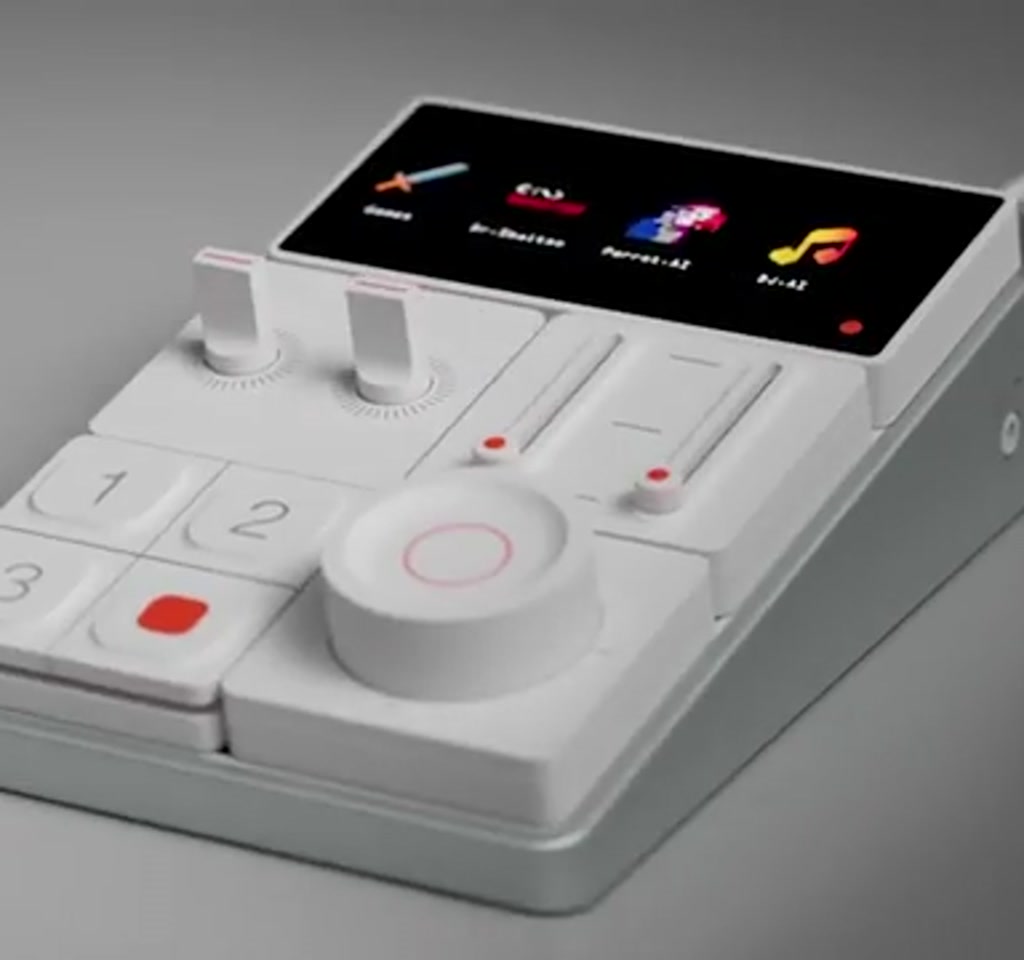
The Sound Blaster Re:Imagine is being presented as a new kind of desktop audio control center, one that treats audio routing, macro control, and even music generation as a single, reconfigurable system. That matters right now because desks are getting busier, workflows more multimodal, and creative setups more bespoke. The claim here is not just better sound, it is a different way of organizing how sound moves through a workspace.
The real significance is not modular panels or programmable buttons alone. What actually determines whether this matters is how much control you want to take back from software and hand to hardware.
By making the device modular and offering root-level hardware access, the creators are betting that enthusiasts will accept higher upfront and ongoing complexity in exchange for stronger, more personal control.
Most people will hear the headline features and imagine a plug-and-play Stream Deck replacement that also happens to be an audio interface. The part that changes how this should be understood is the tradeoff baked into modularity: flexibility scales with cost, configuration time, and maintenance. This piece will explain the promise, the conditions under which it works, and the clear boundaries that determine usefulness.
What Sound Blaster Re:Imagine Is Trying To Solve
At its core, the product aims to centralize every input and every output. That means microphones, game audio, music sources, conference calls, and speaker or headphone outputs all passing through a single hardware hub. The pitch is straightforward: instant switching and tactile control reduce friction in fast workflows.
Short Definition: The Sound Blaster Re:Imagine is a modular desktop audio hub that combines tactile controls, hardware-level routing, and programmable macros so users can assemble a custom control surface tailored to streaming, conferencing, or creative production. It prioritizes physical control and reconfigurability over an out-of-the-box, single-unit experience.
The creators position the unit as a building block system. Users are expected to assemble a layout that matches a desk, a role, or a show. That could be as simple as a row of mute buttons plus a volume encoder, or as complex as a matrix of I O modules and programmable macros that launch applications and trigger routines.
How Modularity Works And Why It Matters
Modularity here is not a cosmetic detail. It changes upgrade paths, repairability, and how the device integrates into an existing rig. Instead of buying a monolithic mixer or interface, the buyer can add or swap modules as needs evolve. That creates a different lifecycle for desktop audio gear.
Short Process Summary: Modules click together and communicate with a central hub so users can physically rearrange controls, add inputs or outputs, and extend functionality over time. This process trades a single purchase decision for an iterative build-and-tune workflow that grows with use.
Physical And Workflow Flexibility
Modules click together and are described as reconfigurable to match desk space and workflow. For people who alternate between streaming, pro audio, and office calls, that physical reordering of controls can be a meaningful time saver. What becomes obvious when you look closer is how ergonomics becomes a feature of configuration, not an afterthought of a fixed product.
Software Integration And Extensibility
The company promises programmable macros and an AI-powered DJ to generate music themes. That suggests a software layer that can route signals, call system functions, and automate actions across applications. The result is closer to a mini ecosystem than a simple audio interface.
Tension Point: Promising deep software integration raises questions about how much configuration belongs to the company and how much is left to the community. That balance affects stability, documentation quality, and how friendly the setup process feels for mainstream users.
The Benefits Of Modular Desktop Audio
Modular systems let you match hardware to a task instead of forcing compromises. Benefits include tailored ergonomics, targeted feature purchases, upgradeable components, and the possibility of community-made modules that add niche functions without bloating a base unit.
Short Benefit Summary: For streamers, creators, and hobbyists, modular audio promises faster workflow moments, fewer on-screen menus to navigate, and the ability to evolve a control surface as demands change.
The Tradeoffs That Define Its Usefulness
Any system that hands power back to users introduces explicit tradeoffs. Three constraints stand out as decisive in practice: cost scaling, configuration complexity, and system performance limits.
Cost Scales With Customization
Modularity shifts spending from a single purchase to a build process. Expect costs to scale into the hundreds rather than remain in the tens as modules accumulate.
A minimal configuration might be accessible for a modest outlay, but a full, multi-module setup that replaces both a mixer and a macro pad will likely move the price into a midrange or premium bracket.
This matters because the perceived value depends on how many modules you actually need. If only two or three modules solve 80 percent of your problems, the system looks like a bargain. If you need five to eight modules to reach parity with a dedicated mixer plus a macro pad, the math changes fast.
Complexity And The Learning Curve
Offering super user root access is a double-edged sword. On the positive side, it enables deep customization, community-driven mods, and advanced routing that software often locks down. The tradeoff appears when setup and troubleshooting require comfort with firmware, drivers, or command-line tools. Users should expect initial configuration and occasional maintenance to take hours rather than minutes.
Support is another practical boundary. When hardware allows rooting, warranty and official support paths become conditional. That is not inherently bad, but it does mean that the target user is someone who tolerates tinkering and values control over turnkey convenience.
Performance Constraints And Latency Considerations
Routing audio through layered hardware and software introduces measurable latency. In typical USB and DSP-based systems, latency often falls in the single-digit to low double-digit milliseconds range depending on buffer settings and processing load. For conferencing and gaming this is usually acceptable, but for tight live monitoring workflows it becomes a limiting factor.
Power draw also grows as modules are added. Each module will add incremental consumption, and a fully built system can move from single-digit wattage into the low tens of watts when driving many active components. That has implications for bus-powered setups and for users who expect micro power footprints on portable desks.
Technical Risks And Opportunities
Giving users root access opens a door to creativity and to risk. On the opportunity side, third-party developers and hobbyists can extend functionality, add community modules, and produce custom firmware. That can create an ecosystem similar to what happened with mod-friendly MIDI controllers.
Tension Point: The same openness that breeds creativity can also create fragmentation and instability. Firmware flaws or poorly written integrations can introduce audio glitches or driver conflicts. The company will need to provide clear documentation, curated stores, or certification paths to prevent a fractured experience.
Sound Blaster Re:Imagine Vs Traditional Mixers And Macro Pads
Comparison Summary: Compared to a traditional mixer, the modular hub emphasizes reconfigurability and physical macro control rather than fixed channel strips and analog signal paths. Compared to a macro pad, it adds native audio I O and routing. Real-world choice depends on whether you value modular growth and hardware-level routing more than immediate, out-of-the-box simplicity.
When A Mixer Makes More Sense
If you need high channel counts, tactile faders, and predictable latency for live mixing, a dedicated mixer or audio interface often gives a simpler path to reliable performance.
When A Macro Pad Makes More Sense
If your primary need is application shortcuts and scene switching with minimal audio re-routing, a Stream Deck-style macro pad plus a compact audio interface may be cheaper and faster to deploy.
How This Fits Into A Broader Desktop Control Trend
There is a broader shift toward making the desktop more physical and programmable. Consumers moved from software mixers to hardware controllers because tactile interfaces reduce cognitive load. The Sound Blaster Re:Imagine is a continuation of that trend with an emphasis on modular building blocks and deep access.
It also echoes developments in adjacent fields, from custom mechanical keyboards to modular synthesizers. Those communities show how vibrant ecosystems form when users can repair, replace, and reconfigure hardware.
The key difference here is the intersection with mainstream audio, which raises expectations for latency, driver support, and cross-platform stability.
Near-Term Success Metrics And What To Watch
Near term, the success of the product will be measured less by raw specs and more by the quality of the configuration experience, the clarity of documentation, and the balance the company strikes between power and safety. Those are the levers that convert an intriguing prototype into a useful tool.
What to Watch: early community modules, official firmware update cadence, and how the company handles certification or approvals for third party additions. Those signals will indicate whether modular audio becomes approachable or remains a niche for tinkerers.
Who This Is For And Who This Is Not For
Who This Is For: Power users who prize tactile audio control, streamers and content creators who want programmable macros tied to audio routing, and hobbyists who enjoy modifying hardware and building bespoke setups.
Who This Is Not For: Users who want a simple, plug-and-play mixer or low-maintenance audio interface; anyone who cannot tolerate periodic configuration, firmware updates, or potential troubleshooting when using community modules.
FAQ
What Is Sound Blaster Re:Imagine?
It is a modular desktop audio hub designed to centralize inputs and outputs, provide tactile controls, and enable programmable macros and routing. It emphasizes reconfigurability and hardware-level access over a single monolithic product.
How Does The Modular System Work?
Modules physically attach and communicate with a central hub. Users assemble a custom layout and use software to map audio routes and macros. Exact connection and module types are determined by the vendor’s implementation.
What Are The Main Benefits Of Modular Desktop Audio?
Benefits include tailored ergonomics, upgradeability, targeted spending on needed features, and potentially richer automation through macros tied directly to hardware controls.
What Are The Tradeoffs Of Choosing A Modular Audio Hub?
Tradeoffs include higher total cost as modules accumulate, longer setup and troubleshooting times, potential warranty or support complexities when rooting is allowed, and increased power draw and latency with more modules active.
Is It Suitable For Live Monitoring Or Professional Recording?
Latency and performance depend on USB, DSP, and buffer settings. The transcript notes typical latency in the single-digit to low double-digit milliseconds, which can be limiting for tight live monitoring workflows. For many conferencing or streaming uses it is acceptable.
Can I Use It For Streaming And Podcasting?
Yes. The device targets streamers and content creators who benefit from instant routing and programmable macros. The main caveat is setup complexity and the need to plan module selection to match your workflow.
Does Modularity Increase Power Consumption Or Latency?
Yes. Each module adds incremental power draw, and a fully built system can move from single-digit wattage into the low tens of watts. Routing through hardware and software layers also introduces measurable latency that depends on configuration.
How Will Community Modules Affect Stability?
Community contributions can extend functionality but also introduce risk. Poorly written firmware or integrations can cause glitches or conflicts, so stability will depend on documentation, curation, and any certification approach the company adopts.
Expect ongoing conversation as the ecosystem develops. The product’s promise of reclaimed control is compelling, but it only pays off for people willing to trade simplicity for configurability and for companies that invest in a usable, safe configuration experience.
COMMENTS