


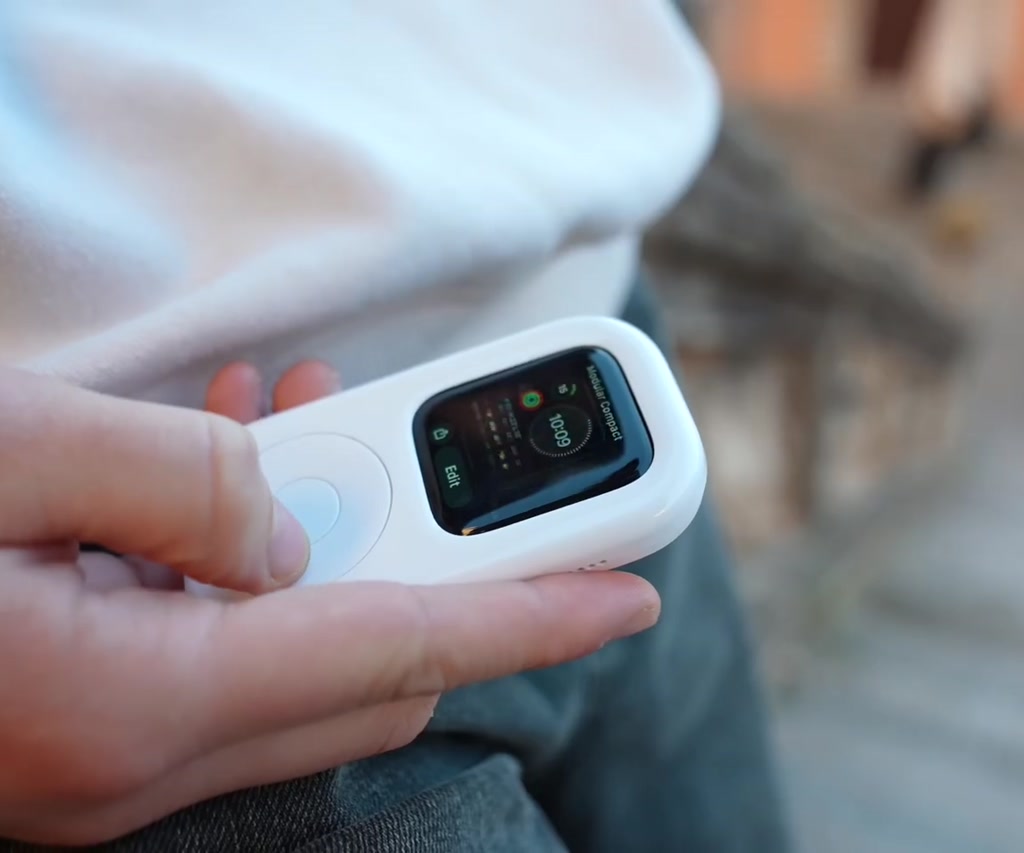
This is not a curiosity for collectors alone. TinyPod is a real, shipping product that wraps an Apple Watch in an iPod-like shell and gives it a functioning click wheel.
Why this matters right now is not because it replaces phones or reinvents hardware. The real significance here is psychological: TinyPod repackages an already capable wrist computer into a discrete, one-handed device designed to make music and basic tasks feel focused again.
That idea both explains why TinyPod exists and what most people misunderstand about it. It is less about technical necessity and more about behaviour design. It asks a simple question: what if the Apple Watch were not worn on the wrist but held like an iPod for a while?
Even before the mechanics land, TinyPod forces a reframe. It is a nostalgia play, a one-handed interface experiment, and a practical accessory all at once. The rest of this piece walks through how it works, the tradeoffs that define its usefulness, and what the product reveals about our appetite for devices that help us disconnect.
What TinyPod Is And How It Works
TinyPod is an aftermarket case for the Apple Watch that recreates the classic iPod silhouette and provides a mechanical scroll wheel that physically turns the watch Digital Crown. It ships without an Apple Watch or charger and comes in two SKUs: a scroll wheel equipped TinyPod and a cheaper TinyPod Lite that is a static shell.
The case uses a direct mechanical coupling between the wheel and the Digital Crown so the scroll sensation feels authentic. Cutouts are provided for the speaker and buttons, and the side and power controls remain accessible for Control Center, Apple Pay, and Siri.
How The Click Wheel Actually Interfaces With The Watch
The wheel is mechanical rather than electronic: it rotates a small internal gear that turns the watch crown. That direct coupling is why the scroll feeling is convincing and why haptic pulses from the Apple Watch are perceptible through the case.
Mechanical Design And User Interaction
The wheel’s tactile clicks do more than sell nostalgia. They supply discrete feedback while scrolling through lists, switching watch faces, or adjusting volume. In demonstrations the wheel reliably increments and decrements audio levels and allows navigation via the Digital Crown linkage.
Where Software Limits Surface
There is a clear platform boundary: the center button on TinyPod’s wheel is decorative. It does not emulate a screen tap, so selections still require touching the Apple Watch display. That watchOS limitation shapes the product experience and is a recurring constraint discussed later.
How People Actually Use TinyPod
TinyPod repackages existing Apple Watch features like local music storage and Bluetooth audio into a one-handed object. In practice it is used to start playlists, control volume, make quick payments, or accept a call without pulling out a phone, turning the watch into a pocketable music-first device.
Benefits Of TinyPod
TinyPod adds a focused, low-friction way to listen and act without a smartphone. It privileges tactile control and single-purpose interaction: less feed scrolling, fewer interruptions, and a deliberately constrained interface that encourages presence while preserving key utilities.
Focused Listening
By putting music controls into a held object, TinyPod reduces the temptation to dive back into apps and notifications. The click wheel and haptic feedback create a more deliberate listening ritual than typical wrist glances.
Practical Utilities
Because it keeps the watch buttons usable, TinyPod still supports Apple Pay, calls, and Siri. That means it is not a frivolous toy but a practical accessory for short outings where a phone is unwanted.
Constraints And Tradeoffs
TinyPod exposes tradeoffs that decide whether it is useful for a buyer: cost versus complexity, and hardware versus platform limits. Those tradeoffs determine how often someone reaches for it instead of wearing a watch or carrying a phone.
Cost Versus Complexity
The active TinyPod with a scroll wheel is priced at about $89, while the TinyPod Lite, a static shell, costs around $39. The premium model reflects additional tooling and a mechanical assembly that must physically rotate the Digital Crown.
Battery Life Expectations
Apple Watch music playback and cellular use are power-intensive. Continuous audio playback should be expected in hours rather than days, with single-digit hours of active streaming a reasonable expectation depending on model and whether cellular is used.
Platform Limits
Because watchOS does not expose an API to convert external wheel clicks into UI taps, TinyPod cannot fully reproduce the original iPod selection model. That software boundary is outside TinyPod’s control and shapes realistic expectations for the product.
TinyPod Vs Alternatives
Comparisons make the product’s role clearer. TinyPod is a niche accessory that sits between carrying an iPod-style MP3 player, relying on the Apple Watch alone, and using a phone. Each choice answers different priorities: nostalgia, simplicity, battery life, and interaction style.
TinyPod Vs Classic iPod
TinyPod borrows the form language and interaction cues of a classic iPod but lacks dedicated audio storage and battery life designed solely for music. It recreates the ritual without being a standalone iPod replacement in endurance or interface completeness.
TinyPod Vs Apple Watch Alone
Compared to wearing the Apple Watch, TinyPod trades wrist convenience for a held, one-handed experience that reduces distraction. It retains much of the watch functionality but introduces the need to touch the screen for selection and accepts battery tradeoffs.
TinyPod Vs Dedicated MP3 Player
A dedicated MP3 player offers longer battery life and a single-purpose interface, while TinyPod leverages the Apple Watch ecosystem for streaming, cellular, and payment features—at the cost of reduced playback duration.
Where TinyPod Could Go Next
The current version is plastic and light; observers imagine premium materials such as stainless steel to better mirror classic iPod heft. Another obvious extension is deeper software collaboration so the center button could become functional, which would require platform changes.
Design Versus Platform Dependencies
The TinyPod team solved the hardware problem cleverly, but software openness would determine how seamless the next iteration could be. This unresolved dependency creates an open question about whether TinyPod will remain a niche design object or evolve into a more integrated accessory.
Who This Is For And Who This Is Not For
Who should consider TinyPod: people who value a tactile, one-handed music experience; those who want to reduce phone reliance while keeping AirPods and Apple Pay handy; and anyone drawn to the nostalgia and ritual of a click wheel. Who should avoid it: users who need full iPod-style selection without touching the screen, those unwilling to accept shorter playback times, or anyone on a strict budget for essential accessories.
Final Thoughts And The Bigger Pattern
TinyPod is a small object that reveals a larger appetite for accessories that change how people relate to technology. It converts a pocketable computer into a focused media object and, in doing so, offers a different way to disconnect while retaining core utilities.
The product succeeds up to the point where platform constraints and battery realities begin to matter. Within those boundaries it is a joyful, precise design experiment that leverages nostalgia without pretending to be a full system replacement.
Expect future iterations to experiment with premium materials and to push for software hooks that would let external controls behave more like native inputs. Whether TinyPod becomes mainstream or stays a cult favorite will hinge on those material and platform shifts.
FAQ: TinyPod Frequently Asked Questions
What Is TinyPod?
TinyPod is an aftermarket case for the Apple Watch that mimics an iPod form factor and, on the premium SKU, adds a mechanical click wheel that turns the Digital Crown.
How Does The Click Wheel Work?
The wheel mechanically rotates a small gear that couples to the Apple Watch Digital Crown. That direct mechanical linkage transmits haptic feedback and allows scrolling and volume control.
Does The TinyPod Include An Apple Watch Or Charger?
No. TinyPod ships as a case only and does not include an Apple Watch or charger.
How Long Does Battery Last When Using TinyPod For Music?
Expect music playback in hours rather than days. Continuous streaming and cellular use are power-intensive, with single-digit hours a reasonable expectation depending on watch model and settings.
Can The Center Wheel Button Act As A Select Button?
No. The center button on TinyPod’s wheel is decorative in the current version because watchOS does not provide a mapping for external click events to UI taps.
What Are The Pricing Options?
TinyPod is available in two SKUs: the active scroll wheel model priced around $89 and the TinyPod Lite static shell priced around $39.
Is TinyPod A Replacement For An iPod Or A Phone?
Not completely. TinyPod recreates the iPod interaction and can support phone-free listening for hours, but it does not match the endurance of a dedicated iPod and remains constrained by Apple Watch battery and watchOS limitations.
Will Software Changes Make TinyPod More Functional?
Potentially yes. If watchOS exposed APIs to let external controls map to UI taps, TinyPod could enable fuller iPod-like navigation. As of the demonstration, that capability is a platform-level dependency and not currently available.
COMMENTS