


The Viture Beast arrives with a promise that sounds straightforward and radical at the same time. It is a pocketable device that can present what feels like a 174-inch display, and it does so by pushing current XR glasses technology toward the practical center of travel and daily life.
The real significance here is not raw specs alone. What actually determines whether the Viture Beast changes how people travel and work is a combination of screen brightness, tracking maturity, and how you manage power on the devices that drive it. In short, the Beast is a spec-forward leap that still depends on firmware and accessory choices to deliver a seamless experience.
During a pre-release trial unit, the most vivid takeaway was how portable big-screen viewing changes behavior. A flight becomes a cinema. A handheld gaming session turns into a theater seat. But the detail most people miss is how often those gains are defined by secondary systems, not by the glasses alone. Battery strategy, tethering options, and tracking stability form the real boundaries of usefulness.
What becomes clear when you look closer is this: Viture Beast is not an incremental upgrade. It amplifies what XR glasses were already good at while exposing where the category still needs work. Brightness, field of view, and on-device 3D processing make the experience more convincing. At the same time, firmware-dependent features and power tradeoffs determine how long and how reliably that experience lasts.
What Is New In The Beast
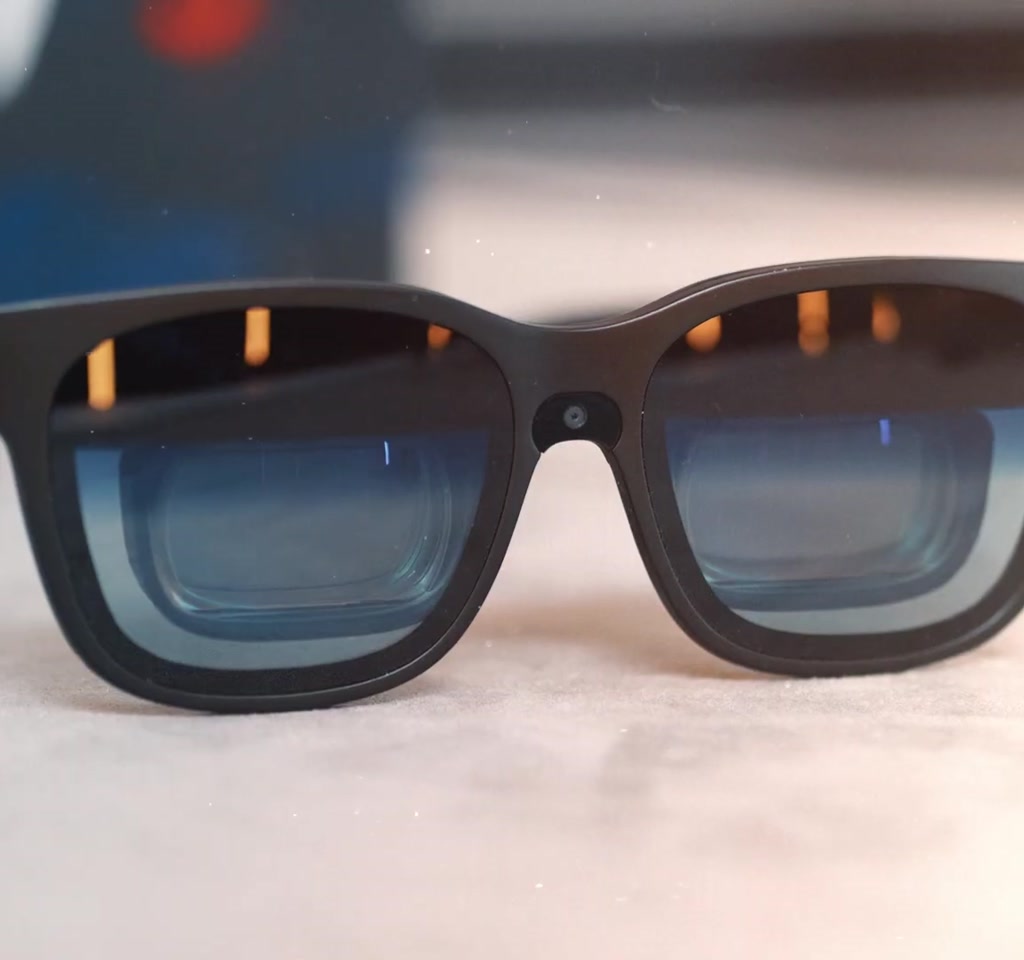
The Viture Beast consolidates three visible changes: brighter Sony panels, a wider 58-degree field of view, and new front-facing sensors plus adjustable electrochromic dimming. Those pieces combine to deliver a larger perceived screen, improved color and contrast in bright environments, and more control over ambient transparency.
Display And Brightness
Viture has moved to Sony panels offering up to 120 Hz and up to 1250 nits peak brightness, and a 1200p resolution. The manufacturer positions that resolution as delivering a 4K-like clarity when you sit back from the virtual screen. The field of view has been increased to 58 degrees, up from 46 to 52 degrees across earlier models.
Spatial Tracking And Dimming
The Beast adds a front-facing RGB camera and adjustable electrochromic dimming. That camera is intended to enable both three and six degrees of freedom experiences, and the dimming now adjusts in increments so users can tune transparency rather than flipping a single on-off toggle. Some of those tracking and refresh rate features were marked as coming via firmware at the time of testing.
How The Beast Works With Devices
The Beast functions as a display extension driven by a host device over DisplayPort over USB-C, offloading most active components to the connected phone, laptop, or handheld console. This architecture keeps the glasses light but makes host power delivery and signal compatibility central to the experience.
Connection Options
In practice the glasses accept a DisplayPort stream over USB-C and, for devices that lack native support, an external dock routes signals from consoles like the Switch. That dock reduces friction and expands real-world compatibility without adding bulk to the glasses themselves.
Power And Battery Strategy
Because the glasses draw power from the host, expect noticeable phone battery drain during streaming or gaming. The practical workaround is an inline splitter or a small power bank that both powers the glasses and charges the host simultaneously. Power planning shifts the Beast from situational accessory to all-day tool.
How The Beast Changes Travel And Media Habits
By compressing a 174-inch virtual screen into a coat pocket, the Beast reframes travel time as an opportunity for big-screen viewing. On flights the electrochromic dimming and high brightness cut cabin glow and made downloaded movies more immersive and less fatiguing than earlier XR glasses in testing.
For content consumption the combination of the glasses and a quality set of earbuds turned long flights into genuinely immersive viewing sessions. The electrochromic dimming shutting out cabin glow while maintaining comfort led to less eye fatigue than earlier models. Watching downloaded movies or locally stored series is the cleanest path because it avoids streaming-related power drains.
Benefits And Real Use Cases
The Beast favors scale, portability, and vivid color, which creates clear benefits for certain workflows. Portable gaming becomes more immersive, travel viewing becomes more cinematic, and spatial media with depth adds a new emotional layer to personal archives.
Gaming
Hooked to a device that supports DisplayPort over USB-C, the Beast gives portable gaming handhelds and laptops a huge virtual display. The unit tested ran titles from a handheld through the glasses and the scale of the virtual screen made a measurable difference to comfort and immersion.
Productivity
Pairing the Beast with a laptop can replace a travel ultrawide monitor. The catch is that even with a larger field of view you will still be constrained by the 58-degree window. For long timeline editing or multi-column spreadsheets, users may need to lock the virtual screen and then look around the space to access the edges of a very wide workspace.
Spatial Media And Memories
The Beast supports playback of spatial photos and videos captured on an iPhone through the Spacewalker app. Spatial captures add depth and presence in ways 2D cannot. For personal archives this creates an emotional use case that is easy to imagine scaling if more people adopt spatial capture practices.
Limits, Tradeoffs, And Firmware Dependencies
There are practical limits that shape daily value: firmware maturity, tracking fidelity, and host power. Some headline features were present but not enabled in the pre-release unit, which means perceived performance depends as much on future updates as on current hardware.
Firmware Maturity: A number of headline features were present in the menu but not enabled yet on the pre-release unit. The advertised 120 Hz support and camera-based six degrees of freedom tracking were reported as coming via updates. This is an important boundary because perceived smoothness and robust anchoring depend on those updates.
Window Drift: Anchor mode can lock a window into the space around you. In testing the anchor occasionally drifted after looking away and then back, both inflight and while seated at a desk. This shows where user experience is conditional on tracking fidelity and on software improvements rather than hardware alone.
Battery And Power: The Beast is powered by the host device when connected over USB-C. That architecture keeps the glasses light and compact, but it creates a second-order constraint. Streaming over cellular can drain a phone in hours rather than over a full day. In practical terms plan for external power if you expect multiple hours of continuous use. A simple splitter that both drives the glasses and charges the phone or a small power bank will typically extend sessions into long flights. Power draw therefore becomes a material variable in whether the Beast is a daily carry tool or a situational accessory.
Two Concrete Constraints To Plan Around
- Power: Expect phone battery life to drop significantly under streaming or prolonged gaming load. Budget for an external power source for multi-hour flights. Power consumption tends to be measured in hours of runtime rather than days when the glasses are driven from a phone.
- Software Locked Features: Some capabilities such as 120 Hz operation and six degrees of freedom tracking were dependent on firmware updates at the time of testing. That creates a window where perceived performance depends on future software releases.
Viture Beast Compared To Alternatives
The Beast sits between compact XR viewers and full mixed reality headsets by trading room-scale fidelity for portability and price. Its peak brightness and field of view make it compelling for content-first users, while full-room-scale headsets remain stronger for spatial computing and environment mapping.
Brightness Vs Competitors
The Beast peaks around 1200 to 1250 nits, while several competitors remain closer to 700 nits. For streaming video in bright cabins or rooms that extra brightness and dynamic range substantially improves contrast and perceived image quality.
Price And Portability Tradeoffs
Compared to premium full mixed reality devices at much higher prices, the Beast is more affordable at a mid-hundreds price band and dramatically more pocketable. That affordability is not apples to apples: the Beast sacrifices optical complexity and full room scale mapping for a lighter, travel-friendly design.
A Few Practical Details From The Pre Release Trial
Accessories matter. For consoles that do not output DisplayPort over USB-C, the Beast offers an external dock that can be mounted to devices like the Switch to route an external signal. That kind of practical engineering reduces friction in real-world use.
Audio matters too. Built-in speakers are serviceable and Harman Audio EFX modes give you quick tuning for media or voice. But pairing the glasses with high-quality earbuds made the difference between a nice experience and a convincing one. The combination of immersive audio and bright, vivid color made long-form viewing on an airplane genuinely pleasurable in the trial unit.
This is a 174-inch screen you can tuck into a coat pocket.
Where The Viture Beast Sits In The XR Story
The Beast highlights a broader tension in consumer XR. The technology is good enough now to sell an emotional and practical experience, but the ecosystem around it still determines adoption. Cabling standards, device power strategies, and app-level support for spatial content form the difference between a novelty and a daily tool.
Expect incremental adoption from travelers, creators, and gamers who prioritize screen scale and portability. The device is particularly compelling when your workflows already fit a portable model and when you accept that some features may arrive post-purchase via firmware.
From an editorial standpoint, the Beast succeeds where it sets realistic tradeoffs. It chooses bright panels, 3D playback via on-device processing, and a metal body, and it defers some complex tracking and configuration to software updates and accessories.
If Viture unlocks promised firmware updates such as full 120 Hz support and improved camera-based tracking, then the experience will close the gap on a small number of remaining usability frictions. Meanwhile battery and FOV will continue to be the practical constraints that define how, where, and for how long people use these glasses.
Who This Is For And Who This Is Not For
Who This Is For: Travelers, commuters, and portable gamers who value screen scale, vivid color, and pocketable design. Creators with spatial content or users who prioritize downloaded media and high-fidelity earbuds will find the Beast most compelling.
Who This Is Not For: Users who need full room-scale mixed reality, professionals requiring multi-monitor desktop workflows without head movement, or anyone unwilling to plan for external power or wait for pending firmware improvements.
FAQ
What Is The Viture Beast?
The Viture Beast is a pair of XR glasses designed to present a virtual 174-inch display using high-brightness Sony panels, a 58-degree field of view, and on-device 3D playback. It relies on a connected host device for power and signal via DisplayPort over USB-C.
How Does Viture Beast Connect To Phones And Laptops?
The glasses receive a DisplayPort signal over USB-C. For devices without native DisplayPort output, an external dock can route the signal from consoles and other sources to the Beast.
Is The 174 Inch Screen Real?
The 174-inch figure describes the perceived virtual screen size when viewed through the headset at the intended virtual distance. It is a way to communicate scale rather than a physical panel measurement.
Can The Beast Run For Hours On A Phone?
Not typically. Because the glasses draw power from the host, streaming or prolonged gaming will drain a phone in hours. External power or a splitter that charges the host is recommended for multi-hour sessions.
Does The Beast Offer Six Degrees Of Freedom Tracking?
The hardware includes a front-facing RGB camera intended to enable three and six degrees of freedom tracking. At the time of the pre-release trial, some camera-based tracking and full 120 Hz support were dependent on firmware updates, so availability may vary with software releases.
How Does The Beast Compare To Full Mixed Reality Headsets?
The Beast prioritizes portability and price over full-room-scale fidelity. It offers higher peak brightness than many compact rivals but does not match the environment mapping and optical complexity of premium mixed reality headsets at much higher price points.
Can You Watch Spatial Photos And Videos On The Beast?
Yes. The Beast supports spatial photo and video playback through apps like Spacewalker, enabling depth and presence that 2D playback cannot replicate.
What Should I Budget For Accessories?
Plan for a small power bank or splitter that charges the host while powering the glasses, and consider quality earbuds for a convincing audio experience. If your device lacks DisplayPort over USB-C, budget for the Beast dock to route external signals.
In the end, Viture Beast is a decisive experiment in portable XR. Its strengths are immediate and emotional, its limits are practical and solvable, and its future depends on firmware cadence and an ecosystem willing to plan for power and cabling as part of the experience.
COMMENTS