


The most revealing part of this ThinkPad T470P project is not the paint job or the laser etching. The real significance here is how a mainstream business laptop can be repurposed into a compact, modular workhorse that borrows the aesthetics and practical priorities of true rugged machines.
That revelation changes what matters when judging a mod. Most people assume cosmetic work is the primary challenge, but what actually determines whether a build succeeds is the way power budgets, enclosure geometry, and controller design collide with the creative idea.
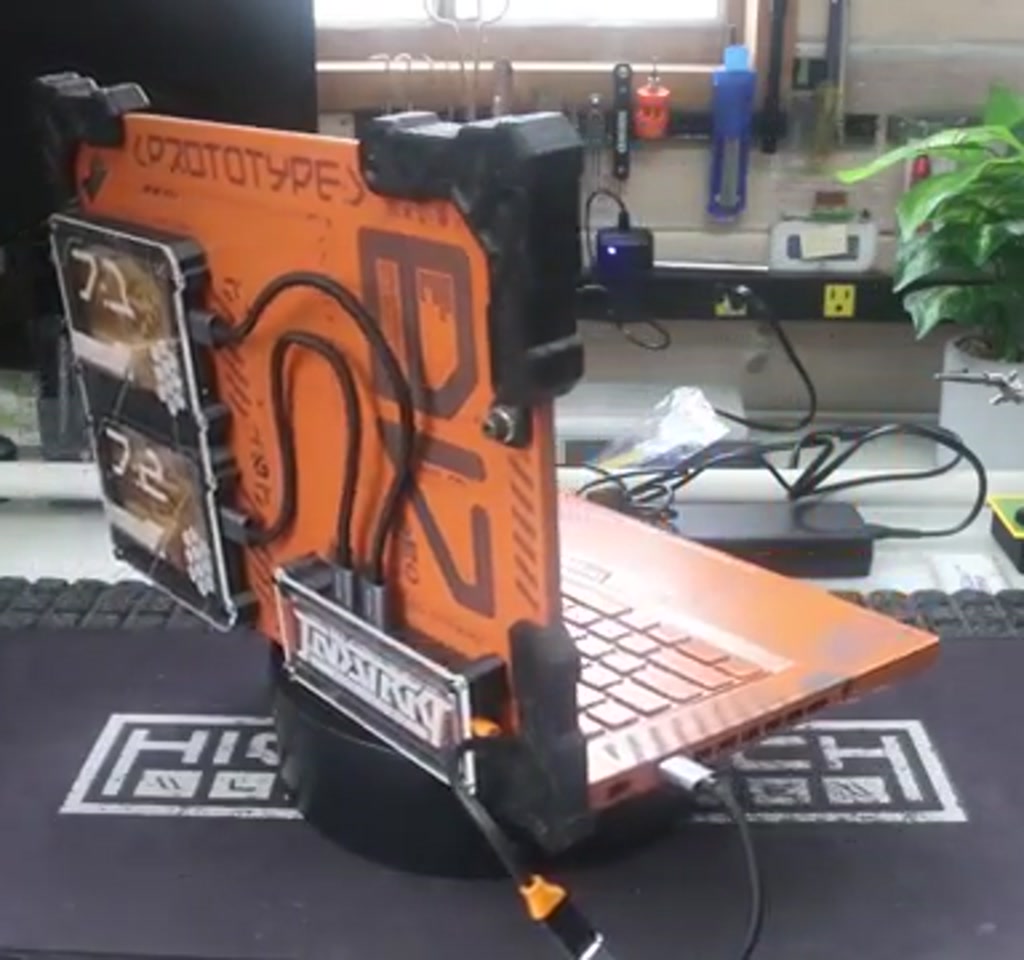
The builder behind this mod took a T470P and layered industrial brutalism, Chappie-inspired orange, attached external storage bays, a small external USB hub, and 3D printed corner bumpers. What this article reveals early is that the most interesting constraints are electrical and mechanical: how multiple drives enumerate through a single hub, how spinning drives demand transient power at startup, and where thin laptop shells limit useful add-ons like handles.
Read on for the engineering choices, the aesthetic inspirations, and the two concrete technical constraints that define whether this kind of mod is a fun hobby project or a fragile hack.
Why The ThinkPad T470P Became The Chosen Canvas
The T470P is a curious intersection of portability and punch. In the maker’s account the specific unit used included an Intel i7 7820HQ, a 2560 by 1440 IPS panel, and an Nvidia 940MX. Those details create a high-performance pocket compared to older classics such as the X230, which requires delicate screen mods to reach a similar resolution.
Beyond specs, there is a pragmatic appeal. The creator found these T470P units available for as little as one hundred dollars, which shifts the economics. Buying a low-cost donor machine lowers the threshold for irreversible mods like drilling the display backing for attachment points.
Another practical takeaway is footprint. A 14-inch chassis does not always feel large in practice. With the optional 9-cell battery, the smaller X230 footprint and the T470P footprint were described as nearly identical. That parity is what makes a 14-inch machine a viable canvas for someone used to more pocketable laptops.
A ThinkPad T470P mod offers a balance between a forgiving donor price and components that are still capable enough to be useful after modification. That combination makes the platform attractive for builders who want a serious machine rather than a pure parts donor.
Design Inspirations: Dell Rugged And Cyberpunk Cinema
The aesthetic choices are deliberately extreme. The builder openly admires the Dell rugged line, especially a model referred to as the XFR 6420, and wanted to transfer that brutalist, chamfered, functional look onto the ThinkPad.
The aim was not only protection but a carried visual language: carry handle, corner bumpers, ballistic textured top, and 45 degree chamfers that read as military industrial.
Film references sealed the color decision. Neill Blomkamp films such as Chappie inspired the orange prototype motif. The orange started as a small accent and became the dominant color because the paint behaved so well in practice that the creator could not bring themselves to artificially weather it.
That decision about not weathering illustrates a creative constraint of its own. Once a mod goes from planned distressed patina to a pristine finish, the design objective shifts toward celebrating material quality rather than narrative wear.
ThinkPad T470P Vs Dell Rugged Laptops
This comparison clarifies why the builder borrowed the Dell rugged language rather than buying it outright. Dell rugged laptops bring certified structural reinforcements and integrated mounting points, while the T470P offers lower entry cost and a hackable shell. The tradeoff is between factory-grade durability and the creative freedom of a donor chassis.
Structural Differences
Dell rugged machines are engineered from the ground up for impact, sealing, and mounting. The T470P can mimic the look with bumpers and brackets but requires reinforcement for load-bearing tasks such as a carry handle. That distinction determines whether a mod is primarily aesthetic or actually ruggedized for field use.
When To Choose Each
Choose a donor ThinkPad if you want affordability and artistic control. Choose a Dell rugged unit if you prioritize out-of-the-box reliability and certified protection. The decision ultimately Hinges on whether the project is an artful one-off or a functional tool intended for heavy field use.
How The Mod Was Engineered
The mechanical parts were modeled in Fusion 360. The approach was pragmatic: measure, model, export faces, and iterate. The corner bumpers and the hold downs for the external hub and drive enclosures were 3D printed and screwed into the panel. Screws were chosen deliberately to be very flat to avoid shorting anything on the display backing.
That decision to screw components to the back of the display made the mod effectively permanent. The builder considered gluing, but opted for mechanical fasteners when possible because they guessed that future disassembly or repair would be easier that way.
The engineering approach balanced quick iteration with serviceability. Using Fusion 360 for fit checks and 3D printing enabled rapid prototyping, while mechanical fasteners preserved an option for future disassembly. That balance is a common process pattern when turning visual ideas into durable hardware mods.
3D Printing And Fusion 360
The parts were iterated until they matched the measured geometry of the lid and hinge area. Print orientation, wall thickness, and screw boss design were practical considerations that affected both fit and lifespan. The builder later considered TPU inserts for better shock absorption, which introduces additional print complexity.
Laser Etching And Paint Choices
Vector artwork was produced in Illustrator, heavy on influences from Chappie and Elysium. The graphics were laser etched into the painted surface, a technique that removes the painted layer to reveal the substrate beneath.
One consequence is a color shift: the ThinkPad material underneath the paint lasered to a gray with a mauve tint, producing an unintentionally favorable contrast.
Material and color choices created another technical boundary. The maker had lost the ability to UV print, which constrained color options. Laser etching also cannot produce white on dark paint without extra layers, so the design language ended up favoring high-contrast etchings rather than multicolor printed artwork.
The Trouble With Drives And Hubs, And The Fixes
Where this project becomes most instructive is the storage and hub behavior. Two external 2.5-inch drive bays were attached and routed through a small hub. Each drive read fine when connected directly, and each read fine individually through the hub. When both were connected at once via the hub, the system would sometimes not recognize one or both drives.
The first instinct was power. 2.5-inch mechanical drives draw noticeably more power than SSDs at spin up, and hub ports adhere to USB power budgets, for example a USB 3.0 port commonly supplies up to 0.9 amps. Those transient power spikes at spin-up can confuse some hubs or cause momentary brownouts.
In short, the storage behavior was driven by two bounded technical forces: transient power draw at spin-up and controller-level collisions during USB enumeration. Both needed practical remedies to make the system reliable across cold boots and reboots.
Power Budgets And Controller Collisions
There were a few concrete diagnostics performed. A faulty cable was found and replaced. Switching from mechanical hard drives to SSDs appeared to stabilize the setup at first. But the long-term fix that delivered consistent results was a software and controller tactic: manually assigning drive letters further down the stack and ensuring that the controllers presented to the operating system were not identical.
That last point is technical but important. When two enclosures use identical USB to SATA controllers, the host can get confused during enumeration.
The recommended remedy is simple in principle and practical in execution: make at least one enclosure use a different controller, or give the OS a deterministic way to identify each device. Doing so removes the collision and makes device recognition consistent across cold boots and reboots.
Quantified constraint summary: hub and drive behavior can be dominated by two bounded factors. First, power draw at spin up can exceed a single port budget of roughly 0.9 amps on USB 3.0, leading to transient failures. Second, identical controllers can cause enumeration collisions that are resolved either by using diverse controller chips or by assigning identifiers in software.
Tradeoffs, What Worked, And What Comes Next
Every creative modification involves tradeoffs. Two concrete constraints stand out and shape what this kind of mod can be in practice.
Constraint One, cost and time: the donor T470P units were inexpensive at about one hundred dollars each. That makes radical irreversible mods palatable.
The build materials, however, including paint, laser etching costs, the USB hub, drive enclosures, and 3D printing filament, typically push a project into the low hundreds of dollars rather than the tens. For builders planning similar work, expect material and time costs to scale into hundreds, not mere pocket change.
Constraint Two, mechanical and structural limits: the thinness and taper of modern laptop bottoms mean that adding a carry handle or heavily loading the bottom requires reinforcement.
A handle that looks right visually will concentrate stress into small areas and likely require internal brackets or additional shell material, adding weight and complexity. That is a structural threshold, not an impossible barrier.
There are also functional tradeoffs. The attached hub and external drive bays add functionality but also add mass and require routing that interferes with hinge travel.
Magnetic connectors were added to tidy cable management, which improves the visual and tactile experience, but they also change hinge geometry and introduce another interface point that must be reliable under motion.
The maker called out a desire to experiment with TPU inserts for the bumpers. TPU gives forgiving rubber-like behavior, but is trickier to print than PETG. Expect a learning curve measured in multiple test prints and filament tuning. TPU inserts would add compliance and improved shock absorption, but also require careful mechanical interface design so the soft material does not detach under load.
Design Lessons That Translate Beyond This Build
One editorial interpretation is that this project sits at the intersection of two ongoing trends. First, the appetite for rugged, brutalist design is growing among enthusiasts who value both toughness and a specific aesthetic. Second, modular externalization is a practical path for adding features to closed thin laptop platforms without tearing the internal architecture apart.
What becomes obvious when you look closer is that the value is not purely aesthetic. Attaching modular storage and protection elements externalizes complexity in a way that preserves the original machine while extending its utility.
That approach works up to the point where electrical budgets and mechanical geometry become limiting factors. Knowing those limits is where the craft becomes engineering.
At a glance this feels like a purely expressive exercise. At the technical level it is a measured exploration of how far a standard chassis can be pushed without rebuilding the motherboard, the cooling system, or the structural shell.
Where This Idea Goes Next
There are practical next steps that follow logically from the constraints uncovered. Reinforcing the bottom case or building an internal bracket would open the possibility of an integrated carry handle.
Selecting a powered hub with an independent supply and designing one of the enclosures around a different USB to SATA controller would remove the last remaining storage fragility. Printing TPU inserts for the bumpers would add an extra layer of real-world protection.
The maker also signaled a shifting preference. After years of ThinkPad mods the creator has been buying into Dell rugged machines because of their unapologetic structural language and raw durability. That cultural shift says something about the broader collector and modder community: aesthetics and tactile confidence now matter as much as heritage branding when choosing a platform for modification.
One paragraph that stands on its own: Bringing rugged, brutalist design to a mainstream laptop exposes the economic and engineering tradeoffs required to make art that actually works, not just looks like it could.
Where this becomes interesting is that the constraints do not stop the ambition, they refine it. The project is less a culmination than a waypoint. Future builds will iterate on power, controller diversity, and material choices, and that cadence is the essential insight this mod delivers to anyone serious about making functional, beautiful, and resilient machines.
Who This Is For And Who This Is Not For
Who This Is For: Makers who want a low cost donor platform to practice mechanical and electrical modifications, and who value aesthetics paired with pragmatic engineering. Builders willing to accept tradeoffs around hinge travel, added mass, and the need for controller or power workarounds will find this project rewarding.
Who This Is Not For: Users who need certified ruggedization, reliable field deployment out of the box, or a maintenance-free mobile workhorse. If you need guaranteed durability and sealed connectors, factory rugged laptops are the safer choice than a heavily modified consumer chassis.
FAQ
What Is The Main Reason To Use A ThinkPad T470P For A Mod?
The main reason is a pragmatic mix of component capability and low donor cost. The T470P offers strong performance options while remaining affordable on the used market, which lowers the barrier for irreversible aesthetic and mechanical changes.
How Does A USB Hub Affect Multiple External Drives?
A USB hub limits per-port power and can introduce enumeration complexities. Mechanical drives draw higher transient current at spin up and identical USB to SATA controllers can collide during device enumeration, both of which may prevent all drives from appearing simultaneously.
Is Power The Only Cause Of Drive Failures In This Build?
No. Power spikes at spin-up are a common cause, but controller collisions due to identical USB to SATA chips also played a role. Both factors should be considered when diagnosing missing drives.
Can Switching To SSDs Fix The Hub Issues?
Switching to SSDs reduced power-related instability in this project, but it did not eliminate controller enumeration issues. Using diverse controller chips or assigning deterministic identifiers provided the more robust long-term fix.
Will Adding A Carry Handle Damage The Laptop Shell?
Not necessarily, but adding a carry handle concentrates stress and typically requires internal reinforcement. Without brackets or added shell material the thin laptop bottom can deform or crack under load.
What Does Laser Etching Do To The Painted Surface?
Laser etching removes the paint layer to reveal the substrate beneath. In this build it produced a gray with a mauve tint under orange paint, creating unexpected contrast but limiting the ability to add white or multicolor prints without extra steps.
Is This Approach Cheaper Than Buying A Rugged Laptop?
For expressive, one off builds the donor plus materials can be cheaper than buying a factory rugged laptop. However, once you factor in paint, 3D printing, enclosures, and time, projects typically reach the low hundreds of dollars and still lack certified structural protection.
Can The Controller Collision Problem Be Solved Without Hardware Changes?
Sometimes. Assigning drive letters or using software to give the OS a deterministic way to identify devices can mitigate enumeration issues, but using a different USB to SATA controller in one enclosure is the more reliable hardware solution.
Expect more experiments that nudge the boundary between tool and artifact, and watch for the next round where TPU, reinforced mounts, and smarter controller selection make the next version both crazier and more dependable.
COMMENTS