


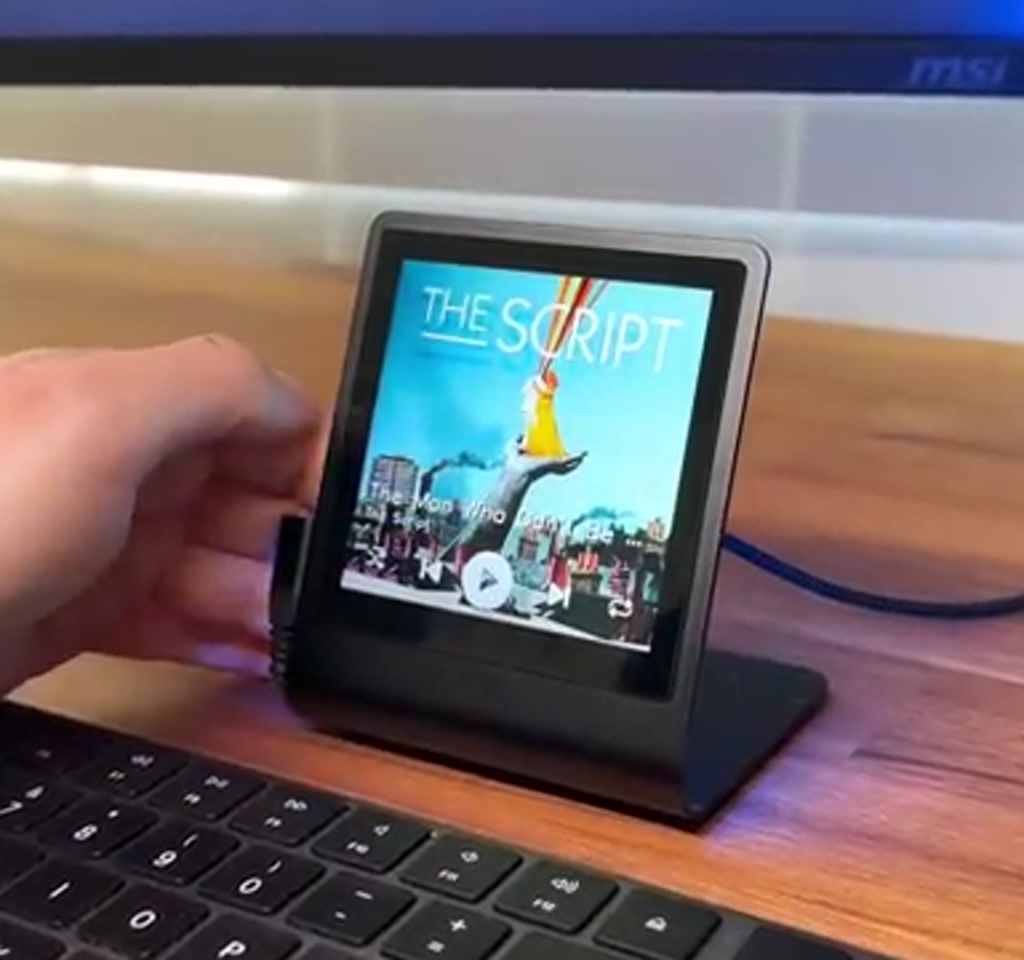
The idea is disarmingly simple. A 4-inch Pimoroni Presto display, driven by Raspberry Pi’s RP2350 class Pico silicon, sits on your desk and faithfully shows the cover art, song name, and artist for whatever you are playing in Spotify. Tap the screen, and you get pause, skip, shuffle, and repeat controls. It is compact, tactile, and purpose-built.
The real significance here is not just the fact that a small Pico class board can render album art and accept touch input. What actually determines whether this matters is the way cloud music services, embedded networking, and compact UIs meet in a single, low-cost piece of hardware.
This project shows how a $100 stack can provide a dedicated, always-on glanceable surface for music, while exposing the practical boundaries that define its usefulness.
Before the first technical heading, a plain truth: you will need a Spotify Premium account to control playback, and some familiarity with flashing firmware and Python.
That makes the Presto project accessible to tinkerers who are comfortable with a little setup, and a clear nonstarter for anyone expecting a plug-and-play consumer appliance.
What follows walks through what the Pimoroni Presto hardware brings, how the Spotify integration works, the practical tradeoffs, and a few ways this small device can be extended or hardened. Along the way there are two constraints that consistently shape decisions: cost and connectivity, and text and UX limitations imposed by the graphics stack.
What The Pimoroni Presto Brings To The Table
The Pimoroni Presto is a compact, preassembled 4-inch touchscreen module built around Pico-class RP2350 silicon, intended as a glanceable music surface. It combines a 480 by 480 display, touch input, a micro SD slot, a battery connector, and simple onboard LEDs into a ready-to-use desk device with minimal assembly required.
At the center of this build is the Pimoroni Presto, a compact, preassembled module with a 4-inch touchscreen that runs at a 480 by 480 resolution.
Physically it includes a USB-C port for power, a micro SD card slot, a battery connector, seven ambient LEDs on the back, and a built-in piezo speaker. The Presto ships on a black aluminum stand, with no soldering required, which lowers the barrier to getting a functional device on the desk.
On the processing side the board is driven by a Raspberry Pi RP2350 class chip. The project runs MicroPython on that chip, and the workflow for developers involves the Thonny IDE, flashing a UF2 firmware file, and copying a Python project to the device.
Those steps are straightforward for anyone who has worked with Pico class boards, and they are well documented in the Presto GitHub repository.
Two hardware details matter for design choices. First, the 480 by 480 resolution and 4-inch size create a dense but physically small canvas. UI layouts must be intentionally minimal, with large touch targets to match finger presses.
Second, the presence of both a micro SD slot and battery connector opens options: local caching of images is possible, and true mobility is within reach if you add a battery pack. Both of these choices have tradeoffs that affect power, responsiveness, and cost.
How The Spotify Integration Works
The Presto uses the Spotify Web API to present cover art and playback controls, polling the service for the current track and using standard web endpoints to issue play, pause, skip, shuffle, and repeat commands. That model keeps the device simple but ties responsiveness and features to the limitations of the Web API and OAuth flows.
The experience is driven entirely by calls to the Spotify Web API. The Presto periodically queries the API for the currently playing track or falls back to the most recently played item when nothing is active. Album art is downloaded and displayed full screen. A single tap reveals a control layer that maps to familiar Spotify playback commands: pause, play, next, previous, shuffle, and repeat.
Setting Up The Developer App
Setting up the Spotify developer app is a one-time step. You must create a new app on the Spotify for Developers dashboard and register a redirect URI, commonly a localhost address used during the OAuth exchange. The app must enable Web API access. Copying the Client ID and Secret into the helper script is the simple part. The harder part is making sure you pick a default playback device during the helper script’s prompts, because the Presto needs a fallback device when there is no active session.
Generating Credentials And Uploading Code
Once the OAuth step is complete the helper script returns a credentials line which is pasted into the project’s secrets file. The rest of the workload is mechanical: set Thonny’s interpreter to MicroPython for the Pico, upload the contents of the project’s Source folder to the Presto, update the secrets file with Wi Fi SSID and password, save, and then run main.py.
At that point the device begins to log status messages and, if everything is correct, it will render album art from Spotify. You can then interact with the touchscreen to show and hide playback controls, and toggle the onboard LEDs which map their colors to the album art.
Real World Use, Limits, And Tradeoffs
The Presto project reads like a negotiation between expectations and constraints: low-cost hardware, a cloud API built for general streaming scenarios, and a minimal graphics stack. Those forces define the device’s real capabilities more than any single component.
What becomes obvious when you look closer is that the project is not just a programming exercise. It is a negotiation between the constraints of embedded hardware, a cloud API that was never designed especially for single-button devices, and the expectations we have for instant touch responsiveness.
The practical constraints are concrete. First, the cost. The hardware stack described in the project, including the Presto and a USB C cable, is around $100.
That price is low enough to make these devices attractive as hobbyist desk companions, but it also imposes component-level tradeoffs. Expect simpler touch sensing and a basic speaker rather than hi-fidelity audio outputs.
Second, Spotify integration requires a Premium subscription. That is not optional; playback control via the Web API requires it. For a listener who wants a purely local or offline experience, this approach does not apply.
Constraint: API Polling And Responsiveness
The implementation periodically polls the Spotify API to detect track changes and playback state. Polling frequency directly controls the feel of the device. With tighter polling the display updates closer to real time, but network traffic and the number of API requests rise. With looser polling network load drops, but the device becomes less responsive.
The moment this breaks down is when the UI assumes instantaneous state changes. If a user expects a tap to immediately pause playback, but the device is mid-request or rate-limited, that expectation is violated.
The practical workaround is both design and engineering: increase touch target size so presses are deliberate, add local debouncing, and implement sensible backoff for API calls. Those changes smooth the experience, but they also push complexity back onto the developer.
Constraint: Text, Fonts, And International Support
The project’s graphics library currently does not support non-ASCII characters. The code strips non-ASCII text from track and artist names before rendering. That is a clear tradeoff. For many English language tracks the loss is invisible. For international content the result is truncated or sanitized titles that reduce discoverability and aesthetic fidelity.
Quantified context helps here. If you imagine a playlist with dozens of international tracks, every title containing accents or non-Latin characters will be reduced to an ASCII subset, which can affect recognition in up to tens of percent of cases for some catalogs.
Fixing this requires either a different font engine, additional font glyphs bundled in the device, or server-side transliteration before sending text to the Presto. Each fix increases storage or complexity; bundled fonts can add megabytes of data while transliteration needs an intermediary service.
Practical Enhancements And Technical Notes
A short technical summary: local caching, smarter polling, and better font handling each address a core constraint while trading storage, network use, and code complexity. Those tradeoffs are practical and incremental, not miraculous.
A few practical observations from building or reading through similar projects are worth calling out. First, the Presto’s micro SD slot is an opportunity. Caching album art locally reduces network use and gives near instant redraws when the same tracks reappear. A small cache of dozens of album covers would likely consume a few megabytes, which is reasonable on a micro SD card and trivial compared to modern storage cards.
Second, the onboard LEDs provide a low-cost ambient light effect that maps to cover colors. That is purely cosmetic, but it demonstrates how inexpensive hardware can add disproportionate polish. If you value desk ambience, toggling the LEDs can transform the device from a utility into a small visual centerpiece.
Third, power. The Presto includes a battery connector. Using a battery pack turns the unit into a cordless device, but runtime will be measured in hours rather than days unless you add a large capacity pack.
The tradeoff is clear: mobility versus runtime and size. For a desk companion that rarely moves, permanent USB power is the simplest and most reliable choice.
Caching Album Art To Reduce Polling Pressure
Local caching of album covers reduces redundant downloads and can make redraws instant. A compact cache policy plus an LRU eviction strategy keeps storage modest while cutting network requests significantly when listening habits repeat across sessions.
Smarter Polling Strategies
An exponentially backed off polling algorithm that shortens intervals when music changes and lengthens them when playback is stable balances responsiveness against API rate limits. Implemented thoughtfully, it reduces unnecessary requests without creating a brittle UI.
Font And Text Workarounds
Possible fixes include bundling additional glyphs, implementing a small transliteration layer, or switching to a different MicroPython drawing engine that supports wider character sets. Each approach raises storage or runtime costs, but they directly address the device’s international usability problem.
Pimoroni Presto vs Smartphone And Dedicated Streamers
Putting a Presto next to a phone or a full-featured streamer clarifies the tradeoffs. The Presto is about a glanceable, tactile surface and minimal distraction; phones and streamers prioritize features, low latency, and broad codec support. Choice depends on whether you value simplicity and desk presence over raw capability.
Cost And Portability
At roughly $100 the Presto is cheaper than many dedicated streamers and offers a unique desk footprint. It is more portable than rack-mounted streamers but less capable than a phone in terms of apps and connectivity options.
Responsiveness And Features
Smartphones provide near instant control and full access to playlists, downloads, and apps. A Presto, constrained by polling and the Web API, will feel slightly delayed by comparison but rewards users with a focused surface and permanent presence on the desk.
Who This Is For And Who This Is Not For
Who this suits: hobbyists, makers, and listeners who want a dedicated, glanceable music surface on the desk with tactile controls and cover art. People who appreciate minimal UIs and are comfortable with simple firmware flashing and MicroPython will get the most from this project.
Who should consider alternatives: users expecting a plug-and-play consumer device, people who need offline local playback without Spotify Premium, and anyone requiring flawless multi-language text rendering out of the box. For those needs a phone, smart speaker, or full-featured streamer will be a better fit.
Where To Go From Here
The project is open source and the repository contains the firmware, helper scripts, and the MicroPython code that runs on the Presto. If you are comfortable with Thonny, flashing UF2 firmware, and copying files to a Pico-style device, you can reproduce the build.
If you want to take it further, consider three directions: improve text rendering for international tracks, implement smarter polling with local caching, or integrate additional sensors over the Quick Stemma QT header for reactive ambient effects.
These are practical engineering challenges. They each involve clear tradeoffs in storage, network use, and code complexity. But they also illustrate the larger point: small, inexpensive embedded devices have matured to the point where they can host polished, networked user experiences if the software is built to match the hardware’s boundaries.
Frequently Asked Questions (FAQ)
What Is The Pimoroni Presto?
The Pimoroni Presto is a compact 4-inch touchscreen module driven by RP2350 class Pico silicon, designed to be a glanceable surface for networked services such as Spotify, with touch controls, a micro SD slot, and simple ambient LEDs.
How Does The Presto Connect To Spotify?
The Presto uses the Spotify Web API and an OAuth flow. A Spotify developer app supplies Client ID and Client Secret, and a helper script walks through authorization to produce credentials that the device uses to poll and control playback.
Do I Need Spotify Premium To Use The Presto?
Yes. Playback control via the Spotify Web API requires a Spotify Premium subscription; without it the device cannot remotely control playback.
Can The Presto Play Music Locally Without The Cloud?
No. The typical Presto build uses Spotify as the source and does not provide local playback of downloaded audio. Local playback would require adding storage and a different playback stack, which is not part of the published project.
How Responsive Is The Interface?
Responsiveness depends on polling interval, network quality, and API rate limits. Tighter polling feels more immediate but increases request volume; looser polling reduces network load but increases perceived latency. Design and debounce strategies help smooth the UX.
Will Track Titles With Accents Display Correctly?
Not by default. The project’s graphics library strips non-ASCII characters, so accented or non-Latin titles may be truncated or sanitized unless you add font support or a transliteration step.
Can I Cache Album Art Locally?
Yes. The Presto’s micro SD slot allows a local cache of album covers, which reduces downloads and speeds redraws. A modest cache of dozens of covers uses only a few megabytes.
Is This Project Suitable For Non-English Users?
Out of the box, international text support is limited. Non-English users can improve rendering by bundling additional font glyphs, switching the drawing engine, or adding a transliteration service, all of which add storage or complexity.
COMMENTS