


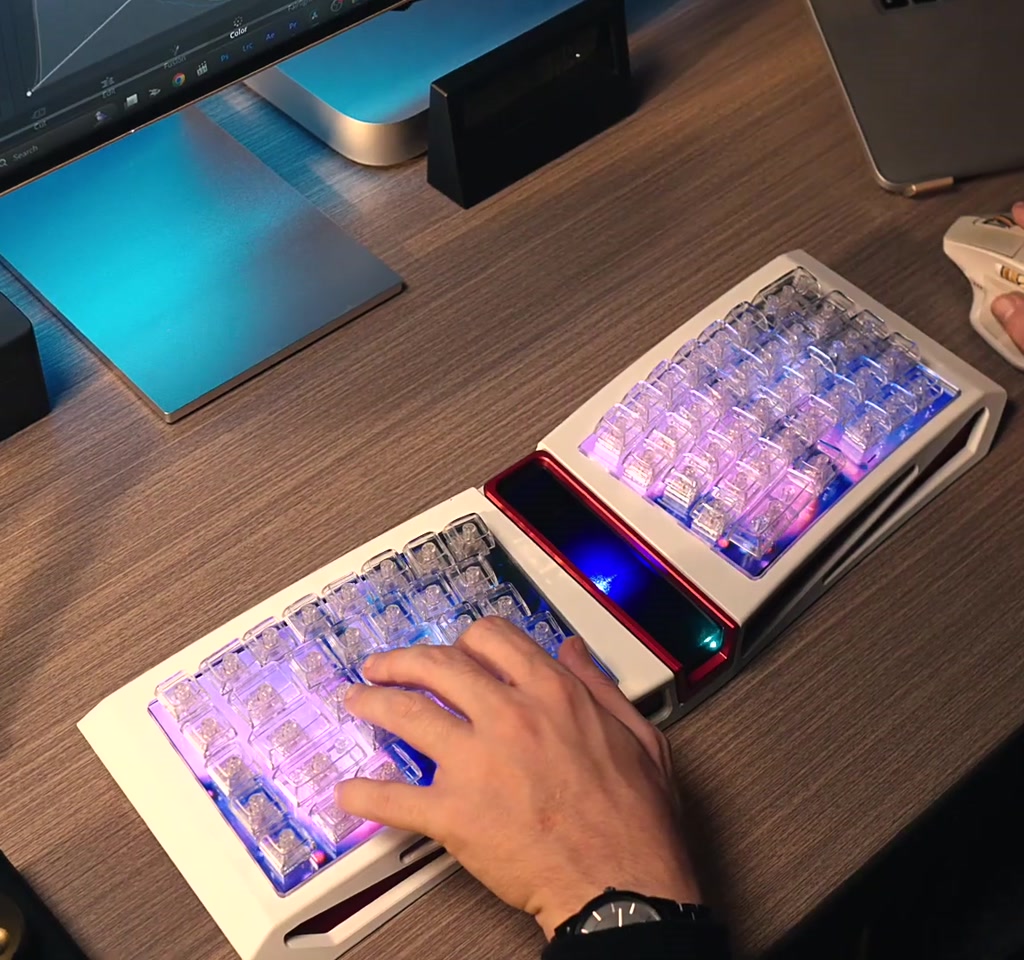
The DS Pixel Pro Keyboard is being presented as something more than a keyboard. It pairs the tactile behavior of mechanical switches with a full color, per-key display system, along with adjustable actuation, an 8kHz polling rate, and one key macro customization. That combination is designed to blur the line between tool and canvas.
The real significance here is not the simple addition of prettier lighting. What actually determines whether this matters is the tradeoff between visual expressiveness and the practical costs of running a display-equipped input device. If you are imagining a keyboard that is both a live art piece and a competitive peripheral, the crucial questions become power draw, latency in different connectivity modes, and the time investment needed to customize it to your workflow.
Most people misunderstand the value proposition as purely aesthetic. The part that changes how this should be understood is the interaction design implication: each key becomes a dynamic feedback channel, not just a mechanical switch. That opens new possibilities for context-aware UI, but it also introduces new constraints that determine where the idea is useful and where it is merely novel.
From an editorial standpoint, the DS Pixel Pro Keyboard is worth examining because it crystallizes a larger trend. Interfaces are moving from static controls to live surfaces, and keyboards are a surprisingly fertile place for that shift. The moment this concept moves from controlled demos to daily use is when the tradeoffs outlined below start to shape whether people adopt it.
What The DS Pixel Pro Keyboard Is Trying To Do
The DS Pixel Pro Keyboard aims to keep mechanical speed and feel while layering a live visual surface across every key, turning the keyboard into an actionable secondary display that sits where your hands already are.
The pitch is straightforward: keep the speed and feel of a mechanical keyboard while adding a vibrant, dynamic visual layer. That layer supports background images, videos, and interactive animations that respond to user actions. Marketing emphasizes adjustable actuation and tactile force, an 8kHz polling rate for near-zero latency, and triple mode connectivity to bridge gaming and portable productivity needs.
Why that matters is not just novelty. Per-key displays change how feedback is delivered. A row of keys can show timers, cooldowns, or status icons. Macro keys can animate to confirm a successful sequence. The keyboard becomes a secondary display that sits where your hands already are, which is an efficient place to put high-bandwidth feedback.
How Per-Key Displays Work And What They Mean
Per-key displays replace single-point lighting with tiny image modules embedded into caps or switches, allowing each key to render icons, gradients, or short animations independently of neighbor keys.
Renderings and product descriptions show tiny color gradients across each key, with animations that react to keystrokes. What becomes obvious when you look closer is the difference between surface-level lighting and true per-key imaging. Lighting uses LEDs under opaque caps, while per-key displays imply small LCD or OLED modules embedded into each key cap or switch.
Visual Customization
Customizable backgrounds, video playback, and reactive animations mean the keyboard can shift identity on demand. For content creators or streamers that can be a performance tool as well as a workspace enhancement. But the more dynamic the visuals, the greater the demand on the device to drive pixels constantly, and that demand has consequences.
Interactive Animations
Interactive feedback that responds to typing speed, key press velocity, or macro states is where this becomes interesting. That kind of responsiveness is not purely decorative, it can be functional. The tradeoff appears when animations must be synchronized with input events while preserving the crisp timing gamers expect.
Benefits Of Per-Key Displays
Putting useful information under your fingers reduces the need to shift gaze and can surface contextual cues like timers, modes, or macro confirmations directly in the input zone.
Per-key displays open obvious benefits: proximate visual feedback, creative branding for streamers, and richer macro confirmation. They let shortcuts and state information live where hands already hover, which can speed workflows and reduce glances to other screens.
Gaming Performance And The 8kHz Claim
The 8kHz polling rate headlines low input latency in wired mode, but real-world advantage depends on connection mode and how display updates are synchronized with keystroke events.
The 8kHz polling rate is a headline figure. In wired mode a high polling rate can reduce input latency and make actuation timing feel more immediate. The part that most people miss is that polling rates and latency advantages are conditional on connection mode. Wired operation typically allows the highest polling rates.
Latency And Polling Modes
Triple-mode connectivity is attractive, but wireless modes tend to carry different latency profiles. In practice that means the 8kHz advantage is likely most relevant when the keyboard is connected via a dedicated wired connection. When using Bluetooth or other wireless protocols, polling rates often fall into the tens or low hundreds of hertz range, and latency gains narrow. The practical implication is clear: competitive players will prefer wired mode to consistently exploit the 8kHz claim.
The other gaming element is adjustable actuation and force, which allows players to tune key travel and tactile feedback to their play style. This is a strong ergonomic and performance signal, but the tradeoff appears when mechanical customization and display-driven features compete for the same design attention and thermal headroom.
Practical Constraints That Determine Whether This Works
The promise only stands when three constraints are balanced: power consumption, software complexity, and cost. Fail any one and the idea slips from useful to novelty.
Power Consumption
Driving hundreds of tiny displays across a keyboard is not the same as running LEDs. Expect power draw to be noticeable, with battery life in wireless use likely measured in hours rather than days unless the manufacturer accepts compromises in brightness, frame rate, or animation complexity. That is a direct cost of adding active pixels to every key.
Software And Customization Workload
The richness of per-key visuals requires software that can author scenes, animations, and context-aware triggers. That capability also creates a learning curve. Customization tends to scale in time investment, often requiring several hours to create polished profiles for workflows or games. The tradeoff here is simplicity versus control.
Cost And Manufacturing Complexity
Devices with integrated per-key displays are materially more complex to produce. Component counts and assembly steps rise, and repairability may decline. As a rule of thumb for devices that add novel displays, costs tend to scale into the hundreds rather than the tens of dollars for the end user. That places this keyboard in a premium category and narrows the addressable market compared to plain mechanical boards.
Design Signals And Real World Adoption
Per-key displays suggest a future where peripherals double as contextual displays, but adoption depends on durability, battery life, and low setup friction as much as allure.
From a user experience viewpoint, the keyboard suggests a future where everyday peripherals double as contextual displays. That has historical parallels in how watches evolved into smartwatches and how monitors added HDR. But peripherals have adoption friction: buyers expect durability, long battery life, and low setup friction. The DS Pixel Pro concept translates well to niche audiences such as streamers, custom PC enthusiasts, and creators who value surface-level signals as part of their brand.
Maintenance and reliability are additional boundaries. Embedded displays increase points of failure, and heat management becomes a concern when displays, controllers, and keyboards work in close proximity for long sessions. Realistic lifecycles for complex peripherals often require serviceable parts or warranties that reflect higher expected failure modes.
The Interface Design Implication
If software ecosystems expose per-key APIs and integrations, the keyboard becomes a new canvas for contextual microinterfaces; if not, it risks staying a designer-driven novelty.
What actually determines whether this matters is the ecosystem around the keyboard. If software ecosystems embrace per-key APIs and game developers or productivity tools expose useful hooks, the device becomes a new canvas for contextual microinterfaces. Without that, it risks becoming an elaborate vanity surface that is impressive but underused.
There is also an attention economy angle. Putting high-resolution feedback where the hands are could reduce glances to other displays, shifting interface design toward tactile proximal displays. That is a first-order insight about how peripheral surfaces can rewire attention patterns across workflows.
What will be interesting to watch is whether peripheral makers standardize interfaces for per-key displays, or whether each vendor builds closed ecosystems. Standardization would lower the customization burden and accelerate useful integrations, while closed systems will keep the feature set niche and designer-driven.
DS Pixel Pro Keyboard Versus Conventional Mechanical Keyboards
Comparing per-key display keyboards to conventional mechanical boards means weighing visible benefits against tangible costs: feedback proximity and customization versus battery, latency in wireless, and higher price.
Conventional mechanical keyboards trade simplicity and lower cost for less visual expressiveness. The DS Pixel Pro adds information density at the cost of complexity. For gamers who require minimal latency and long wireless battery life, classic low-power mechanical boards remain attractive. For streamers and creators who want visual branding and contextual cues, the DS Pixel Pro type device is appealing despite its premium tradeoffs.
Key Differences To Consider
Consider three decision factors: whether you need proximate visual feedback, whether you will primarily use wired mode, and whether you are willing to invest time in customization. Those factors separate buyers who will use the feature set daily from those who will rarely use it.
Who This Is For And Who It Is Not For
Practical clarity helps choose: this is for creators and enthusiasts who value proximal visual feedback and accept higher cost and maintenance. It is not for users who prioritize long wireless battery life, simple plug-and-play use, or the lowest possible latency in wireless gaming.
Who This Is For: Streamers, content creators, custom PC builders, and users who treat the keyboard as part of their visual identity and workflow. These buyers will get steady value from per-key visuals and are likely to invest time in profiles.
Who This Is Not For: Competitive gamers who require minimal wireless latency, users who demand multi-day battery life in wireless mode, and anyone who prefers low-cost, highly repairable mechanical boards with minimal software overhead.
FAQ
What Is The DS Pixel Pro Keyboard?
The DS Pixel Pro Keyboard is a mechanical keyboard concept that integrates full-color per-key displays, adjustable actuation, and an advertised 8kHz polling rate, aiming to combine tactile performance with dynamic visual feedback.
How Do Per-Key Displays Affect Battery Life?
Driving per-key displays consumes significantly more power than simple LEDs. The transcript suggests wireless battery life is likely measured in hours rather than days unless brightness, frame rate, or animation complexity are reduced.
Does 8kHz Polling Matter For Gamers?
8kHz polling can lower wired input latency, but its advantage is conditional. In wireless modes where polling falls to much lower rates, the latency benefits diminish, so wired connection is likely required to exploit that claim consistently.
Can Per-Key Displays Be Useful Beyond Aesthetics?
Yes. Per-key visuals can present timers, macro states, mode indicators, or short notifications where the hands are, which can reduce glances to other screens and deliver context-aware feedback if software integrations exist.
How Much Will A Keyboard Like This Cost?
The transcript does not provide a specific price, but notes that adding per-key displays increases component and assembly complexity, typically placing such devices in a premium price range rather than a budget category.
Is The Software Easy To Use For Customization?
Software for per-key visuals must author scenes and triggers, which creates a learning curve. The transcript indicates customization often requires several hours to produce polished profiles, so expect higher software complexity than standard RGB tools.
Are Per-Key Displays Reliable Long Term?
Embedded displays add points of failure and raise heat management and repairability concerns. The transcript recommends realistic lifecycles, serviceable parts, or warranties to account for higher expected failure modes.
Will Developers Support Per-Key Displays?
That depends on ecosystem choices. If vendors standardize APIs and game or productivity developers expose hooks, per-key displays could gain practical integrations; absent standardization, support may remain vendor-specific and limited.
For readers who want to dive deeper, refer to the DS Pixel Pro presentation materials and demos for technical specifics and official specs.
COMMENTS