


The Xeneon Edge reframes what a small secondary display can do. Instead of acting as a tiny mirror of your desktop, it serves as a persistent control surface for live widgets, chat, and system controls. That shift matters more than raw pixel count or bezel size.
In practice, this means reclaiming attention and screen real estate. You keep your main app full screen while the Edge hosts volume knobs, stream controls, telemetry strips, and iframe widgets that update without interrupting your workflow.
What The Xeneon Edge Actually Is
Direct Answer: The Xeneon Edge is a mountable 2560 by 720 ultrawide LCD touchscreen with five-point capacitive touch and a 60Hz refresh rate. It supports USB-C with DisplayPort Alt, plus HDMI and DisplayPort options, and is built as a compact control surface rather than a primary gaming panel.
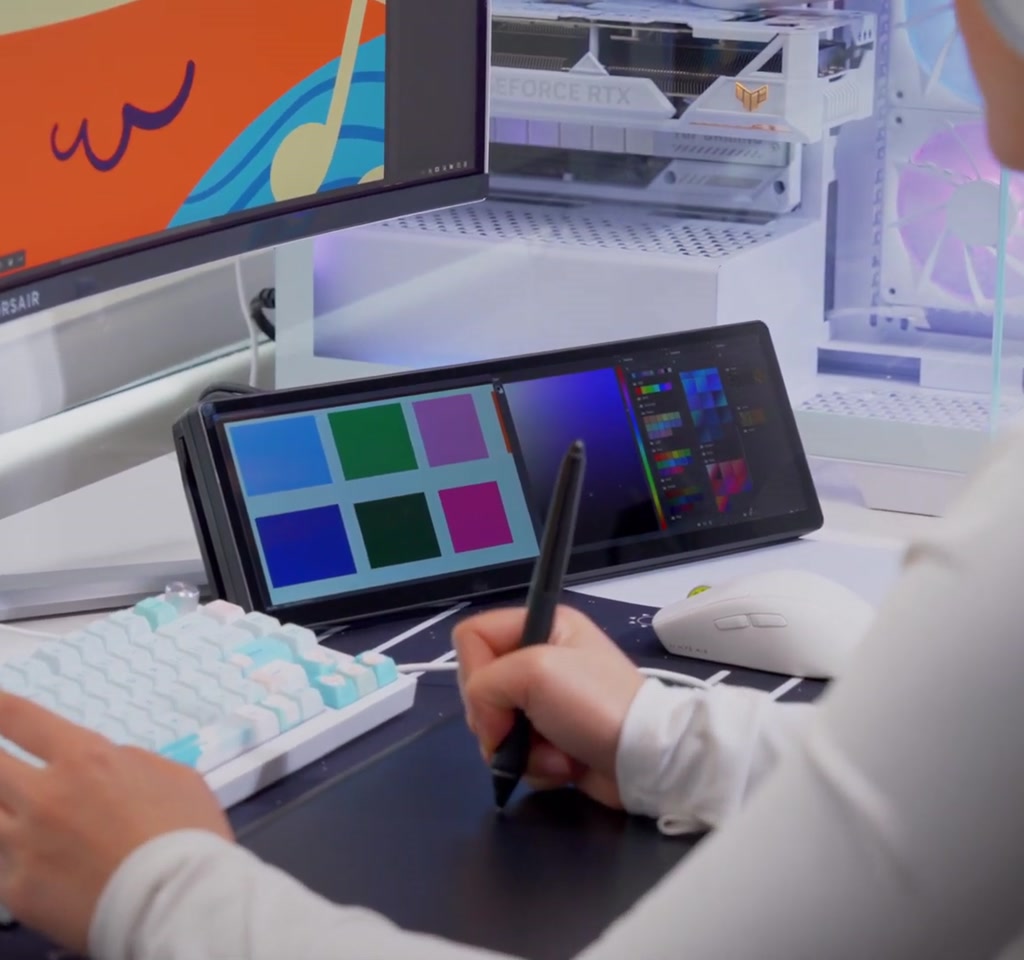
The display is designed to be small and versatile: 2560 by 720 resolution, 60Hz refresh, five-point touch, and multiple connection options including USB-C, DisplayPort Alt, and HDMI. Hardware includes a magnetic desk stand, a 1/4-20 mount point, and fittings for a 360 millimeter fan mount for internal installation.
How It Integrates With Your Setup
Direct Answer: Integration depends on your PC ports. If your system supports DisplayPort Alt over USB-C you can run video and touch over a single USB-C cable. If not, the Edge requires both USB-C and HDMI for full function, creating a predictable but tangible compatibility boundary.
Connections Explained
USB-C standalone operation is convenient when your PC exposes the right alternate modes. On systems without that support you will need both USB-C and HDMI to enable video plus touch. That may use an extra HDMI port that some laptops or small form factor PCs cannot spare.
Port Requirements And Workflow Implications
Plan for a port and cable check before buying. Single-cable USB-C setups are cleaner, but many machines will fall back to a dual-cable solution. The tradeoff is cable management versus guaranteed compatibility.
How The Mounting Works And Physical Compatibility
Magnetic Mounting Details
The back of the panel has 14 magnets and will adhere to suitable metal surfaces. Magnetic attachment gives quick repositioning on flat, unpainted or thinly painted steel, but adhesion strength depends on case material, paint thickness, and surface flatness.
Internal Installation Requirements
Internal mounting uses a 360 millimeter fan or radiator location, which often means mid-tower and larger cases that already support long radiators. If your case lacks that space, internal installation will not be possible.
Desk Stand And Arm Mount Options
The Xeneon Edge ships with a magnetic desk stand and provides a 1/4-20 mount for common monitor arms and rigs, so you can choose desk placement, side case adhesion, or internal install when compatible.
What You Can Use The Display For
Direct Answer: Use the Edge as a living set of widgets for streaming overlays, SimHub telemetry, system monitoring, chat, and small iframe embeds like timers or tickers. It is designed to present controls and glanceable data while your main display remains focused on the primary task.
Streaming Dashboard Use Cases
Place Twitch chat, stream health stats, and OBS controls on the Edge. The tactile, always-on nature reduces alt-tab interruptions and speeds scene changes or quick moderation actions during live broadcasts.
Sim Racing Telemetry And Racing Cockpits
The narrow ultrawide shape works well as a telemetry strip for lap times, tire temperatures, and splits beside a wheel or cockpit. Pairing with SimHub brings lap and sensor data into immediate view without crowding the main display.
Work From Home And Productivity Widgets
For productivity, use the Edge for media controls, mute toggles on calls, calendar reminders, or persistent task widgets so you can keep a document or spreadsheet full screen and still reach essential controls with a touch.
Widget And Iframe Support
The Edge supports resizable widgets and iframe content, letting you embed countdown timers, weather, or stock tickers by pasting iframe code and sizing panes to taste. That flexibility makes it useful for creators and teams with custom overlay stacks.
Benefits And Value Of A Dedicated Control Strip
Direct Answer: The main benefits are persistent, tactile controls that reduce context switching, a small footprint that preserves primary screen real estate, and flexible mounting that lets the display live on a desk, case, or inside a chassis depending on your needs.
Because the panel is designed as an adjunct control surface, it replaces small interruptions like alt-tabbing and window juggling. For streamers, sim racers, and focused knowledge workers the value is speed and less visual friction.
Limitations And Performance Tradeoffs
Direct Answer: Expect tradeoffs in refresh rate and multi-touch capability: the Edge runs at 60Hz and uses five-point capacitive touch. That is fine for UI and overlays, but it does not match high refresh gaming panels or 10-point touchscreens for advanced multitouch gestures.
Refresh Rate And Responsiveness
At 60Hz the display updates every 16.7 milliseconds. High refresh monitors at 144Hz update every 6.9 milliseconds, which explains why cursor tracking and ultra-smooth animations will differ between the Edge and a fast gaming panel.
Touch Limitations
Five-point touch supports up to five simultaneous contacts, which is responsive for taps and light multi-touch. It is not designed for dense multi-finger input or piano-style interactions where 10 or more touch points would be preferable.
Compatibility, Cabling, And Maintenance
Port requirements can force a dual-cable setup. Software widget ecosystems require updates and ongoing developer support to remain consistent. Both hardware and software constraints affect how seamless the experience will be over time.
Xeneon Edge Vs Alternatives
This comparison focuses on real decision factors: portability, controls, compatibility, and refresh behavior. The Xeneon Edge is a control-first device, unlike small second monitors that aim to mirror desktop space or stream decks that use buttons instead of a full touch display.
Xeneon Edge Versus Small Second Monitor
Compared to a small second monitor, the Edge emphasizes touch widgets and mounting flexibility rather than delivering another high refresh or color-critical panel. If your priority is a tactile widget layer, the Edge is closer to purpose-built than a generic monitor.
Xeneon Edge Versus Stream Deck And Button Controllers
Compared to button-based controllers, the Edge offers dynamic, resizable interfaces and live iframe content. The tradeoff is a need for display bandwidth and possibly more ports, while button controllers are simpler and often more portable.
Xeneon Edge Versus High Refresh Gaming Displays
High refresh gaming displays prioritize latency and smooth frame rates, while the Edge prioritizes persistent controls and glanceable information. If you need matched refresh across all displays for competitive input, the Edge will feel out of step.
Two Planning Constraints To Watch
- Port And Cable Requirements: Verify DisplayPort Alt over USB-C on your machine to use a single cable. Otherwise you will need both USB-C and HDMI for full functionality.
- Mounting And Case Compatibility: Internal installs require a 360 millimeter fan or radiator position. Magnetic and desk mounts are flexible but dependent on surface flatness and finish.
Who This Is For And Who This Is Not For
Who This Is For: Streamers, sim racers, and professionals who want a tactile set of persistent widgets and quick controls without sacrificing main-screen real estate. Also useful for creators who embed iframes or remote dashboards.
Who This Is Not For: Users who need a matched high refresh secondary monitor for gaming, those who require dense 10-plus point multitouch, or systems without the necessary ports and spare HDMI outputs.
Summary And Final Verdict
The Xeneon Edge is a focused ultrawide touchscreen control center that replaces small interruptions with an intentional tactile layer. It delivers immediate value for streaming, telemetry, and quick controls while tradeoffs in refresh rate, touch capacity, and port requirements shape where it fits in a modern setup.
Frequently Asked Questions
What Is The Xeneon Edge?
The Xeneon Edge is a mountable 2560 by 720 ultrawide LCD touchscreen with five-point capacitive touch and a 60Hz refresh rate, built to host widgets, iframes, and quick system controls rather than serve as a primary gaming screen.
How Does The Xeneon Edge Connect To A PC?
It supports USB-C with DisplayPort Alt for single-cable setups when supported. On systems without that mode it expects both USB-C and HDMI for full video and touch functionality.
Can I Mount The Xeneon Edge Inside My PC Case?
Yes, it can mount to a 360 millimeter fan or radiator position in cases that provide the space. It also ships with a magnetic desk stand and offers a 1/4-20 mount for arms or rigs.
Is The Touchscreen Good For Multitouch Gestures?
The panel uses five-point capacitive touch, which is responsive for taps and light multi-touch. It does not provide the wider multitouch capabilities of 10-point touchscreens for complex gesture layering.
Will The 60Hz Refresh Rate Affect Gaming?
At 60Hz the display updates every 16.7 milliseconds. That is fine for widgets and overlays but will not match the smoother tracking of 120Hz or 144Hz gaming panels that update more frequently.
What Kind Of Widgets Can Run On The Edge?
The device supports resizable widgets and iframe embeds, so you can run system monitoring, Twitch chat, OBS controls, SimHub telemetry, timers, tickers, and other web-based widgets supported by the platform.
Does The Edge Replace A Stream Deck?
Not exactly. The Edge provides a dynamic touch surface with widgets and live visuals, while stream decks are button-focused. Which is better depends on whether you prefer tactile buttons or a flexible visual control surface.
What Are The Main Compatibility Risks?
Main risks are missing DisplayPort Alt over USB-C, limited HDMI ports on small systems, and the physical limits of internal mounting or magnetic adhesion depending on case material and finish.
COMMENTS