


In an era where data is often called the “new oil,” our personal information has become one of our most valuable—and vulnerable—assets. Every time you delete a file, format a hard drive, or discard an old computer, you might think your data is gone forever.
However, the reality is much more sobering. Standard deletion methods only remove the “pathway” to the data, leaving the actual binary code intact and easily recoverable by anyone with basic data recovery software.
To truly protect your privacy, especially when selling, donating, or recycling a device, you need a professional-grade solution. Enter Donemax Data Eraser, a powerful, certified data wiping tool designed to permanently sanitize storage media. In this article, we will explore why data erasure is critical and provide an in-depth look at the three primary erasure modes that make Donemax a top-tier choice for both Windows and Mac users.

IMAGE: UNSPLASH
Why “Delete” Isn’t Enough
Before diving into the software, it is important to understand the mechanics of data storage. When you “Empty the Trash” or perform a “Quick Format,” the operating system simply marks the space occupied by those files as “available.” The data stays on the platter or the flash memory chips until it is eventually overwritten by new files.
If you give away a laptop or sell a USB drive without securely wiping it, the next owner could use a free recovery tool to see your bank statements, private photos, or saved passwords. Donemax Data Eraser solves this by using military-grade algorithms to overwrite the data multiple times, ensuring that even the most advanced laboratory recovery methods cannot retrieve a single byte.
Exploring the 3 Data Erasure Modes of Donemax
Donemax Data Eraser is designed with a user-friendly interface that masks its complex cryptographic power. It offers three distinct modes tailored to different scenarios, ranging from targeted file removal to total disk destruction.
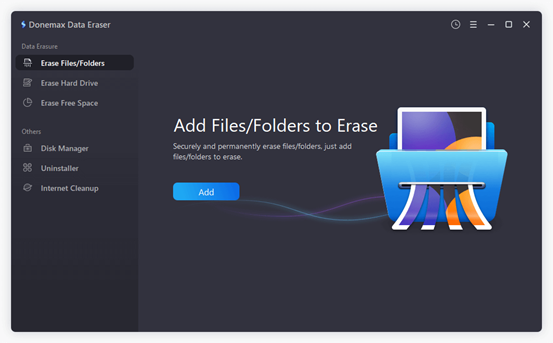
Mode 1: Erase Files/Folders
The “Erase Files/Folders” mode is the most surgical approach to data security. It is designed for users who want to get rid of specific sensitive documents without affecting the rest of the data on their drive.
- How it Works: You simply select the specific files or folders you wish to destroy. Once you click the “Erase” button, Donemax targets the physical sectors occupied by those specific files and overwrites them.
- Best For: Daily privacy maintenance. If you have finished a tax return, a confidential business proposal, or have private photos you no longer want on your machine, this mode allows you to “shred” them instantly while keeping your operating system and other files intact.
- The Advantage: It is fast and efficient. You don’t need to wipe your entire computer just to secure a handful of documents.
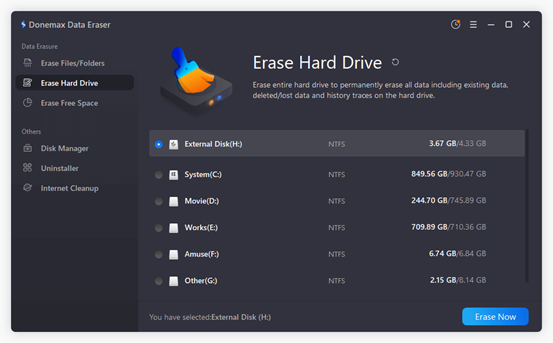
Mode 2: Erase Hard Drive
When it comes time to part ways with a computer, an external hard drive, or a digital camera, “Erase Files/Folders” isn’t enough. You need a clean slate. The “Erase Hard Drive” mode is a “nuclear” option for storage devices.
- How it Works: This mode wipes the entire logical drive or physical disk. It destroys every single bit of data, including hidden files, system logs, and partition information. It essentially returns the drive to its original “factory” state—empty and unreadable.
- Best For: Selling a laptop, returning a leased computer, or disposing of an old external backup drive.
- Crucial Note: Because this mode is irreversible, Donemax includes safety checks to ensure you don’t accidentally wipe your primary system drive while you are currently using it. If you need to wipe your system drive, you would typically do so via a bootable version or by connecting the drive to another computer as an external device.
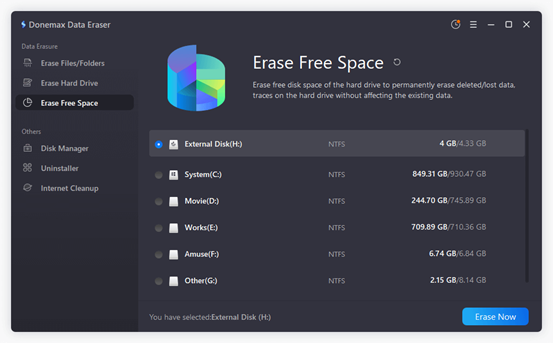
Mode 3: Erase Free Space
This is perhaps the most unique and useful feature for the average user. Often, we have already “deleted” thousands of files over the years using the standard Windows or Mac delete keys. As established, those files are still lurking in the “Free Space” of your hard drive.
- How it Works: This mode does not touch your existing, visible files. Instead, it scans the portions of your hard drive that are marked as “empty” and overwrites them with random data.
- Best For: Users who want to secure their privacy without losing their current files. If you have been using a laptop for three years and just realized you never securely deleted your old data, “Erase Free Space” will “mop up” the invisible remnants of your past activity.
- The Advantage: It provides peace of mind. You can continue using your computer exactly as it is, but you can rest easy knowing that your “history” has been permanently scrubbed from the hardware.
Certified Erasure Standards
What sets Donemax Data Eraser apart from a simple formatting tool is its adherence to global data destruction standards. The software allows users to choose from several different wiping algorithms, depending on their security needs:
- HMG Infosec Standard 5: A baseline standard often used for commercial purposes.
- U.S. Army AR380-19: A high-security protocol used by military branches.
- DoD 5220.22-M: The Department of Defense standard that overwrites data three or seven times.
- Peter Gutmann’s Algorithm: An intensive method that overwrites data 35 times for maximum security.
For most users, the DoD 5220.22-M standard provides the perfect balance between speed and unshakeable security.
Additional Features: The “Toolbox”
Beyond the three core erasure modes, Donemax Data Eraser includes a suite of utilities to help maintain your system’s health:
- Uninstaller: A clean way to remove applications and their leftover “junk” files that standard uninstallers often miss.
- Internet Cleaner: Instantly wipes browser caches, cookies, and history to prevent web tracking.
- Disk Manager: Provides a quick overview of your drives to check capacity and health status.
Take Control of Your Digital Footprint
We live in an age where our digital footprint is larger than ever. Leaving that footprint behind on old hardware is a risk no one should take. Whether you are a business professional protecting trade secrets or an individual protecting your identity, Donemax Data Eraser provides a professional, military-grade solution that is accessible to everyone.
By utilizing the Erase Files/Folders, Erase Hard Drive, and Erase Free Space modes, you can ensure that your private data stays exactly that—private. Don’t just delete; erase!

COMMENTS