


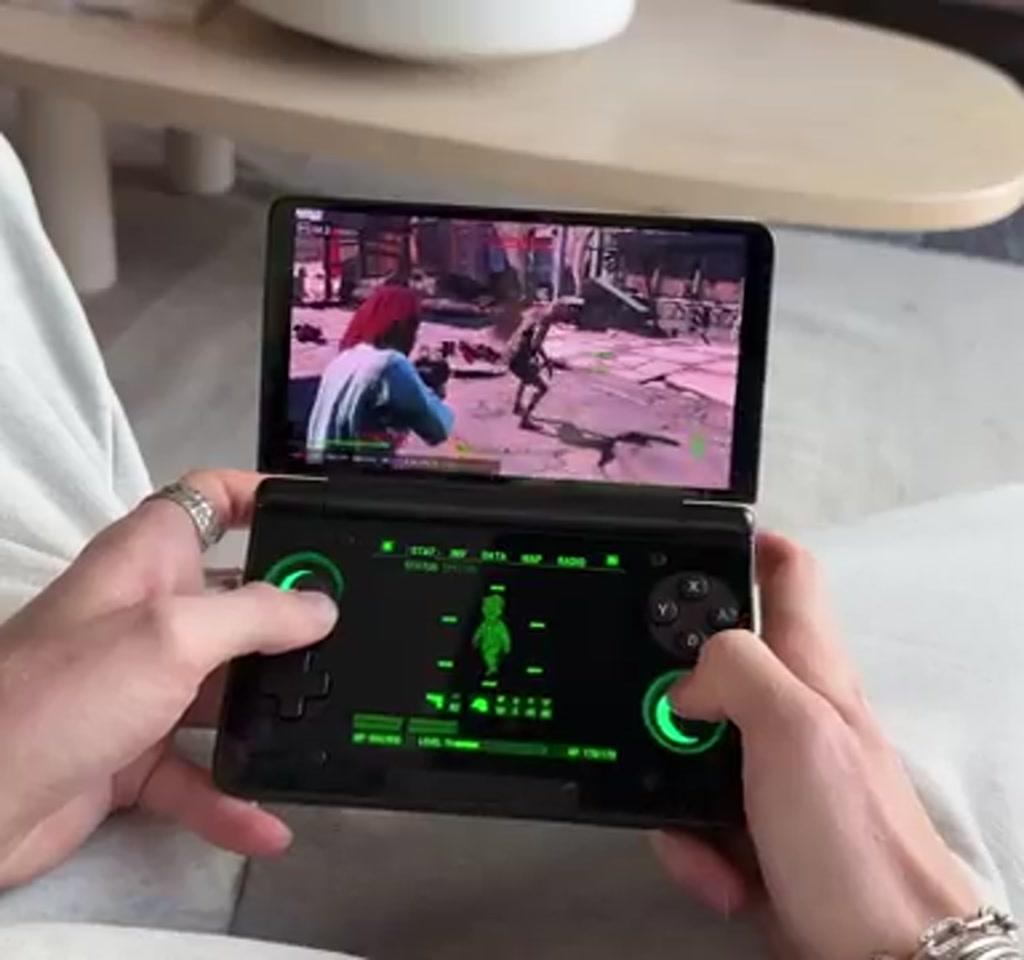
What looks impossible on paper has landed in pockets and hands across Reddit. Fallout 4, the PC Game of the Year edition, is running inside a Windows compatibility layer on an Android dual-screen handheld, and the official Pip-Boy companion app is functioning on the lower display as a real-time second screen. There is no PC, no remote streaming, no cloud trickery. It is the game, the companion, and the handheld, all together.
The real significance here is not merely that Fallout 4 boots. What actually determines whether this matters is that the Pip-Boy app, the interface Bethesda designed to pair with a remote game, can be repurposed as a fully operational second screen inside the same device. That changes how people think about companion interfaces, portability, and where the user interface of a modern PC game can live.
This project did not come from the game studio or a hardware vendor. It surfaced because a Reddit user known as Mr. Brotherson stitched existing tools together and posted the results. Community techniques, a handful of compatibility tweaks, and a curious handheld called the AIM Thor made the experience both possible and shareable. The discovery is a lesson in what happens when software designed for a phone is dropped into an unexpected runtime and hardware environment.
What follows is an exploration of how the trick works, what the gameplay experience actually feels like, and the tradeoffs that define whether this is a neat experiment or a genuinely useful way to play. Expect concrete constraints, setup essentials, and a look at the human side of using a device that behaves like a Nintendo DS for a modern, demanding open-world title.
How This Impossible Setup Actually Works
In short: a GOG copy of Fallout 4, Game Hub Lite running Windows containers on Android, and an older Pip-Boy APK combine so a single AIM Thor device hosts both the game and its companion locally. The approach routes the game through a compatibility layer while the Pip-Boy app talks to the local instance as if over a network.
The short version is a stack of three things: a GOG copy of Fallout 4 Game of the Year, an Android app called Game Hub Lite that runs Windows containers and compatibility layers, and an older Pip-Boy APK installed on the device to act as the lower screen companion. The AIM Thor hosts both the game and the companion app locally.
Crucially, the Pip-Boy app was never intended to be local to the PC process in this way. It was written to connect to a console or a PC over a network. The community workaround uses the compatibility layer in Game Hub Lite to expose the game in a Windows container while the Pip-Boy APK runs on Android and talks to the local instance. That choreography makes the map, inventory, and radio live on the lower screen without pausing the top screen.
Key players in the chain deserve credit. The Reddit thread that brought this into view was posted by Mr. Brotherson. A YouTuber called Tech Dweeb published an essential fix for missing audio in this configuration. And the AIM Thor was provided to the presenter by ET Prime, who enabled hands-on demonstration and reporting. These attributions matter because none of the behavior described here is a product feature from Bethesda or the handheld vendor; it is community orchestration.
Compatibility And The Local Pip-Boy
At the center of the trick is a compatibility layer that makes x86 Windows code behave on ARM hardware while the mobile Pip-Boy APK connects locally. That coupling is fragile: specific translator versions, effects settings, and a community sound patch are required to keep dialogue and radio from dropping out.
The Pip-Boy companion app is not available on the Play Store anymore, so obtaining an older APK is part of the setup. The Game Hub Lite container exposes the Fallout 4 executable on the device and the Pip-Boy app points to the local instance. Expect manual compatibility tuning and occasional swapping of translator families to keep things functional.
Playing Fallout 4 On The AIM Thor
The experience reads as two converging design choices: modern open world on the top OLED display and a persistent, interactive companion on the bottom. Quests stay visible, maps are live, and inventory swaps or fast travel happen without invoking a menu that covers the main view.
Controls And Comfort
From a human standpoint, the AIM Thor feels familiar, close to a Nintendo DS in form factor, which makes running a companion app feel natural. The OLED screens are vivid, with deep blacks and bright highlights that preserve Fallout 4’s atmosphere. Radio playback and most interface actions are responsive enough that the scene on top and the Pip-Boy below feel synchronized.
That said, the control layout introduces practical thresholds. The trigger and shoulder placements are reported as awkward for extended shooter play, with comfort issues surfacing after roughly 40 minutes of continuous play. This is a boundary condition that determines whether long sessions remain comfortable or require alternative peripherals or breaks.
Visuals And Latency
Frame rates typically fall within a 40 to 80 FPS window depending on location and settings. Open-world wandering on low-power settings can produce smooth sessions, while dense urban areas like Boston press the device and drop performance. Occasionally there is screen tearing and other artifacts. Latency is low enough that tapping the lower screen to change radio stations or fast travel feels immediate, but restoring input to the top screen requires an extra tap, a minor interaction quirk to internalize.
Performance, Limits, And Real Tradeoffs
Compute is the gating factor. Running a demanding PC title inside a compatibility layer on ARM requires tradeoffs among framerate, thermal output, and battery life. The AIM Thor can boost performance at the cost of fan noise and power draw, turning portability into a choice between fidelity and endurance.
This approach is compelling up to a set of clear limits. First, compute is the gating factor. Running a modern PC game inside an emulation or compatibility layer on an ARM-based handheld translates to tradeoffs between framerate, thermal load, and battery life. Pushing the AIM Thor into an extreme performance mode raises fan noise and power draw while improving frame rates. For a portable, that tradeoff is the defining tension between portability and fidelity.
Second, stability and compatibility are conditional. With this exact setup, the presenter reported roughly seven hours of playtime without an in-game crash, which is a meaningful data point for community experiments. But that stability appears to be a fragile equilibrium. Heavy NPC density, particle effects, and larger city areas produce pronounced frame drops and make the experience more sensitive to which compatibility effect or translator version is selected inside Game Hub Lite.
Two explicit constraints deserve emphasis:
1) Required Software Versions: The companion Pip-Boy app is no longer available on the Play Store. You must obtain an older APK externally, and the GOG edition of Fallout 4 is required for this pairing to behave. That means a legal copy from GOG and extra steps to install a deprecated mobile app.
2) Compatibility Tuning: The Windows container and CPU translator settings are not automatic. Users need to select between different effects versions, and a particular community zip file is needed to restore missing dialogue and sound in this mode. Expect a setup time measured in hours the first time and several manual toggles when a game updates or boots differently.
Putting numbers behind the friction helps. Frame rate variability lives in a 40 to 80 FPS range, sleep and resume generally work, but dense areas can push the device toward its thermal ceiling. Comfort issues tend to appear after sessions around 40 minutes. The sound fix and the GOG requirement are single points of failure that determine whether the Pip-Boy will function without missing dialogue or audio elements.
How To Recreate The Setup
This is written as an explanation of the community method rather than a step-by-step manual. The broad steps are installing Game Hub Lite to host the Fallout 4 executable in a Windows container, placing a GOG copy of the game into internal storage, and running an older Pip-Boy APK on the lower screen. After that, a community audio patch and translator tuning are typically required.
If the goal is to reproduce this on your own AIM Thor or a similar dual-screen handheld, the high-level steps are:
1) Install Game Hub Lite from Chrome on the device and use it to load the Fallout 4 executable.
2) Transfer the GOG copy of Fallout 4 into internal storage, locate the exe, and add it to Game Hub Lite so it runs inside a Windows container.
3) Install the older Pip-Boy APK on the bottom screen, and set the lower display to run that app while the game plays on the top.
4) Apply the Tech Dweeb audio fix, and experiment with different CPU translator and effects settings inside the compatibility options until the game boots with dialogue and stable audio.
Required Files And The Sound Fix
Download sources and specific zip fixes are community-maintained. The Tech Dweeb patch addresses a missing dialogue bug that otherwise renders much of the game sterile. Community packages like this are the difference between a proof of concept and a playable experience. Because these are not vendor-supported, treat the instructions as fragile and maintain a copy of working configurations.
Game Hub Configuration And Compatibility Layers
Inside Game Hub Lite the game runs in a Windows container and you select a CPU translator. The presenter highlights a translator family called FEX, which is similar to what some other ARM gaming efforts use to run x86 games. Different games and even different boots of the same game may require switching effect versions. That tuning is a recurring maintenance step.
AIM Thor Versus Alternatives
Comparing the AIM Thor setup to other handheld options clarifies tradeoffs. AIM Thor offers a rare, integrated dual-screen companion experience, while most single-screen Android handhelds rely on streaming, remote desktop, or external controllers. The choice hinges on local performance, developer support for companions, and willingness to manage compatibility layers.
For decision makers, the real comparison is local dual-screen portability versus remote streaming convenience. Local hosting reduces input and audio lag potential but increases setup fragility and thermal stress. Streaming shifts the burden to network reliability and a separate PC or cloud instance.
What This Means For Portable Gaming
The Pip-Boy proof is not merely a novelty. It demonstrates that companion systems can be decoupled from original workflows and used meaningfully on a single handheld. That opens a keyword-sized set of new questions for UI design, developer intent, and the future of portable PC gaming.
From an editorial standpoint, this is not a finished product story. It is a community-driven milestone in which software flexibility and inexpensive hardware meet to create a new use case. The value is highest for tinkerers, for players who prize portability over absolute stability, and for anyone interested in rethinking where a game’s UI lives.
There are practical next steps for anyone tracking this space. Handheld hardware will continue to improve in raw ARM performance and thermal design, compatibility layers will mature, and community patches that fix audio or controller quirks will become easier to apply. Each of those trends reduces friction and narrows the gap between a clever hack and a repeatable experience.
For further context on the community work behind the audio fix and specific configuration notes, the original walkthroughs referenced in the community thread are a useful next read.
Portable PC gaming is arriving through unconventional routes, and the AIM Thor Pip-Boy experiment is a vivid preview of what that future might look like when software, hardware, and community ingenuity meet. The interesting part is not that this can be done today, but how quickly the thresholds that make it merely possible will shift toward genuinely practical.
What happens next will be decided by a mix of hardware advances, better compatibility tooling, and whether developers decide to design companion systems with local dual-screen use in mind. That is a conversation worth watching because it changes what portability can mean for big, modern games.
Who This Is For And Who This Is Not For
Who This Is For: Tinkerers and early adopters who accept setup fragility in exchange for a unique local dual-screen experience. Players who value portability and creative workarounds over plug-and-play stability will find the experiment rewarding.
Who This Is Not For: Players who demand rock-solid stability, guaranteed multiplayer parity, or long continuous sessions without ergonomic issues. Anyone who prefers official support, simplified updates, or streaming-based portability should consider alternatives.
FAQ
What Is Required To Run Fallout 4 Locally On An Android Handheld?
A GOG copy of Fallout 4, Game Hub Lite to run the Windows container, and an older Pip-Boy APK for the lower screen. Community patches such as the Tech Dweeb audio fix are typically needed for full audio and dialogue.
How Does The Pip-Boy App Communicate With The Game?
The Pip-Boy was designed to communicate over a network with a console or PC. In this setup it talks to a local instance running inside Game Hub Lite’s Windows container, tricking the companion app into treating the handheld like a remote client.
Is The Pip-Boy App Available On The Play Store?
No. The companion Pip-Boy app used in this project is no longer on the Play Store and must be obtained as an older APK from community sources.
What Performance Can I Expect On The AIM Thor?
Frame rates reported in the demonstration range from roughly 40 to 80 FPS depending on settings and location. Dense urban areas and heavy effects will lower performance and increase thermal stress.
How Stable Is This Configuration For Long Sessions?
The presenter reported about seven hours of playtime without a crash in this particular demonstration. Stability is conditional and sensitive to compatibility settings, so experiences may vary.
Can I Use This Method On Other Android Handhelds?
Potentially, but success depends on hardware capability, available compatibility tooling, and community support for the specific device. The AIM Thor’s dual screens and form factor make it particularly suited to the Pip-Boy pairing.
Does This Require Legal Copies Of The Game?
Yes. The method requires a legal GOG edition of Fallout 4 for the compatibility pairing described here.
Where Can I Find The Community Fixes And Walkthroughs?
The original Reddit thread by Mr. Brotherson and linked walkthroughs, plus the Tech Dweeb video and community zip packages, are the primary sources. Because these fixes are community-maintained, links and files may move or change over time.
COMMENTS