


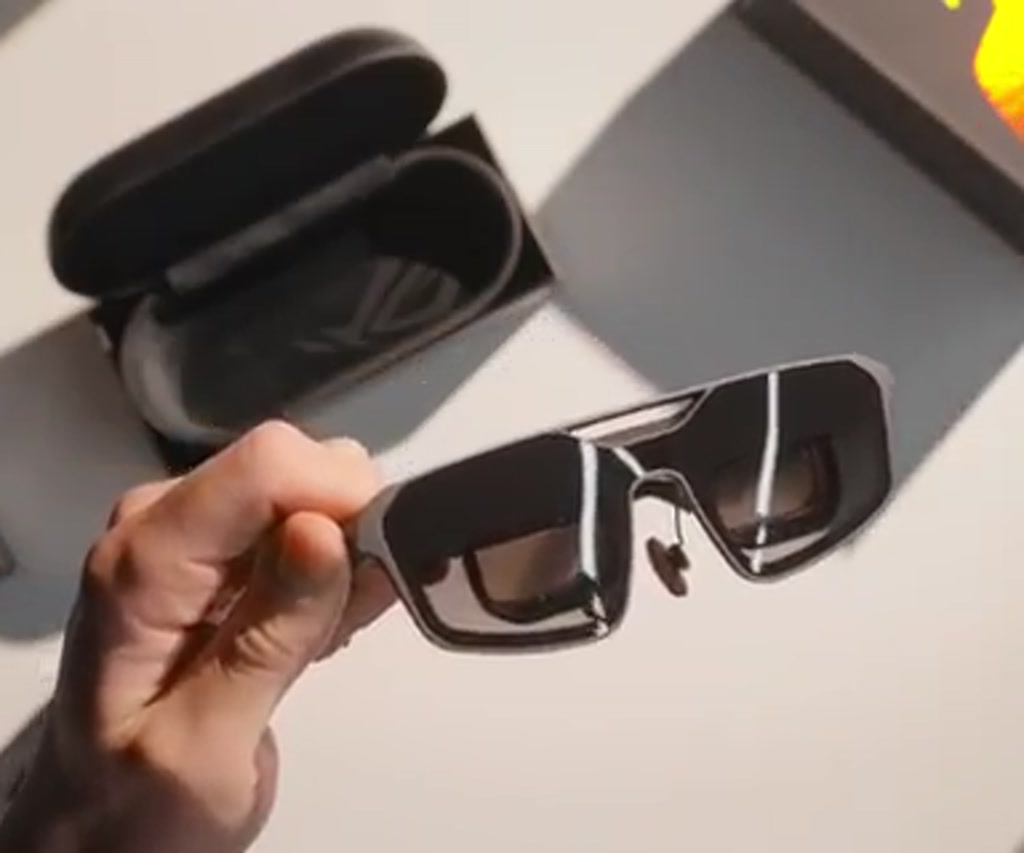
Imagine carrying a 240 Hz OLED monitor in your pocket and then remembering you did not open a sci-fi novel after all. The ROG XREAL R1 behaves exactly like that promise translated into consumer hardware: a pair of glasses with micro OLED panels tucked right in front of your eyes, driven by a single USB-C cable and able to render a virtual display that feels far larger than the device itself.
The immediate payoff is obvious and visceral. Plug the R1 into a Steam Deck, laptop, or a PC and a giant screen appears. It can follow head movement, be locked in place, and be nudged closer or further away. The hardware choices are surprisingly coherent: 1920 by 1080 micro OLED panels, 120 Hz native timing, a 240 Hz frame rate boost mode, and a chassis that tips the scales at about 91 grams.
The real significance here is not simply that a tiny display ecosystem exists. What matters is how this changes expectations about high-fidelity gaming on the go. The ROG XREAL R1 does not try to be a tiny VR rig or a fancy pair of sunglasses. It is a monitor that you wear, and that shift in role exposes a set of useful strengths and predictable limits that will determine who should consider one.
What most people misunderstand at first glance is where the tradeoffs land. This is not about replacing your living room 4K OLED and surround sound. It is about replacing portable compromises, such as cramped laptop screens or low pixel density handhelds, with an experience that delivers high frame rates, vivid contrast, and a surprisingly immersive sense of scale while you stay mobile. The sooner you treat the R1 as a wearable monitor and not a consumer spectacle, the sooner its unique value becomes clear.
How The Hardware Reads On Paper And In Use
The spec sheet is compact but meaningful. Each eye receives a native 1920 by 1080 micro OLED panel. They run at 120 Hz by default and can be boosted to 240 Hz through a frame rate boost mode that halves the vertical resolution and then upscales. The manufacturer also quotes a virtual screen size of 171 inches, though subjective perception landed closer to what feels like a 65-inch TV for the reviewer. Weight is 91 grams and vertical hinge adjustment is about three and a half degrees, helping with fit and alignment.
These numbers matter because they frame two immediate constraints. First, the panels are 1080p each, which makes gaming visually crisp for most titles but pushes performance requirements when the host device is not powerful. Second, the 240 Hz mode is a tradeoff: you double frame rates for smoother motion, but you accept a drop in sharpness, especially for text and UI elements.
Design, Build, And Wearability
The R1 feels light and mechanically solid. Hinges have a firm clamp and the top of the frame is rubberized for comfort. Controls are concentrated on the right arm and include a volume rocker and menu buttons. Built-in speakers are present and usable, though they lean thin and lack the body of seated headphone audio; the reviewer recommended IEMs for a fuller soundstage.
Comfort is a practical constraint that the review highlights with numbers: the longest continuous session reported was about five hours, after which the wearer felt they could continue for another five without major eye strain. That implies these glasses can sustain marathon sessions far longer than many portable displays permit, which is notable. Still, individual experiences will vary.
Gaming: What Works, And What Determines Whether It Works For You
Hook the R1 to a Steam Deck and the experience changes almost immediately. The Deck’s native display is 800p, so feeding the R1 at 1080p places a higher GPU load on an already mobile device. In one test, Doom Eternal at 1080p on the Steam Deck ran between 60 and 70 frames per second. That performance is impressive given the platform, but it is also the clearest example of a constraint turned into a condition: if a title already struggles on the Deck, the R1 will amplify that pressure because you are asking the system to render at a higher resolution.
Paired with a powerful PC, the R1 plays to its strengths. With a mini PC containing a high-end GPU, the sense of immersion was described as one of the most compelling recent portable gaming experiences. Forza Horizon rendered cranked up to the max felt like a living, portable cinema. The R1 becomes a legitimate monitor replacement in these contexts: BIOS, secure logins, full desktop control all work directly through the lenses.
240 Hz Frame Rate Boost: The Tradeoff That Feels Like A Win
The frame rate boost mode is not magic. It doubles the frame rate by halving vertical resolution and then upscales. That creates a visual softness, noticeably on small text and menus. Yet for fast-paced games, the subjective improvement in smoothness was dramatic. In practice, the 240 Hz mode felt smoother than many 240 Hz monitors and even approached the fluidity of higher-end displays in motion, according to the reviewer.
Consider the constraint in quantified terms. Native operation at 120 Hz preserves 1080p fidelity. Boosted operation trades that fidelity for refresh. The decision becomes situational: for twitch shooters and high-speed racing, the gain in responsiveness and motion clarity can outweigh the loss in fine detail. For slower, visually rich single-player titles, the full resolution at 120 Hz may be the better choice.
Optics, Image Quality, And Field Of View
Micro OLED panels deliver contrast and black levels that are difficult to replicate in tiny form factors. Colors pop and contrast is punchy. The reviewer observed minor chromatic fringing and slight softness around the periphery, but those artifacts recede once immersed in gameplay. The lenses create a narrow field of view relative to VR headsets, which is a deliberate boundary rather than a flaw: it preserves awareness of the physical surroundings while still providing immersion.
Claimed virtual size and perceived size diverged for the reviewer. The marketing number of 171 inches is technically defensible based on angular subtension calculations, but perception landed closer to a 65-inch screen because field of view and viewing distance in real rooms matter. This is a useful example of how optical claims translate into human experience: headline numbers capture dimension, but perceived scale depends on the viewing context.
Where Text And Productivity Encounter Limits
The R1 excels at gaming scenarios where motion, contrast, and immersive scale are prioritized. Productivity tasks that depend on crisp, small type, like text-heavy editing or long-form spreadsheets, expose limits. Small fonts can be hard to read and the slight softness in certain modes makes extended text work uncomfortable for some users. The reviewer found basic editing and web browsing doable but not enjoyable for long stretches.
That boundary is worth stating plainly. If your primary use case is document editing and line-by-line code review, a dedicated monitor remains the better tool. If portability and immersive gaming are primary, the R1 flips that equation in your favor.
Practical Constraints And Tradeoffs You Have To Accept
Two constraints deserve explicit attention because they determine real-world usefulness. First, performance and power. Driving two 1080p panels and pushing higher frame rates makes more demands on host devices. On battery-powered hardware like the Steam Deck, expect the runtime to fall into hours rather than a full day of casual use. The recorded Doom Eternal run of 60 to 70 fps at 1080p illustrates that the Deck can do it, but at a cost in thermal load and battery life.
Second, field of view and legibility. The R1 has a narrower field of view than head-mounted VR headsets, which preserves situational awareness but limits the sense of total immersion. Text sharpness is a second quantified constraint: while gaming textures frequently read at a perceived higher resolution than 1080p, fine UI elements and small fonts can be difficult to parse, especially in the 240 Hz boosted mode where vertical resolution is halved before upscaling.
There are other practical considerations to weigh. The glasses do not function well as normal eyewear when the displays are off. Seeing through the lenses can be difficult, and the presence of a USB-C cable means the form is not socially invisible in public. The reviewer suggested that a slightly bulkier design might be acceptable if it enabled a wider field of view and improved optical performance.
Where The ROG XREAL R1 Fits In The Tech Landscape
Viewed against alternatives, the R1 changes the comparison set. It does not compete directly with a home theater setup. It competes with portable monitors, gaming laptops, and the idea of compromise that comes with them. For the reviewer, the R1 dramatically outperformed portable monitors and laptop displays in terms of perceived size and comfort while remaining far more travel-friendly than a 4K OLED and a full audio rig.
From a usage standpoint, the R1 lands as a specialized tool. It is best for people who need high-fidelity portable gaming and are ready to accept the defined constraints of the field of view, power, and text clarity. It is not a general-purpose replacement for all visual tasks. That specialization is its strength. The device makes a strong case that the future of portable high-fidelity graphics might be wearable rather than boxed.
Practical Setups And Power Profiles
Setups vary and the R1 is flexible. A handheld like the Steam Deck offers near instant portability at the expense of graphical headroom. A mini PC with a substantial GPU pushes the experience into the realm of desktop fidelity while remaining more packable than a full monitor and speaker setup.
The reviewer mentioned a mini PC with a volume of roughly 10 liters that powered ultra graphics and made the R1 sing. That suggests a spectrum of power illusions from light to very capable, depending on the host.
For travelers, a gaming laptop or a smaller GPU like a 5070-class card will cover most needs without requiring the largest desktop GPUs. That creates a practical rule of thumb: the richer the GPU you pair, the closer the R1 becomes to a true monitor replacement for gaming. Less powerful hosts push you toward resolution and frame rate tradeoffs.
What Is A Wearable Monitor And Why The R1 Matters
A wearable monitor places small displays directly in front of the eyes to create a virtual screen that follows head motion. The ROG XREAL R1 is a concrete example: two micro OLED panels deliver high contrast and low latency, and a USB-C connection makes host compatibility simple. This format redefines portability by prioritizing perceived screen size over raw pixel count.
How The ROG XREAL R1 Works With Host Devices
The R1 is driven over USB-C and behaves like an external display to most hosts. Each eye receives its own micro OLED image at native 1080p and the system supports a frame rate boost to 240 Hz by halving vertical resolution and upscaling. That makes the R1 straightforward to integrate but also places clear performance demands on the source device.
Benefits And Use Cases For Portable Gaming And Travel
The core benefits are perceptual size, high refresh rates, and strong contrast in a travelable package. For gamers who move between locations, the R1 offers a cinema-like experience without hauling a monitor. It also enables discreet desktop-level tasks like BIOS setup and secure logins when paired to a capable mini PC or laptop.
Limitations And When The R1 Will Disappoint
The main limits are field of view, small text legibility, and power draw on mobile hosts. If your workflow depends on dense text, spreadsheets, or long coding sessions, the R1 will feel corrective rather than complementary. If you need social invisibility or eyewear that doubles as normal glasses, the R1 is a compromise.
ROG XREAL R1 Vs Portable Monitors And VR Headsets
Comparisons highlight decision factors rather than brand claims. The R1 sits between portable monitors and VR headsets: more immersive than a small portable display, less enveloping than VR. Each choice forces tradeoffs across portability, immersion, text clarity, and social acceptability.
R1 Versus Portable Monitors
Portable monitors offer a wider field of view and easier shared viewing, and they do not require a head-mounted form. The R1 outshines them in perceived scale for a single user and in travel footprint, but it sacrifices text comfort and public discretion compared to thin flat displays.
R1 Versus VR Headsets
VR headsets provide a wider field of view and deeper immersion but usually come with extra weight, bulk, and a total loss of situational awareness. The R1 trades some immersion for comfort and real-world visibility, making it a better fit for mixed environments where awareness matters.
R1 Versus Gaming Laptops
Gaming laptops provide integrated input, audio, and cooling. The R1 with a powerful host can match or exceed perceived visual scale while being far more packable. However, it does not replace built-in keyboards or full audio rigs, and pairing adds complexity that a laptop avoids.
Who This Is For And Who This Is Not For
Best Suited For: Gamers and travelers who prioritize perceived screen size, high refresh gameplay, and travel-friendly setups. Owners of mini PCs, gaming laptops, or Steam Deck-class devices who accept power and text tradeoffs will find the R1 compelling.
Not Recommended For: Knowledge workers who depend on long sessions of small font reading, people who need normal eyewear functionality when displays are off, or users who want a socially invisible public setup. If absolute field of view and pixel-perfect UI legibility are essential, stick with traditional monitors or head-mounted VR solutions.
FAQ
What Is The ROG XREAL R1?
The ROG XREAL R1 is a wearable display in the form of glasses that uses two 1920 by 1080 micro OLED panels to create a virtual screen. It connects over USB-C and supports native 120 Hz and a 240 Hz frame rate boost mode that halves vertical resolution before upscaling.
How Does The 240 Hz Frame Rate Boost Work?
Frame rate boost doubles refresh by rendering at half the vertical resolution and upscaling to the final image. The result increases motion smoothness at the expense of fine detail, particularly on text and UI elements.
Can I Use The R1 With A Steam Deck Or Laptop?
Yes. The R1 works with Steam Decks, gaming laptops, and mini PCs that support an external USB-C display. Performance will depend on the host GPU and power profile; battery-powered devices will see reduced runtime under load.
Is The R1 Good For Productivity And Text-Heavy Work?
Not as a primary productivity display. The R1 handles basic web browsing and document edits but small fonts and dense spreadsheets can be uncomfortable for extended sessions, especially in 240 Hz boosted mode.
How Long Can I Wear The R1 Comfortably?
Comfort varies by user, but the reviewer reported a longest continuous session of about five hours before feeling they could continue for another five without major eye strain. Individual results will differ based on fit and sensitivity.
Does The R1 Replace A Home Monitor Or VR Headset?
No. The R1 replaces certain portable display compromises and competes with portable monitors or small laptops, but it does not substitute for home theater setups or fully immersive VR headsets because of its narrower field of view and unique tradeoffs.
Are There Any Social Or Practical Drawbacks?
Yes. The glasses are not invisible in public and seeing through the lenses when displays are off can be difficult. The tethered USB-C cable and headset-like appearance mean you should consider social context when using them outside private spaces.
Will Software Need To Change For Wearable Displays?
Possibly. The reviewer and editorial perspective suggest UI and OS designers can optimize for head-tracked displays and dynamic perceived scale, but widespread software adaptation remains an open opportunity rather than an existing standard.
Related Coverage: For readers curious about how wearable displays compare to portable monitors and VR rigs, Bit Rebels has explored portable display ergonomics and the evolving role of micro OLED tech in mobile workflows.
COMMENTS