


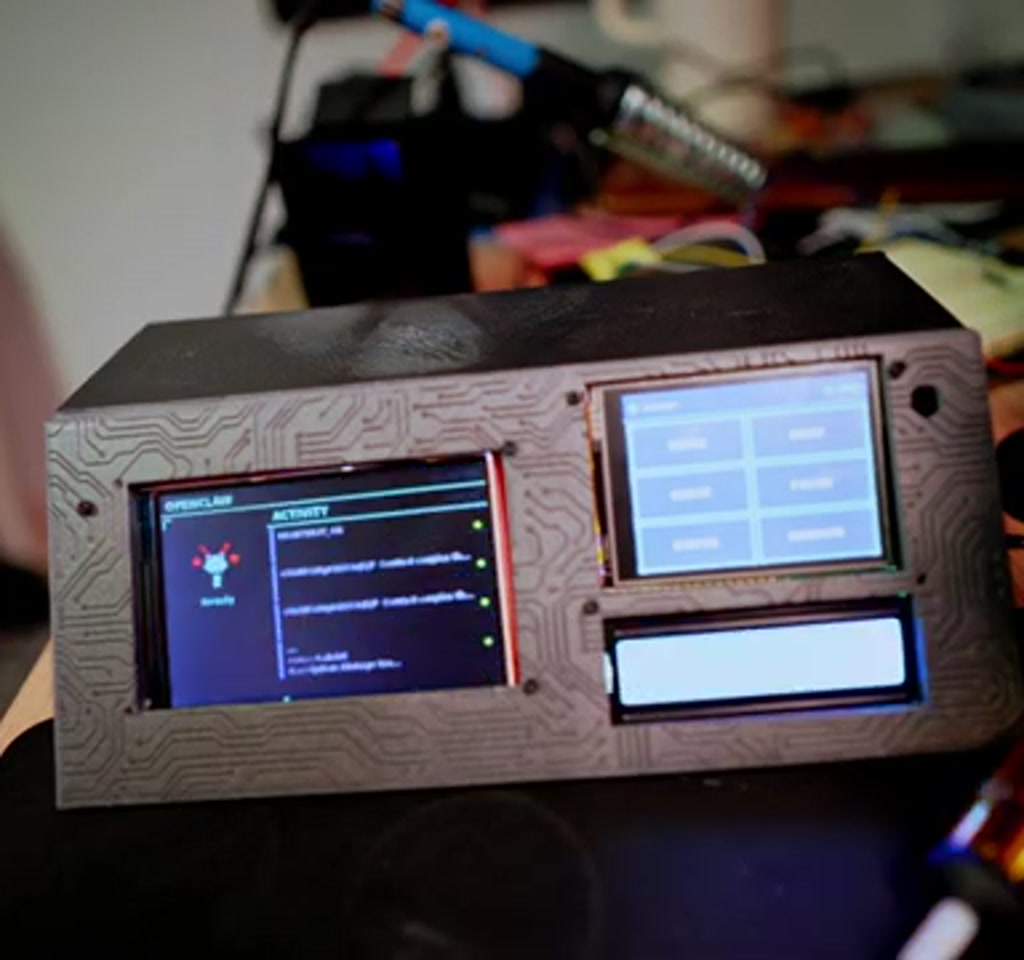
The most interesting thing about this project is not that OpenClaw automates email or creates tasks. The real significance here is that a dedicated physical interface changes how AI agents get treated, shifting them from noisy chat companions into a manageable queue of actions you can work through on your desk. Called an OpenClaw command terminal, the two-screen setup reframes agents as a focused action center rather than a background notification source.
That shift matters because attention architecture is a design problem, not a technical novelty. Instead of another app fighting for screen time, the terminal presents a curated feed of items that the agent has flagged as needing human judgment. The effect is less distraction and more decision throughput, and that behavioral change is the design intention behind the build.
What this article reveals early is where the idea is strongest and where it becomes fragile. The design succeeds when the stack isolates the agent from your personal environment and maintains reliable uptime. It becomes fragile when you try to run everything on a single, always-on personal device, or when API costs and hardware tradeoffs are not accounted for.
This piece walks through the components, the hard-engineering edges, the security choices, and the user-experience decisions behind a two-screen OpenClaw command terminal. It also lays out concrete constraints so a maker knows what they are committing to before firing up a 3D printer and soldering iron.
Why A Dedicated OpenClaw Terminal Matters
At its core, the OpenClaw command terminal is an interface decision: move agent output from ambient chat to a single-task queue. This changes how people prioritize suggested actions and reduces the cognitive cost of switching contexts. The result is a predictable workflow for human review instead of a scattering of interruptions across apps.
That design choice brings an immediate tension: convenience versus isolation. A deskside terminal is convenient and visible, but it only works if the agent is reliably monitored and the host environment is properly contained. Those trade-offs reappear when we look at hosting, API usage, and the hardware choices below.
The Hardware Stack And What It Costs
The build centers on a Raspberry Pi 4 connected to two small displays, basic input controls, and a custom enclosure. Parts listed by the creator total roughly 35 to 40 USD for displays, buttons, a micro SD card and wiring, excluding access to a 3D printer and any fabrication tools. The Pi handles the local UI, not agent hosting.
Concrete Cost And Power Tradeoffs
Hardware cost is low on the parts list, but always on power and a host server create recurring expenses. Expect a modest monthly VPS fee to keep OpenClaw monitoring reliably. That separation is intentional: the Pi serves as an interface while a VPS provides continuous uptime and isolation from personal files.
Integration Friction
Putting the parts together is not plug-and-play. The displays were designed for Arduino and ESP32 boards, so adapting them to a Raspberry Pi required soldering and careful GPIO planning. Shared pins and limited interfaces forced a double-sided PCB for a reliable build rather than a breadboard prototype.
Software, Security, And Where To Run OpenClaw
OpenClaw needs a host that stays online because its heartbeat checks and monitors build the task queue. If the host loses power or connectivity, monitoring stops and the terminal no longer surfaces fresh tasks. That dependency makes hosting a first-order design decision for anyone considering a dedicated agent terminal.
Where To Host OpenClaw
Sandboxing OpenClaw on a VPS isolates agent access from your daily workstation and personal files. The creator used a KVM-based VPS and noted a provider that offers a dedicated OpenClaw setup page with SSH key setup and a quick install. This approach reduces accidental data exposure compared to running agents on a personal machine.
API Costs And Usage Scaling
API usage is a critical operational constraint. The creator explicitly warns that costs can scale quickly, turning a single-digit monthly bill into hundreds for heavy or frequent checks. Planning automation frequency and metering API calls is therefore essential before committing to always-on monitoring.
OpenClaw Vs Chat-Based Agents
Comparing a dedicated OpenClaw command terminal to chat-based agents clarifies the tradeoffs. The terminal prioritizes sequential task processing and reduced interruption, while chat agents emphasize conversational discovery and ad hoc interaction. Decision factors include privacy, cost, visibility, and how tightly you want agents integrated into everyday apps.
Interruption Patterns And Productivity
Chat-based agents can increase noise because they surface in the same apps you use for other tasks. A deskside terminal turns that noise into a single queue to process. The efficiency gain depends on discipline: if you ignore the terminal or let it go stale, the advantage disappears.
Privacy, Isolation, And Control
Running OpenClaw on an isolated VPS reduces the chance that agent access mixes with sensitive local files. Chat-based agents hosted within personal apps may simplify setup but increase data exposure. That makes hosting choice a major factor in long-term safety and compliance for sensitive workflows.
Design, Build, And The Aesthetic Choices
The project leans into a cyberpunk, crafted aesthetic: a mascot, styled live feed, matte PLA casing, and accent PETG bezels. The wedge enclosure was modeled in Fusion 360 and prints in two halves, with blocky bezels added to conceal imperfections. The build prioritizes personality over factory polish.
Enclosure And Fabrication Notes
Practical steps included sanding parts, priming, and adding metal washers for weight. The case accepts the Pi, rotary encoder and displays, but real assembly time goes into cable routing, trimming bezels and aligning screws. These details determine whether the final device feels robust or makeshift.
Practical Lessons From The Build
The build rewards patience and incremental problem-solving. Pairing components that work separately often introduces new compatibility headaches, whether overlapping pins, power routing, or display drivers. Expect to iterate on wiring and software integration rather than finishing in a single afternoon.
Two takeaways stand out. First, the user interface matters as much as the mechanics: a styled feed and mascot make the terminal approachable. Second, time sinks are physical: cable management and tolerances will dominate the final assembly time more than code tweaks.
Open Source Availability And Next Steps
The project is open-sourced with 3D print files, software, and assembly instructions so others can reproduce the build. That lowers the entry barrier, but adoption remains shaped by ongoing server costs and API usage fees. Community forks can trade features against cost or polish.
There is an open question about whether this concept stays a maker novelty or evolves into a mainstream productivity category. The answer depends on three converging trends: cheaper stable hosting options, clearer metering for agent APIs, and hardware modules designed specifically for agent UIs rather than repurposed displays.
Who This Is For And Who This Is Not For
Who This Is For: Makers and privacy-conscious users who want a visible, single-queue interface for agent-suggested actions. It suits people willing to manage a VPS, budget for API usage, and invest time in fabrication and wiring.
Who This Is Not For: Users expecting a polished consumer product with plug-and-play reliability, or anyone unable to accept recurring hosting and API costs. If you need a fully managed, no-hardware solution, chat-based agents inside existing apps will be a better fit.
FAQ
What Is An OpenClaw Command Terminal?
An OpenClaw command terminal is a small, dedicated desktop device that displays a curated queue of tasks produced by the OpenClaw agent framework. It uses a Raspberry Pi for the user interface while the agent itself runs on a separate, always-on host to monitor email, calendars, and other services.
How Much Does The Build Cost?
The parts list reported by the creator totals about 35 to 40 USD, excluding access to a 3D printer and excluding a VPS. Ongoing hosting and API fees are separate and can add recurring monthly costs.
Where Should I Run OpenClaw For Reliability?
Running OpenClaw on an isolated VPS is the recommended approach for continuous monitoring and reduced data exposure. The creator used a KVM-based VPS and noted a provider with a quick install page to simplify setup.
Are API Costs A Major Concern?
Yes. The creator warns that API costs can scale quickly and may move from tens to hundreds of dollars per month depending on automation frequency. Estimate usage and plan metering before committing to always-on checks.
Can I Use A Raspberry Pi To Host Everything?
The Raspberry Pi is suitable for the local display and input, but it is not recommended as the primary host for continuous monitoring. A Pi can be unreliable for always-on tasks and mixes agent access with local files, which increases risk.
Are The Files And Code Available To Reproduce The Build?
Yes. The creator has open-sourced the code, 3D print files, and assembly notes in the project repository for anyone who wants to reproduce or iterate on the design.
Is This A Finished Product Or A Maker Proof Of Concept?
This project is presented as a maker proof of concept. It demonstrates the idea and makes reproduction feasible, but recurring hosting and API costs, plus integration details, determine whether it matures into a daily tool for a wider audience.
Can This Approach Reduce Distraction?
Potentially. By converting agent outputs into a single, processable queue, a deskside terminal can reduce interruption. Its effectiveness depends on discipline, reliable hosting, and careful selection of automations so the queue remains meaningful rather than noisy.
For makers and curious readers, the repository provides everything needed to try the build. The broader implication is more interesting: whether dedicated agent hardware will become a new category of productivity device that changes how work gets done on the desk.
COMMENTS