


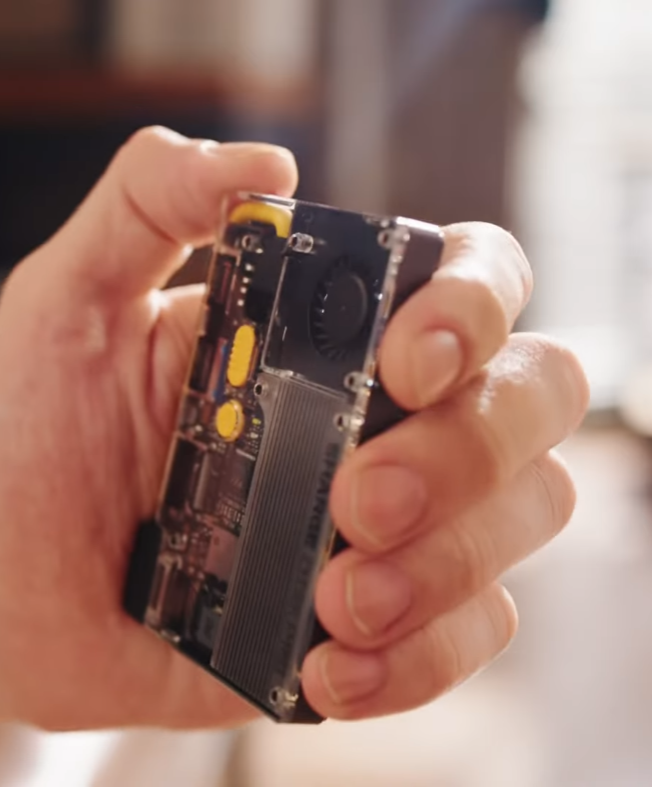
Put bluntly, the SHARGE Disk Pro is asking a question most accessories avoid: what if the external SSD did more than store files, and the USB hub did more than route ports? The product folds those two roles into one aluminum pocket box that includes a fan, a built-in NVMe, two USB-A ports, an HDMI output, MagSafe-style mounting, and pass-through charging. That packing of functions is the device’s central idea and its biggest implication for how people travel and capture media.
The real significance here is not the single number that wins benchmark pages. What actually determines whether the Disk Pro matters is its ability to deliver sustained throughput while connected to phones, tablets, and handheld consoles, without dangling cables or a separate hub. In practice, this shifts the decision from chasing peak throughput to valuing consistent, reliable transfers during travel and capture sessions.
Most people misunderstand the trade at the heart of this product. They see a 10Gbps USB 3.2 Gen 2 rating and assume it is obsolete compared with Thunderbolt 3 or USB4.
That is true if your only metric is peak bandwidth. It misses the point that active cooling, pass-through charging up to 100W, HDMI output, and magnetic mounting turn the Disk Pro into a travel toolkit where stability matters more than top-end bursts.
What follows is a close look at how the Disk Pro assembles those features, where the engineering choices create clear benefits, and which constraints determine whether it will fit a particular workflow. The aim is to show the thresholds that define its usefulness, not to hand out a rating or a single verdict.
The device is a compact design proposition: trade the highest possible peak speeds and user serviceability for consolidated function and predictable long-form performance. That trade opens new decisions for mobile creators and travelers, and it surfaces questions about whether integration or modularity better serves future workflows.
What SHARGE Disk Pro Actually Packs
Compact Specs, Dense Feature Set
The Disk Pro is a pocket-friendly device that measures 90 x 61 x 11 mm and weighs 150 g. It ships with built in TLC NAND in three capacity options: 1TB, 2TB, and 4TB.
The enclosure includes an integrated USB-C cable rated for 10Gbps and a separate USB-C port for power delivery input. Ports listed by the maker include two USB-A ports, one HDMI 2.1 output, and the integrated USB-C cable, which together are marketed as a 5-in-1 expansion device.
Storage is sealed and not user-upgradeable. That design decision preserves the enclosure’s cooling layout and magnetic mounting, but it also fixes capacity at purchase time. If future storage needs grow, the only option is to buy a replacement model with a larger internal drive.
How The Port Mix Functions In Practice
The port values are practical: two USB-A ports for keyboards, mice, or a thumb drive; an HDMI port for video output to a monitor or TV; and a USB-C pass-through that accepts up to 100W from a wall charger. The built-in cable can supply up to 80W to the host, subject to host and charger negotiation.
Video output is specified as HDMI 2.1, with support up to 4K at 144Hz or 8K at 30Hz depending on what the host can deliver. In mobile workflows that means a handheld console or phone that supports DisplayPort over USB-C can drive an external monitor through the Disk Pro while also writing to the internal SSD.
What Is A Portable SSD Hub And Why It Matters
A portable SSD hub combines external NVMe storage with hub functions such as display output, USB ports, and power delivery in a single enclosure. The appeal is practical: fewer cables, less chance of accidental disconnects, and integrated cooling so sustained transfers stay near the bus ceiling during long copy or recording sessions.
How It Handles Heat And Sustained Transfers
Active Cooling As A Design Choice
Thermal management is the feature that turns a fast but short-lived SSD into a device that performs consistently across long transfers. The Disk Pro has an internal fan described as the 3004 silent turbo fan. Official specs list auto mode spanning roughly 7,000 to 10,000 rpm and a turbo mode at 10,000 rpm.
Reviews report that with the fan active, sustained read speeds land in the 800 to 900 MB per second range and sustained writes in the 700 to 800 MB per second range on repeated tests.
Those sustained figures matter because the USB 3.2 Gen 2 10Gbps bus sits in a practical ceiling near 1,000 MB per second. Without active cooling most portable NVMe enclosures thermal throttle and drop well below those sustained numbers, so the Disk Pro trades a little extra weight and acoustics for more predictable throughput over longer durations.
Noise, Temperatures, And User Controls
Cooling is not invisible. NAS Compares recorded operating temperatures in the mid-30s to around 40 °C under sustained load with the fan running.
Fan noise during those tests was reported in the low 40 dBA range when active, and effectively silent when the fan is idle. There is a physical button that toggles turbo mode so users can force the fan to run continuously when recording long sessions or performing repeated transfers.
What becomes obvious when you look closer is that the Disk Pro treats sustained performance as a feature that is as important as raw speed. For creators who record video directly to external storage or who copy multi-gigabyte libraries on the go, the ability to keep speeds near the bus ceiling for extended periods is what separates a useful travel drive from an accessory that needs frequent breaks.
Ports, Power, And The Mini Dock Promise
Pass Through Charging And Power Budgets
The USB-C input supports power delivery up to 100W, while the built-in cable can deliver up to 80W to the host. Those numbers are bounded by how chargers and hosts negotiate power. In practice it means you can plug a 65W or 100W charger into the Disk Pro, charge a laptop or phone while also using the SSD and other ports, and avoid losing a host USB-C port to a hub. The convenience is tangible when traveling with a single charger and a single cable.
Display Output And Peripheral Latency
HDMI output through the Disk Pro makes it functionally a tiny dock. For a laptop or a handheld device that supports DisplayPort alt mode over USB-C, the Disk Pro can mirror or extend a display while providing storage and peripheral ports.
The tradeoff appears when multiple ports are active: the controller architecture must share bus bandwidth between display, SSD, and USB peripherals. The manufacturer documents and review testing indicate multiple controller chips help reduce bottlenecks, but the USB 3.2 Gen 2 limit still defines an upper bound.
How The SHARGE Disk Pro Works In Typical Mobile Workflows
Connect the Disk Pro to a phone or laptop via the integrated USB-C cable, mount it magnetically when supported, and plug a charger into the pass-through port to keep the host powered while transferring data.
That simple sequence converts a pocket-sized NVMe into a working mini dock that minimizes cable stress and preserves sustained throughput during long copies or direct camera recording.
Benefits Of The SHARGE Disk Pro
The most practical benefits are consolidation and consistency. Combining SSD, hub, cooling, and MagSafe-style mounting into a single package reduces points of failure, shortens setup time in the field, and keeps transfer speeds more predictable than a passive enclosure that thermal throttles during long sessions.
Who Should Pick Which Capacity
The Disk Pro comes in 1TB, 2TB, and 4TB configurations. The 1TB model suits travel users who want additional space for games, photos, and everyday projects.
The 2TB option is a solid middle ground for creators who shoot a lot of video. The 4TB model targets users who need a portable archive or who want to record large amounts of footage directly to external storage without running out of space.
Because the SSD is sealed, choosing capacity up front is a commitment. That constraint shifts the buying decision from “how much do I need today” to “what will I need over the next couple years”. For many creative workflows, 2TB represents a balance between cost and longevity, while the 4TB configuration is an insurance policy at a higher price.
Practical Tradeoffs To Consider
The Disk Pro embraces tradeoffs rather than denying them. Two of the most concrete boundaries to keep in mind are interface ceiling and upgradeability.
- Interface Ceiling – The device uses USB 3.2 Gen 2 at 10Gbps. That caps theoretical peak throughput near 1,000 MB per second and explains why sustained reads are roughly 800 to 900 MB per second, and writes are roughly 700 to 800 MB per second in real-world tests. If a workflow demands Thunderbolt 3 or USB4 peak throughput for simultaneous multi-stream recording, this device will be limited by bus bandwidth.
- Non-Upgradeable Storage – The internal NVMe is sealed into the enclosure. That preserves the compact cooling and magnetic mounting design, but it means capacity cannot be expanded later. Expect the relevant cost tradeoff to be front-loaded when selecting 1TB versus 4TB.
Two additional constraints to quantify are power flow and noise. The pass-through power is rated up to 100W in, and the integrated cable can supply up to 80W out to the host.
Fans in turbo mode reach about 10,000 rpm, and measured noise under load falls into the low 40 dBA range in review testing. Those characteristics matter if the host is a phone where audible noise near a camera can be undesirable, or when trying to squeeze battery life from a compact charger.
SHARGE Disk Pro Vs Thunderbolt And Modular Alternatives
SHARGE Disk Pro Vs Thunderbolt 3 Or USB4 Drives
Thunderbolt 3 and USB4 enclosures offer higher ceiling bandwidth and may support simultaneous multi-stream recording at higher sustained throughput.
The Disk Pro trades that peak headroom for integrated cooling, MagSafe-style mounting, and a compact dock experience. Choose based on whether peak bandwidth or consolidated, travel-friendly predictability matters more to the workflow.
SHARGE Disk Pro Vs Modular Hub Plus NVMe
Buying a separate hub and user-serviceable NVMe enclosure provides modularity and future upgrade options, but increases cable clutter and failure points. The Disk Pro consolidates those parts into one sealed package that prioritizes convenience and steady performance over replaceability.
Pricing, Size, And Real World Portability
SHARGE lists the Disk Pro at 150 g with a credit card-sized footprint and an 11 mm thickness. In crowdfunding coverage pricing started at roughly $189 for 1TB, $289 for 2TB, and $469 for 4TB on Kickstarter. Those prices position the product as premium relative to simple external SSDs, but sensible when compared to buying a separate active hub, an NVMe enclosure with cooling, and a MagSafe mounting solution.
From an editorial standpoint, the best value proposition comes when you routinely carry multiple accessories. If your bag already contains a USB hub, an external SSD, and a charger, consolidating them into a single item can simplify cable management and reduce the chances of accidental disconnection during recording.
Compatibility, Formatting, And Practical Workflows
The Disk Pro ships preformatted as exFAT which maximizes cross-platform compatibility across Windows, macOS, Android, and Linux. That reduces setup friction for photographers and videographers who need immediate access to the drive across devices. Magnet mounting and MagSafe functionality let phones and compact consoles stick the drive to the host, which reduces cable stress and the chance of disconnects during capture.
One practical caveat is that video output and peripheral support depend on what the host device exposes over USB-C.
Phones and handheld consoles vary in their support for DisplayPort alt mode and USB host functions, so the Disk Pro’s full dock functionality will not be identical across every device. That is a host-dependent limitation rather than a shortcoming of the Disk Pro itself.
Where This Becomes Interesting
The Disk Pro becomes compelling when a user values consistent, long-form transfers and a consolidated travel kit over chasing the last percent of peak throughput. In scenarios like multi-hour transfers in the field, direct-to-drive camera capture, or using a phone as a lightweight editing workstation with an external monitor, the device removes friction by combining functions and protecting performance with active cooling.
Where It May Not Fit
If maximum single device bandwidth is the sole priority, and the workflow demands Thunderbolt 3 or USB4 sustained multi-gigabit streams, then the Disk Pro’s 10Gbps ceiling is a limiting factor. Similarly, if an organization prefers user-serviceable drives for in-field replacement or RAID expansion, the sealed design becomes a constraint rather than a convenience.
One paragraph that stands alone as a clear claim: The SHARGE Disk Pro is a compact, actively cooled compromise that replaces three or four travel accessories at the cost of a fixed internal capacity and a 10Gbps interface ceiling.
Who This Is For And Who This Is Not For
Who This Is For – Mobile creators, photographers, videographers, and travelers who prioritize consolidated gear, consistent long transfers, and a tidy travel kit that reduces cable stress during capture.
Who This Is Not For – Users whose workflows require Thunderbolt 3 or USB4 peak bandwidths, people who need user-replaceable or RAID expandable storage in the field, and those who cannot tolerate any audible fan noise near microphones or camera setups.
FAQ
What Is The SHARGE Disk Pro?
The SHARGE Disk Pro is a pocket-sized NVMe SSD enclosure that doubles as a mini dock, combining a sealed internal SSD with active cooling, HDMI output, two USB-A ports, MagSafe-style mounting, and power delivery pass-through.
How Fast Is The SHARGE Disk Pro?
The enclosure uses a USB 3.2 Gen 2 10Gbps interface. Reported sustained read speeds are roughly 800 to 900 MB per second and sustained writes around 700 to 800 MB per second when the fan is active.
Does The Disk Pro Work With Mac And Windows?
Yes. The Disk Pro ships formatted as exFAT for cross-platform compatibility with Windows, macOS, Android, and Linux. Display output and some peripheral features depend on host device support for USB-C alt modes.
Can You Upgrade The Internal NVMe?
No. The internal NVMe is sealed in the enclosure and not user-upgradeable. Capacity must be chosen at purchase time.
Is The Fan Loud During Use?
Review testing reports fan noise in the low 40 dBA range under sustained load, and effectively silent when idle. Noise is noticeable but described as reasonable for an actively cooled portable device.
Will The Disk Pro Charge My Laptop Or Phone?
The Disk Pro accepts up to 100W input on its pass-through port and can deliver up to 80W to a connected host via the integrated cable, subject to host and charger negotiation.
Is The Disk Pro A Better Choice Than Buying Separate Accessories?
It depends on priorities. For those who value consolidation, predictable sustained performance, and MagSafe-style mounting, the Disk Pro simplifies a travel kit. For users who prioritize peak Thunderbolt bandwidth or user serviceable storage, separate modular components remain preferable.
Sources for the technical details and test numbers include the SHARGE product pages and hands-on testing and reviews from outlets such as NAS Compares and Android Central, which provide sustained speed and acoustic measurements as well as pricing context.
Looking ahead, the Disk Pro exemplifies a design trend where accessories are recomposed into multifunction modules for travel and mobile creation.
That raises practical questions for the accessory market: will more makers prioritize sustained performance and integration over outright peak speed, or will modular, upgradeable designs remain the default for pros who want endless flexibility?
Either way, the Disk Pro is a useful data point. For users who prize convenience, stable long transfers, and a tidier travel kit, it will feel like a thoughtful consolidation.
For those who need the absolute highest bandwidth or user serviceable storage, the boundaries are clear and quantifiable. The choice comes down to which constraints matter most to the workflow.
Disclaimer: Some links in this article are affiliate links, meaning we may earn a commission if you make a purchase.
COMMENTS